Комбинируйте входы и выходы
 |
 |
 |
 |
 |
 |
 |
 |
 |
 |
 |
 |
Пример кода на MicroPython работает на микроконтроллере Raspberry Pi Pico 2 Вт подключены микросервомотор, RGB-светодиод, пассивный пьезоэлектрический зуммер, модуль OLED-дисплея (SSD1306) и один из нескольких входных компонентов — акселерометр, кнопка, датчик движения, фоторезистор, джойстик, микрофон, поворотный энкодер или другой датчик — на макетной плате Считывать входные данные с выбранного компонента, интерполировать их в частоту звукового сигнала, цвет светодиода и угол поворота сервопривода, а затем отображать значения на дисплее
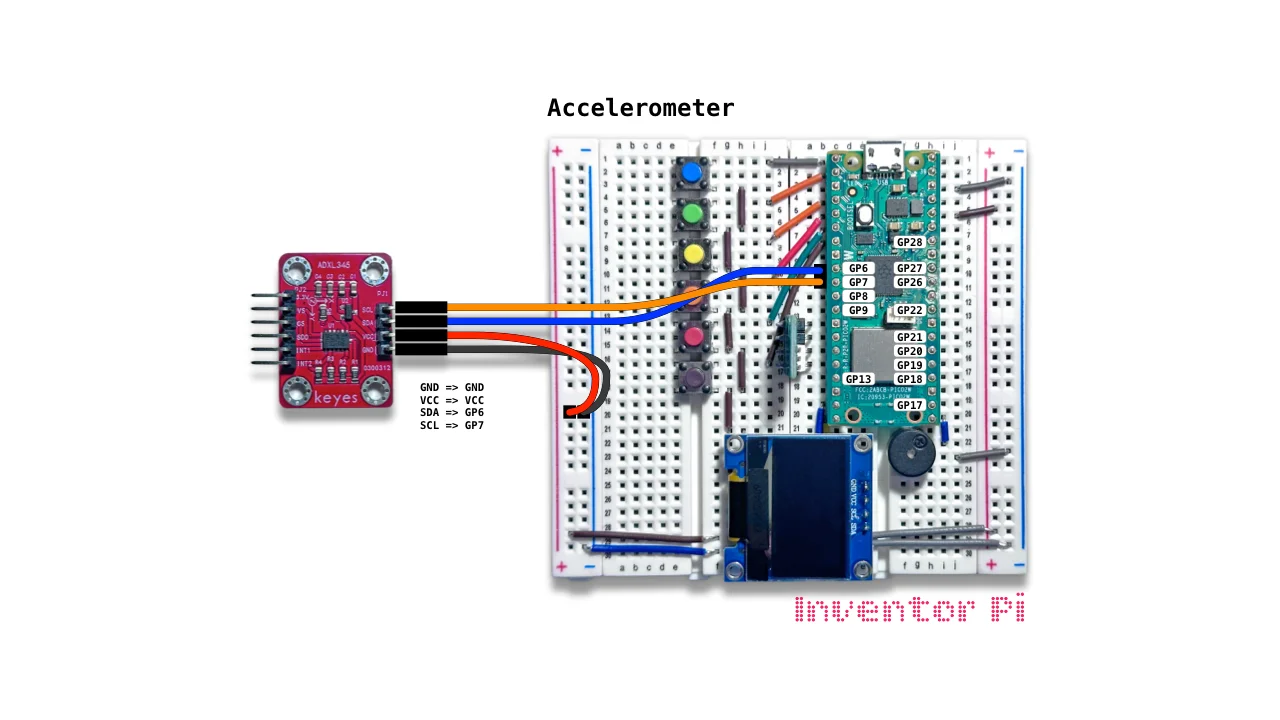
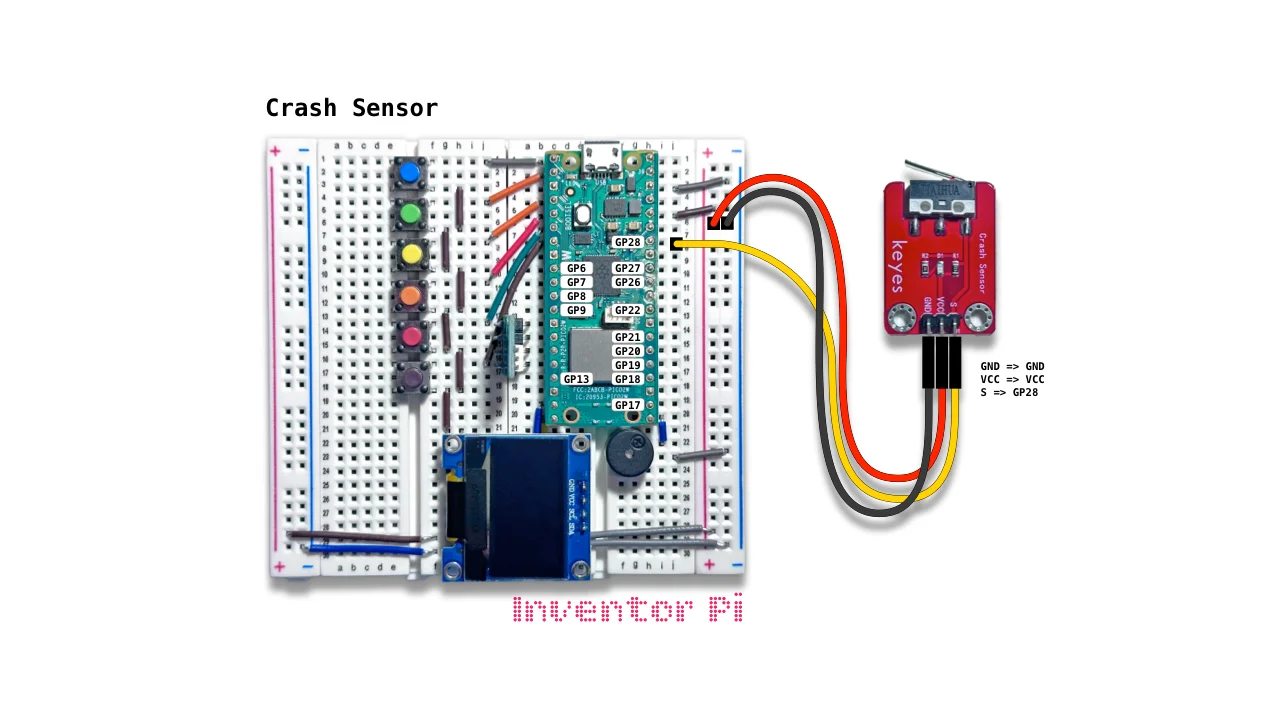
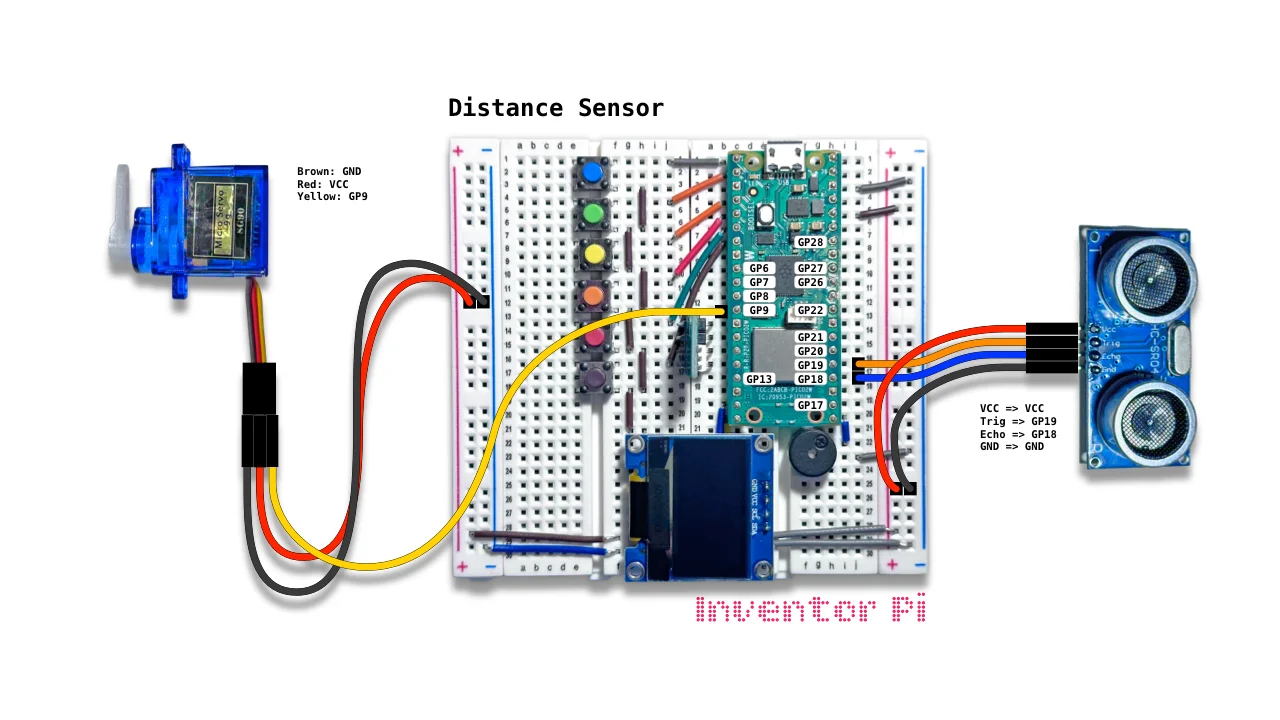
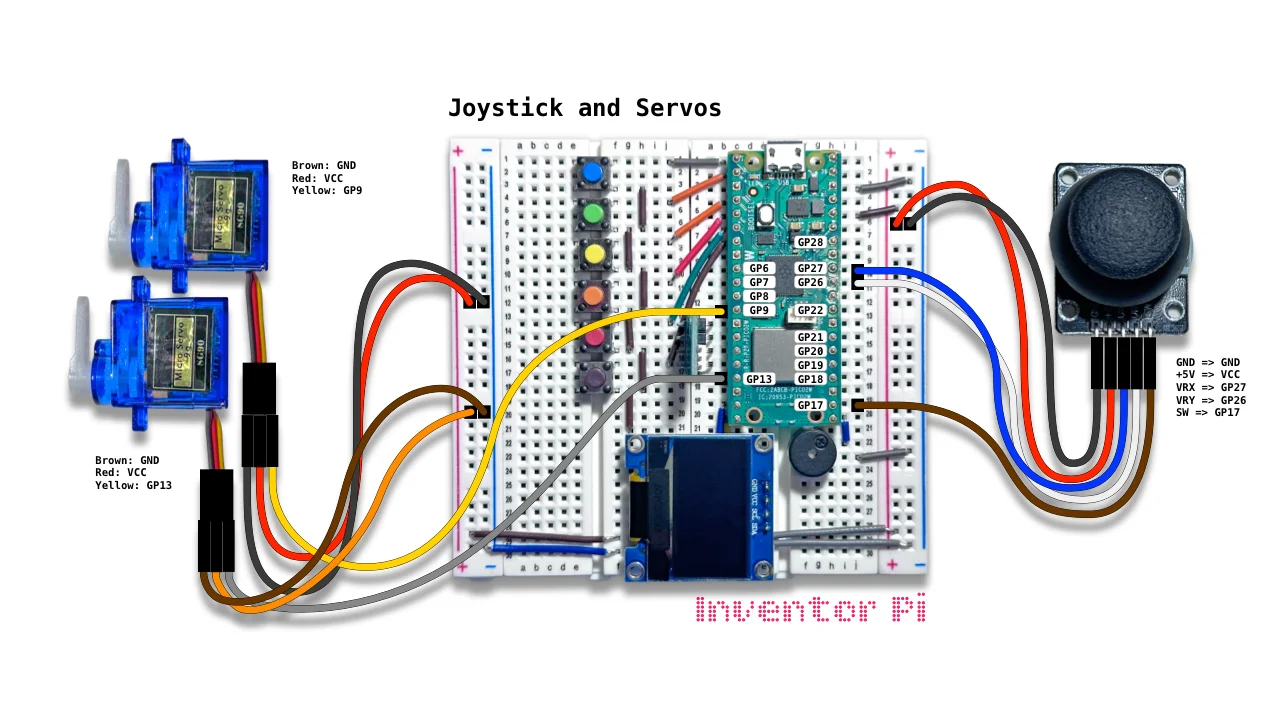
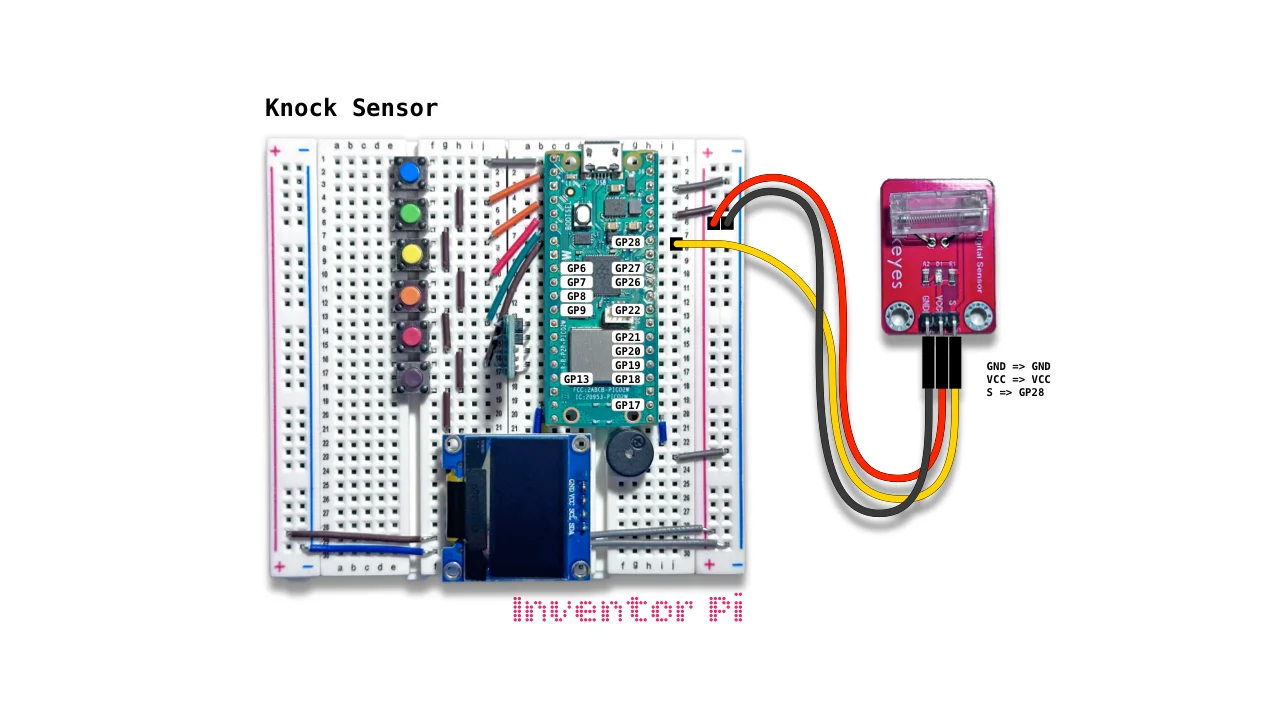
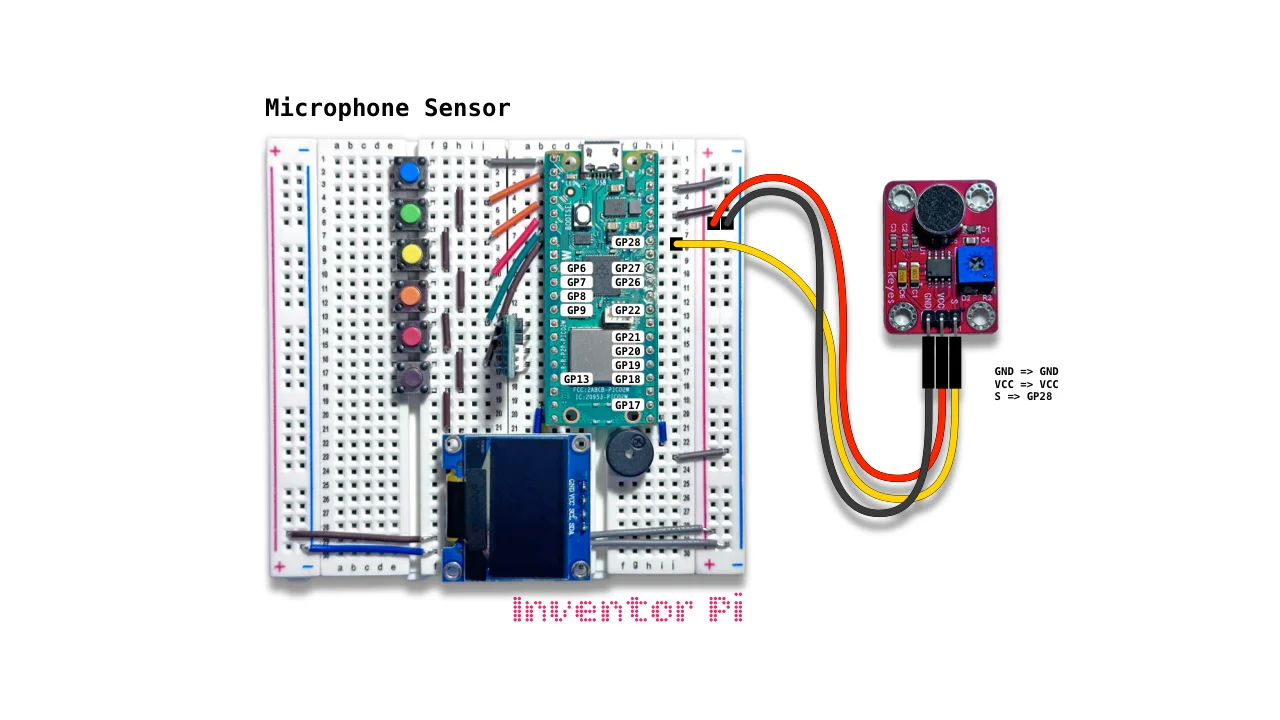
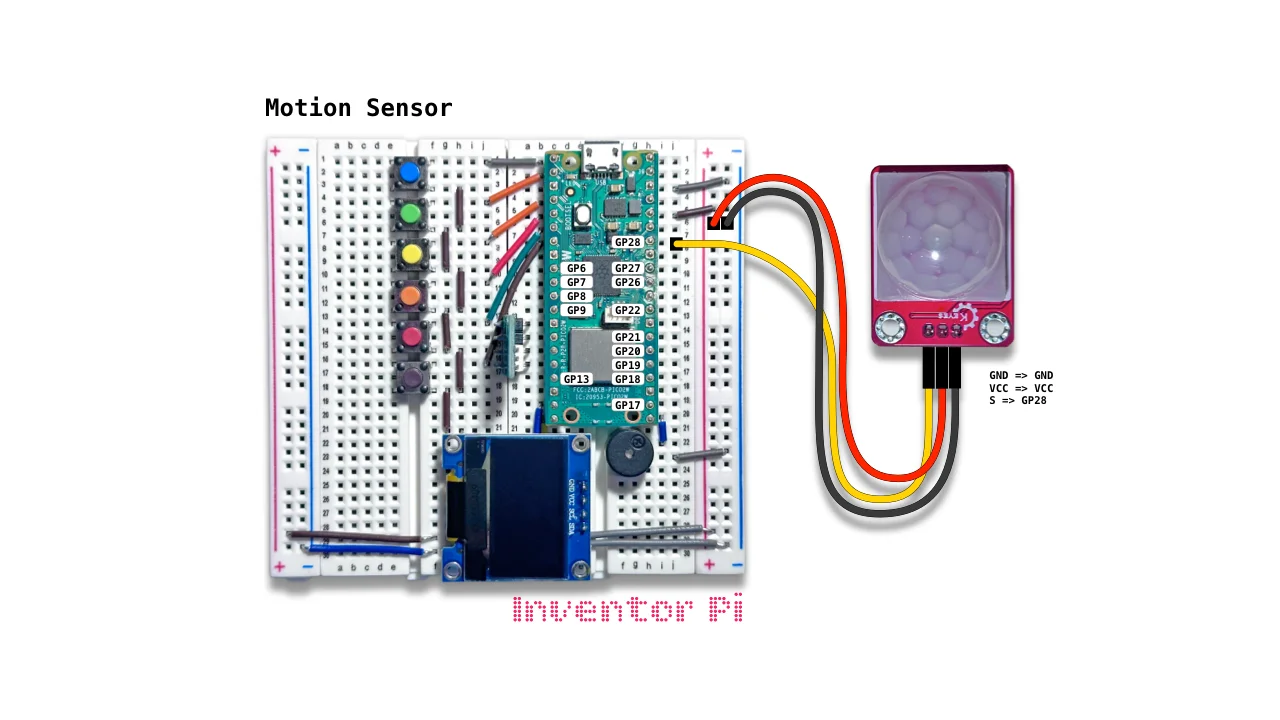
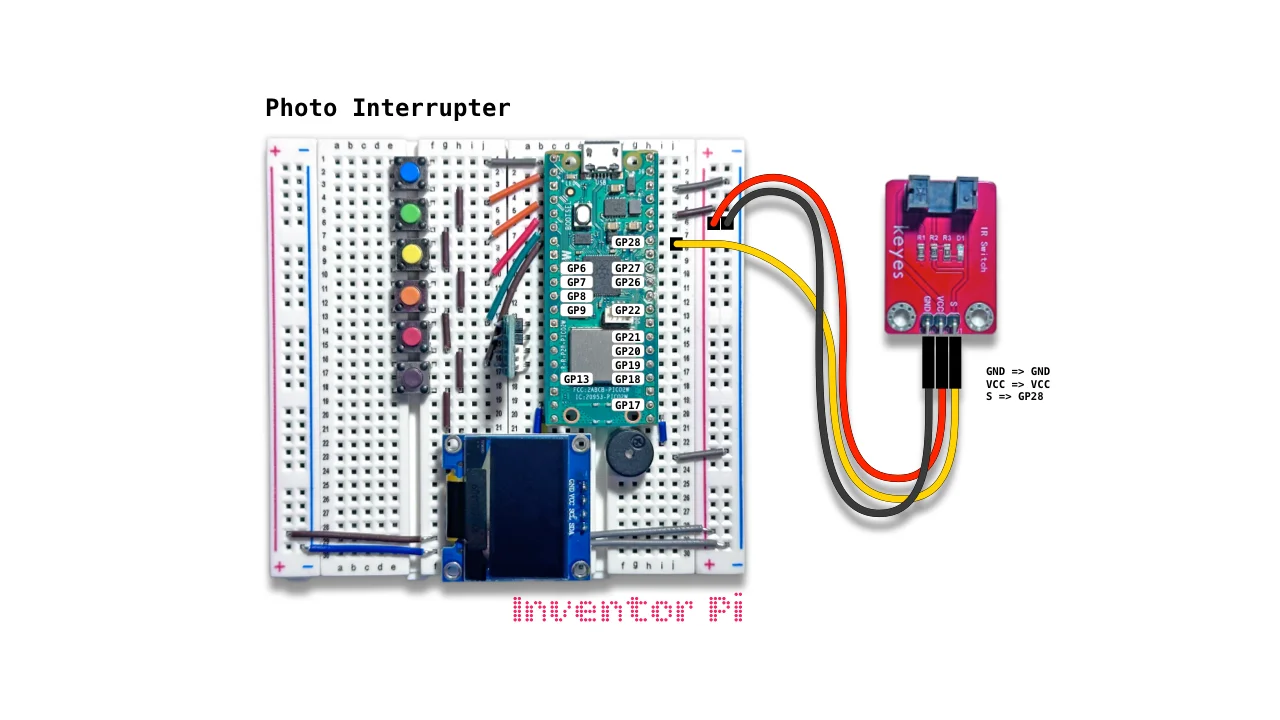
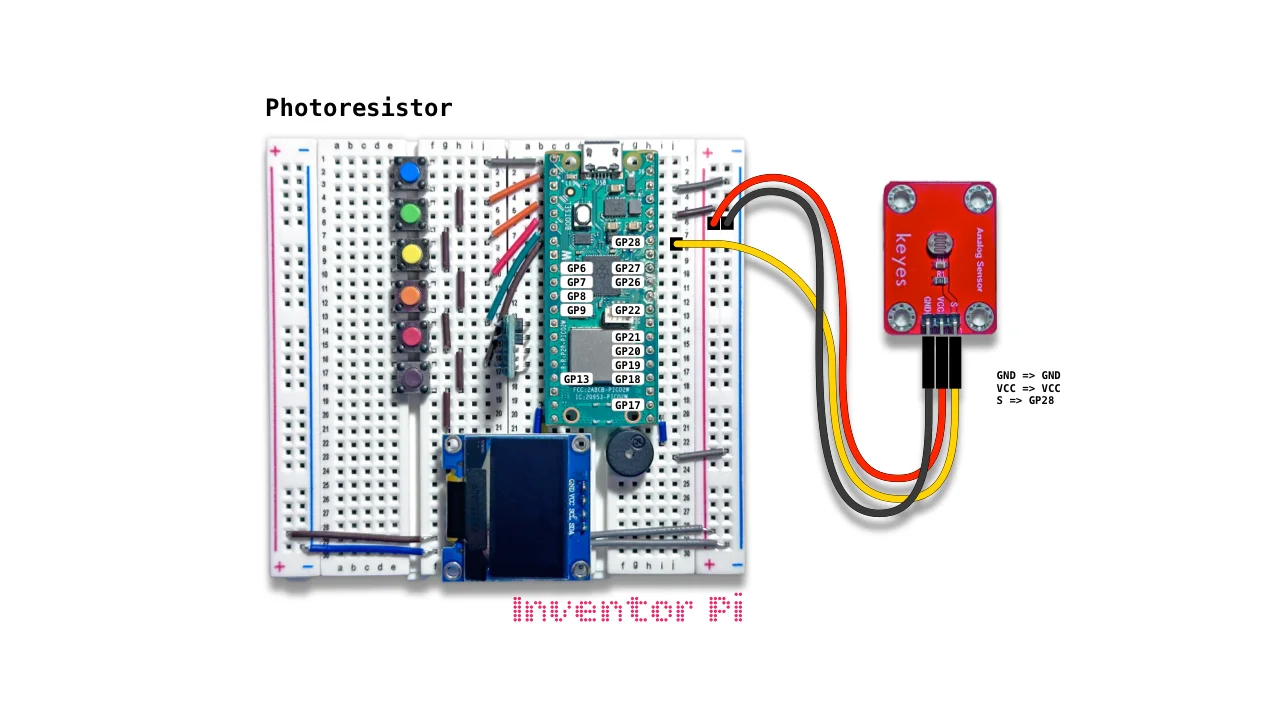
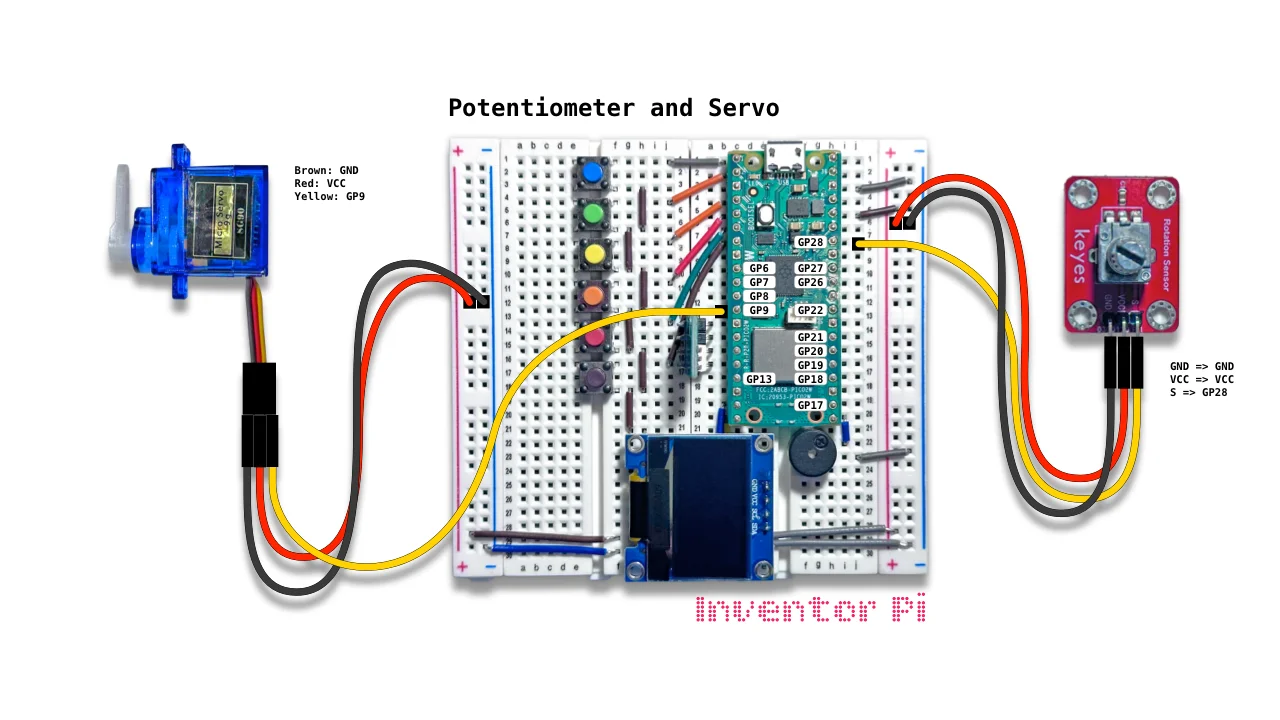
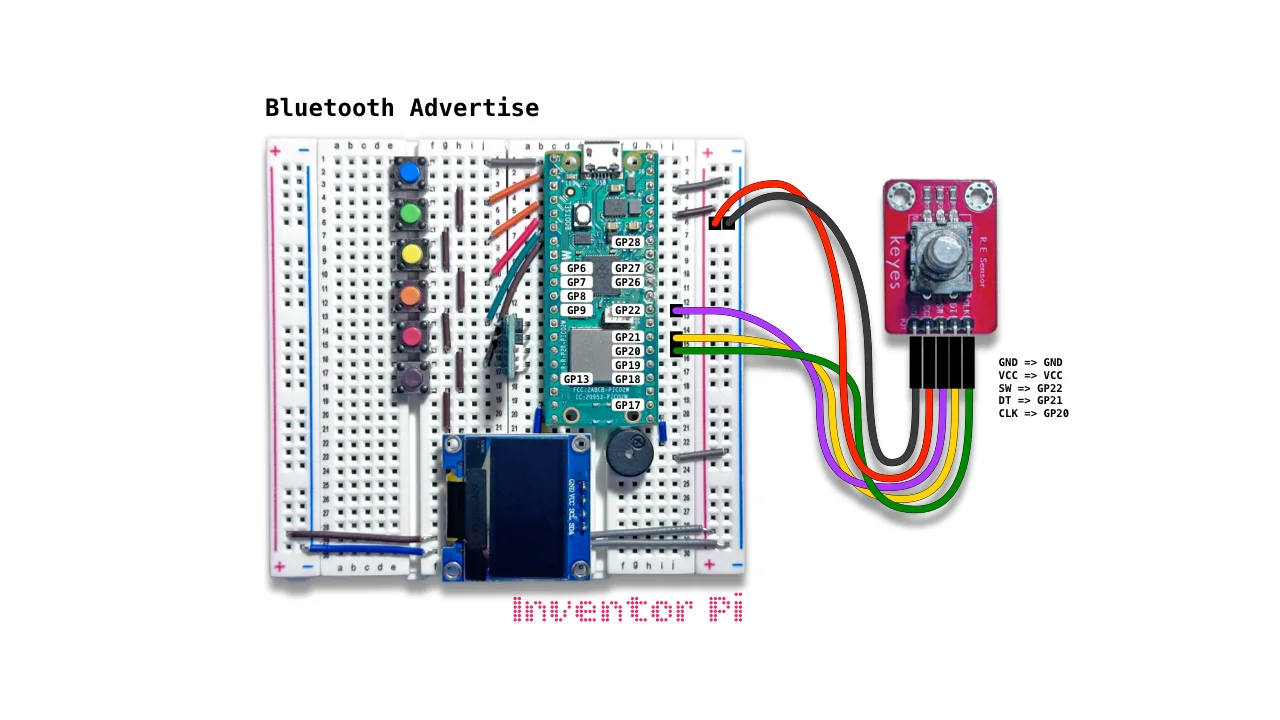
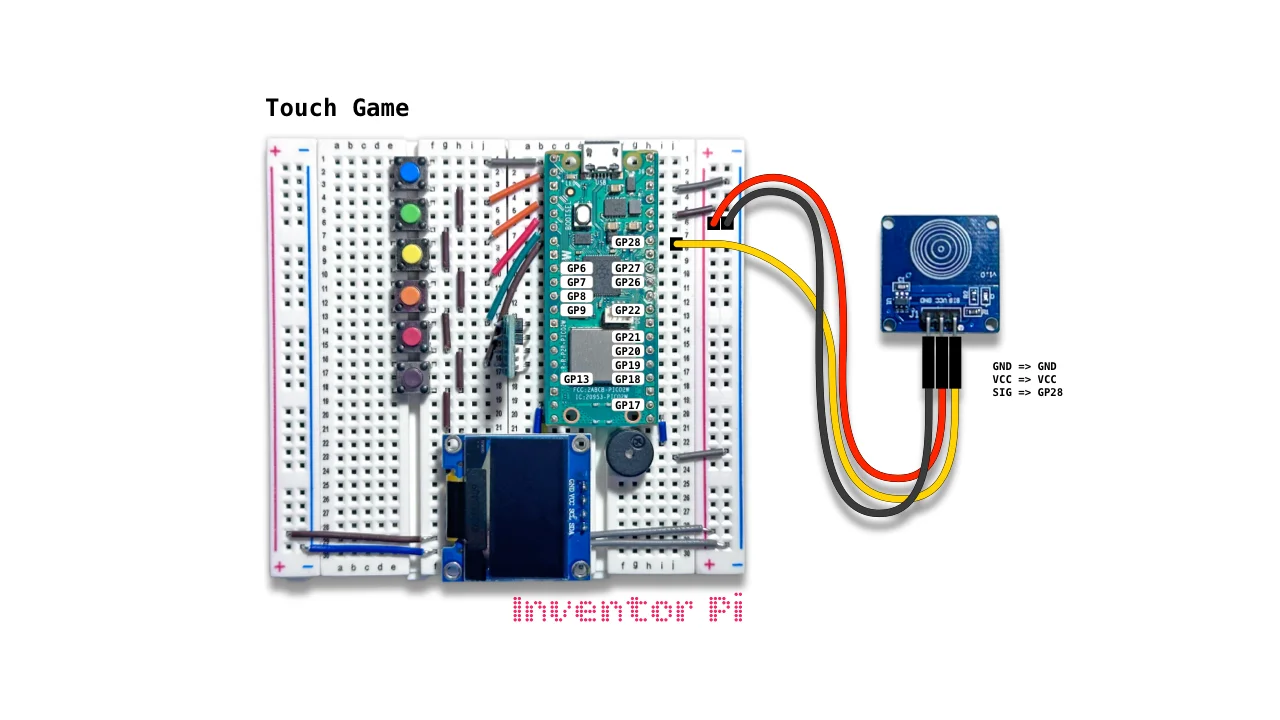
Это универсальный скрипт, позволяющий комбинировать различные входные и выходные данные. Показания датчиков преобразуются в цвет светодиода, угол поворота сервопривода, частоту звукового сигнала и текст на OLED-экране. В зависимости от выбранного вами входного сигнала, обратитесь к соответствующим схемам, приведенным выше.
Создайте в Thonny новый файл с именем mix_and_match.py. Скопируйте и вставьте приведенный ниже код в созданный вами файл.
1
2
3
4
5
6
7
8
9
10
11
12
13
14
15
16
17
18
19
20
21
22
23
24
25
26
27
28
29
30
31
32
33
34
35
36
37
38
39
40
41
42
43
44
45
46
47
48
49
50
51
52
53
54
55
56
57
58
59
60
61
62
63
64
65
66
67
68
69
70
71
72
73
74
75
76
77
78
79
80
81
82
83
84
85
86
87
88
89
90
91
92
93
94
95
96
97
98
99
100
101
102
103
104
105
106
107
108
109
110
111
112
113
114
115
116
117
118
119
120
121
122
123
124
125
126
127
128
129
130
131
132
133
134
135
136
137
138
139
140

print("\nMix and Match")

# DESCRIPTION

# This is the kitchen sink catch-all script that lets you mix and match
# different inputs and outputs. The sensor readings are converted to LED color,
# servo angle, buzzer frequency and text on the OLED screen.

# CONNECTIONS REQUIRED

# Connect Servo
#   Pins: Brown: GND, Red: VCC, Yellow: GP9
# Select an input by modifying the input variable below, and connect
# the corresponding module using pins listed next to its name.

input = 2

input_names = {
    1: "Accelerometer", # Pins: GND => GND, VCC => VCC, SDA => GP6, SCL => GP7 (Connect ADXL345 module using only the 4 pins on the right side)
    2: "Buttons", # No additional connections are needs. The 6 buttons are connected to GP0 through GP5
    3: "Crash Sensor", # Pins: GND => GND, VCC => VCC, S => GP28 (Connect Crash Sensor (KY-021) module)
    4: "Distance Sensor", # Pins: VCC => VCC, Trig => GP19, Echo => GP18, GND => GND (Connect HC-SR04 module)
    5: "Joystick", # Pins: GND => GND, +5V => VCC, VRX => GP27, VRY => GP26, SW => GP17 (Connect Joystick (KY-023) module)
    6: "Knock Sensor", # Pins: GND => GND, VCC => VCC, S => GP28 (Connect Knock Sensor (KY-031) module - labeled 'Digital Sensor' with an encased spring)
    7: "Microphone Sensor", # Pins: GND => GND, VCC => VCC, S => GP28 (Connect Microphone Sensor (KY-037) module - with a cylindrical mic with black circular pad on top)
    8: "Motion Sensor", # Pins: GND => GND, VCC => VCC, S => GP28 (Connect PIR Motion Sensor (HC-SR501) module)
    9: "Photo Interrupter", # Pins: GND => GND, VCC => VCC, S => GP28 (Connect Photo Interrupter (KY-010) module - labeled 'IR Switch')
    10: "Photoresistor", # Pins: GND => GND, VCC => VCC, S => GP28 (Connect Photoresistor (KY-018) module - labeled 'Analog Sensor' with a small round head with squiggly line)
    11: "Potentiometer", # Pins: GND => GND, VCC => VCC, S => GP28 (Potentiometer module - labeled 'Rotation Sensor')
    12: "Rotary Encoder", # Pins: GND => GND, VCC => VCC, SW => GP22, DT => GP21, CLK => GP20 (Connect R E Sensor (KY-040) module)
    13: "Touch Sensor" # Pins: GND => GND, VCC => VCC, SIG => GP28 (Connect Touch Sensor module - blue board with concentric circles)
}

from machine import Pin, SoftI2C, ADC
from oled import OLED
from buzzer import Buzzer
from rgbled import RGBLED
from servo import Servo
from helper import interpolate

# Output Initialization
oled = OLED(scl_pin=15, sda_pin=14)
buzzer = Buzzer(pwm_pin=16)
rgbled = RGBLED(red_pin=12, green_pin=11, blue_pin=10)
servo = Servo(servo_pin=9)
red = 0
green = 0
angle = 90
freq = 0

# Input Initialization
input_name =  input_names[input]
print(f"\n{input_name}")
value = 0
value_min = 0
value_max = 1

def input_value():
    return sensor.value()

if input_name in ["Crash Sensor", "Knock Sensor", "Photo Interrupter"]:
    sensor = Pin(28, Pin.IN, Pin.PULL_UP)

elif input_name in ["Motion Sensor", "Touch Sensor"]:
    sensor = Pin(28, Pin.IN)

elif input_name in ["Microphone Sensor", "Photoresistor", "Potentiometer"]:
    from value_filter import ValueFilter
    sensor = ADC(Pin(28))
    value_filter = ValueFilter(filter="SMA")
    value_max = 65535
    def input_value(): return value_filter.update(sensor.read_u16())

elif input_name == "Accelerometer":
    from adxl345 import ADXL345
    from math import atan2, sqrt, degrees
    accel = ADXL345(SoftI2C(sda=Pin(6), scl=Pin(7)))
    value_max = 360
    def input_value():
        x, y, z = accel.read()
        return 180 + degrees(atan2(y, z))

elif input_name == "Buttons":
    buttons = []
    for i in range(len(buzzer.notes)): buttons.append(Pin(i, Pin.IN, Pin.PULL_UP))
    value_max = 5
    def input_value():
        button_value = value
        for i in range(len(buzzer.notes)):
            if buttons[i].value() == 0:
                button_value = i
        return button_value

elif input_name == "Distance Sensor":
    from hcsr04 import HCSR04
    sensor = HCSR04(trigger_pin=19, echo_pin=18)
    value_min = 4
    value_max = 40

elif input_name == "Joystick":
    from joystick import Joystick
    joystick = Joystick(PinX=27, PinY=26, PinButton=17)
    value_min = -100
    value_max = 100
    def input_value(): return joystick.x

elif input_name == "Rotary Encoder":
    from rotary_encoder import RotaryEncoder
    sensor = RotaryEncoder(sw_pin=22, dt_pin=21, clk_pin=20, min_val=0, max_val=255)
    value_max = 255

# Main loop
try:
    while True:

        # Read input value
        value = input_value()

        # Interpolate value to output variables
        red = interpolate(value, value_min, value_max, 255, 0)
        green = interpolate(value, value_min, value_max, 0, 255)
        angle = interpolate(value, value_min, value_max, 0, 180)
        freq = interpolate(value, value_min, value_max, 100, 1000) if value > value_min and value_max > 1 else 0

        # Update all outputs
        servo.set_angle(angle)
        rgbled.set_color(r=red, g=green)
        oled.print(f"Value: {value:0.0f}", f"Angle: {angle:0.0f}", f"Freq: {freq:0.0f}", f"Color: {rgbled.hex}")
        buzzer.play_tone(freq)

except KeyboardInterrupt:
    print("\nInterrupted by user!")

finally:

    # Reset outputs
    oled.reset()
    rgbled.reset()
    buzzer.reset()
    servo.reset()