Piano
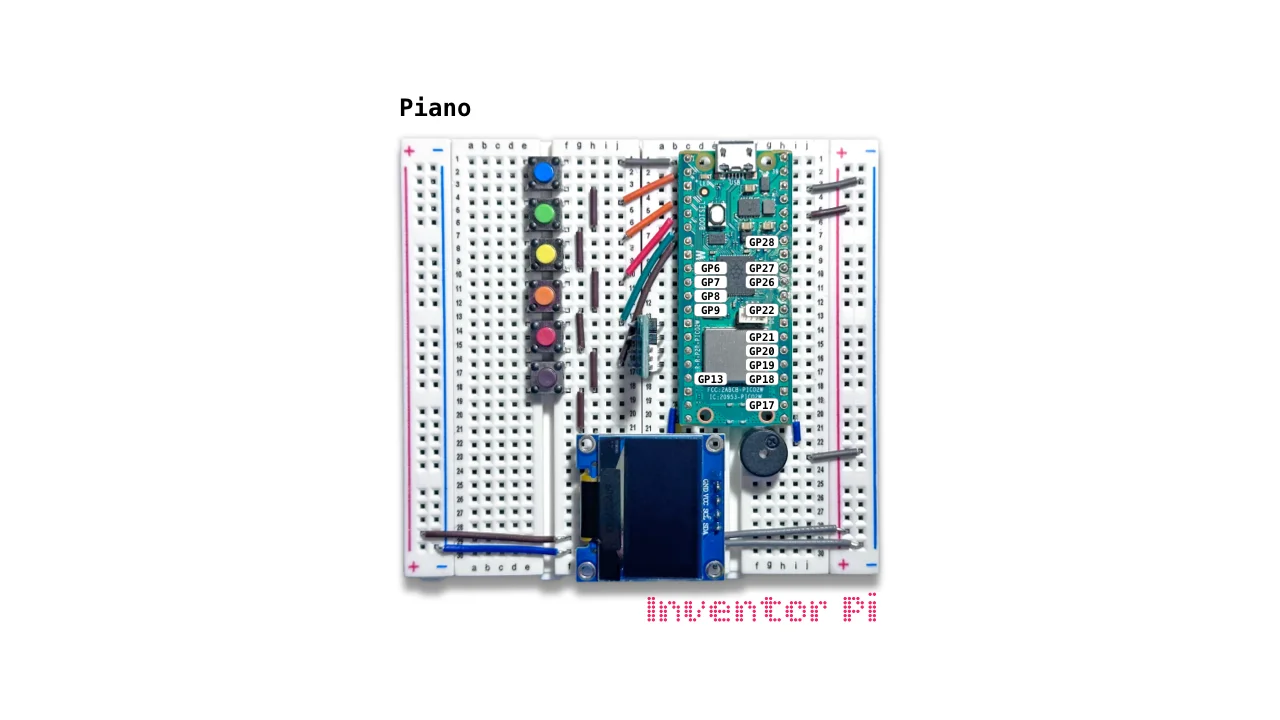
Un exemple de code MicroPython fonctionnant sur un microcontrôleur Raspberry Pi Pico 2 W connecté à un buzzer piézo passif, un module d'affichage OLED (SSD1306) et 6 boutons-poussoirs sur une plaque d'essai jouer différentes notes de musique sur le buzzer, Dessinez les notes et les lignes de la portée musicale sur l'écran et de relire l'enregistrement après une pause
Nous utilisons les boutons pour jouer différentes notes de musique. Nous apprenons également à dessiner des formes sur l'écran OLED pour représenter les notes sur les portées musicales. Enfin, nous enregistrons les notes dans une list avec leur durée de jeu. Et lorsque l'utilisateur interrompt sa saisie, nous rejouons les notes pour créer un instrument de musique amusant.
Nous avons enregistré 6 entrées différentes pour les 6 boutons. Pour cela, nous utilisons une list comme celle présentée ci-dessous :
1
2
3
4
5
6
7
8
9
10
11
12
13
14
15
16
17
18
19
20
21
22
23
24
25
26
27
28
29
30
31

from machine import Pin
from time import sleep, ticks_ms, ticks_diff
from buzzer import Buzzer

buzzer = Buzzer(pwm_pin=16)

note = "Silence"
notes = []
buttons = []
start_time = ticks_ms()
buzzer.melody_note_gap = 0

# Add buttons for each buzzer note C4, D4, E4, F4, G4, A4
# connected to pins 0, 1, 2, 3, 4, 5 respectively
for i, note in enumerate(buzzer.notes): buttons.append(Pin(i, Pin.IN, Pin.PULL_UP))

def current_note_duration():
    return ticks_diff(ticks_ms(), start_time) / 1000

def current_note():
    note = "Silence"
    for i, key in enumerate(buzzer.notes):
        if buttons[i].value() == 0:
            note = key
    return note

while True:
    note = current_note()
    note_duration = current_note_duration()
    buzzer.play_note(note)
Pour approfondir l'apprentissage du dessin de formes sur un écran OLED, nous dessinons la forme des notes au fur et à mesure qu'elles sont jouées, en créant une fonction draw_notes_on_screen()
1
2
3
4
5
6
7
8
9
10
11
12
13
14
15
16

def draw_notes_on_screen():
    global note, notes
    notes.append(note) # save note in list
    if len(notes) > 7: notes.pop(0) # remove oldest note if list grows past 7 notes
    oled.display.fill(0) # clear display
    for i in range(5): oled.display.hline(0, 8*i + 8, 128, 1) # draw 5 staff lines
    for position, note in enumerate(notes):
        draw_note(position, note) # draw each note at its position
    oled.display.show()

def draw_note(position, note):
    x = 16 + 16*position
    y = 48 - 4 * buzzer.notes.index(note)
    oled.display.ellipse(x - 6, y, 6, 4, 1, True) # note ellipse
    oled.display.vline(x, y - 28, 28, 1) # note vertical line
    if note == "C4": oled.display.hline(x - 16, y, 20, 1) # add a small horizontal line for C4
Enfin, nous enregistrons les notes dans une list avec leur durée de jeu. Et lorsque l'utilisateur interrompt sa saisie, nous rejouons les notes pour créer un instrument de musique amusant. Pour cela, nous ajoutons quelques fonctions d'assistance supplémentaires ci-dessous.
1
2
3
4
5
6
7
8
9
10
11
12
13
14
15
16
17
18
19
20
21
22
23
24
25
26

recording = []

def remove_empty_notes_from_start_and_end():
    global recording
    if recording[0].startswith("Silence"): recording.pop(0)
    if recording[-1].startswith("Silence"): recording.pop()

def add_last_note_to_recording():
    global recording, start_time
    last_note = value_filter.previous_value
    last_note_duration = ticks_diff(ticks_ms(), start_time) / 1000
    recording.append(f"{last_note} {last_note_duration}")
    start_time = ticks_ms()

def reset_recording():
    global recording, notes, start_time
    recording.clear()
    notes.clear()
    start_time = ticks_ms()

def replay_recording():
    remove_empty_notes_from_start_and_end()
    oled.print("Replaying...")
    buzzer.play_melody(*recording) # replay recording
    reset_recording() # reset to start recording again
    oled.print("Ready")
Malgré toutes ces fonctions, notre boucle principale reste facile à suivre.
1
2
3
4
5
6
7
8
9
10
11
12
13
14
15

    while True:
        note = current_note()
        note_duration = current_note_duration()
        buzzer.play_note(note)

        # If stopped playing for 2 seconds, and anything was recorded, replay the recording
        if note == "Silence" and note_duration > 2 and recording: replay_recording()

        if value_filter.did_change(note): # when note changed or ended

            # Save note in recording list to replay later
            add_last_note_to_recording()

            # When a new note is pressed, append to notes and draw notes
            if note != "Silence": draw_notes_on_screen()
Pour assembler le tout et tester, créez un nouveau fichier dans Thonny, nommé piano.py. Copiez et collez le code ci-dessous dans le fichier que vous avez créé.
1
2
3
4
5
6
7
8
9
10
11
12
13
14
15
16
17
18
19
20
21
22
23
24
25
26
27
28
29
30
31
32
33
34
35
36
37
38
39
40
41
42
43
44
45
46
47
48
49
50
51
52
53
54
55
56
57
58
59
60
61
62
63
64
65
66
67
68
69
70
71
72
73
74
75
76
77
78
79
80
81
82
83
84
85
86
87
88
89
90
91
92
93
94
95
96
97
98
99
100
101
102
103
104
105
106
107
108
109
110

print("\nPiano")

# DESCRIPTION

# We use the buttons to play different musical notes. We also learn how to
# draw shapes on the OLED screen to draw the notes on musical staff lines.
# Finally, we save the notes in a list along with their duration played. And
# when user input pauses, we replay the notes to create a fun musical instrument.

# CONNECTIONS REQUIRED

# No additional connections are needed

from time import sleep, ticks_ms, ticks_diff
from buzzer import Buzzer
from oled import OLED
from machine import Pin
from value_filter import ValueFilter

buzzer = Buzzer(pwm_pin=16)
oled = OLED(scl_pin=15, sda_pin=14)
value_filter = ValueFilter(initial_value="Silence")

note = "Silence"
notes = []
buttons = []
recording = []
start_time = ticks_ms()
oled.print("Ready")
buzzer.melody_note_gap = 0

# Add buttons for each buzzer note C4, D4, E4, F4, G4, A4
# connected to pins 0, 1, 2, 3, 4, 5 respectively
for i, note in enumerate(buzzer.notes): buttons.append(Pin(i, Pin.IN, Pin.PULL_UP))

def remove_empty_notes_from_start_and_end():
    global recording
    if recording[0].startswith("Silence"): recording.pop(0)
    if recording[-1].startswith("Silence"): recording.pop()

def add_last_note_to_recording():
    global recording, start_time
    last_note = value_filter.previous_value
    last_note_duration = ticks_diff(ticks_ms(), start_time) / 1000
    recording.append(f"{last_note} {last_note_duration}")
    start_time = ticks_ms()

def reset_recording():
    global recording, notes, start_time
    recording.clear()
    notes.clear()
    start_time = ticks_ms()

def replay_recording():
    remove_empty_notes_from_start_and_end()
    oled.print("Replaying...")
    buzzer.play_melody(*recording) # replay recording
    reset_recording() # reset to start recording again
    oled.print("Ready")

def current_note_duration():
    return ticks_diff(ticks_ms(), start_time) / 1000

def current_note():
    note = "Silence"
    for i, key in enumerate(buzzer.notes):
        if buttons[i].value() == 0:
            note = key
    return note

def draw_notes_on_screen():
    global note, notes
    notes.append(note) # save note in list
    if len(notes) > 7: notes.pop(0) # remove oldest note if list grows past 7 notes
    oled.display.fill(0) # clear display
    for i in range(5): oled.display.hline(0, 8*i + 8, 128, 1) # draw 5 staff lines
    for position, note in enumerate(notes):
        draw_note(position, note) # draw each note at its position
    oled.display.show()

def draw_note(position, note):
    x = 16 + 16*position
    y = 48 - 4 * buzzer.notes.index(note)
    oled.display.ellipse(x - 6, y, 6, 4, 1, True) # note ellipse
    oled.display.vline(x, y - 28, 28, 1) # note vertical line
    if note == "C4": oled.display.hline(x - 16, y, 20, 1) # add a small horizontal line for C4

try:
    while True:
        note = current_note()
        note_duration = current_note_duration()
        buzzer.play_note(note)

        # If stopped playing for 2 seconds, and anything was recorded, replay the recording
        if note == "Silence" and note_duration > 2 and recording: replay_recording()

        if value_filter.did_change(note): # when note changed or ended

            # Save note in recording list to replay later
            add_last_note_to_recording()

            # When a new note is pressed, append to notes and draw notes
            if note != "Silence": draw_notes_on_screen()

except KeyboardInterrupt:
    print("\nInterrupted by user!")

finally:
    oled.reset()
    buzzer.reset()