Accéléromètre
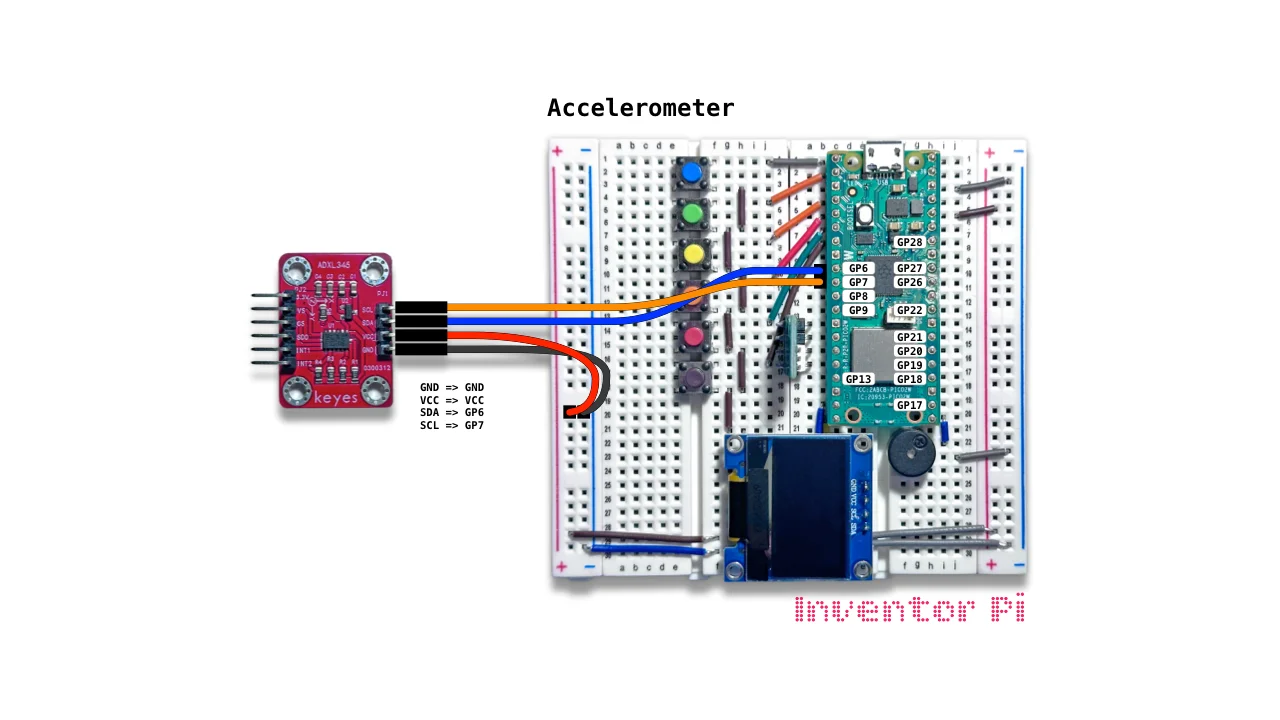
Un exemple de code MicroPython fonctionnant sur un microcontrôleur Raspberry Pi Pico 2 W connecté à un module accéléromètre numérique 3 axes (ADXL345) et à un module d'affichage OLED (SSD1306) sur une plaque d'essai dessiner et faire pivoter une forme 3D sur l'écran OLED en faisant tourner l'accéléromètre autour de ses axes X et Y
Un accéléromètre mesure l'accélération autour des axes x, y et z. En robotique, il est essentiel de déterminer la position et le mouvement du robot. Dans ce script, nous dessinons une forme 3D et contrôlons sa rotation à l'aide de l'accéléromètre.
Créez un nouveau fichier dans Thonny, nommé accelerometer.py. Copiez et collez le code ci-dessous dans le fichier que vous avez créé.
1
2
3
4
5
6
7
8
9
10
11
12
13
14
15
16
17
18
19
20
21
22
23
24
25
26
27
28
29
30
31
32
33
34
35
36
37
38
39
40
41
42

print("\nAccelerometer")

# DESCRIPTION

# An accelerometer measures acceleration around the x, y and z axis.
# In robotics, it is essential in determining the robot position and movement.
# In this script, we draw a 3D shape, and control its rotation using the accelerometer.

# CONNECTIONS REQUIRED

# Connect ADXL345 module using only the 4 pins on the right side
#   Pins: GND => GND, VCC => VCC, SDA => GP6, SCL => GP7

from machine import Pin, SoftI2C
from oled import OLED
from adxl345 import ADXL345
from cube import Cube
from math import atan2, sqrt, degrees

accel = ADXL345(SoftI2C(sda=Pin(6), scl=Pin(7)))
oled = OLED(scl_pin=15, sda_pin=14)
cube = Cube(scaleX=1, scaleY=1.4, scaleZ=0.2)

try:
    while True:

        # Calculate pitch (rotation around y-axis, 360 degrees)
        # and roll (rotaton around x-axis, 180 degrees)
        # using x, y and z from the accelerometer.
        # Yaw (rotation around vertical z-axis) needs
        # a different sensor, a magnetometer or a gyroscope.
        x, y, z = accel.read()
        pitch = atan2(-x, sqrt(y*y + z*z))
        roll = atan2(y, z)

        cube.draw(display=oled.display, angleX=-degrees(roll), angleY=-degrees(pitch))

except KeyboardInterrupt:
    print("\nInterrupted by user!")

finally:
    oled.reset()