بيانو
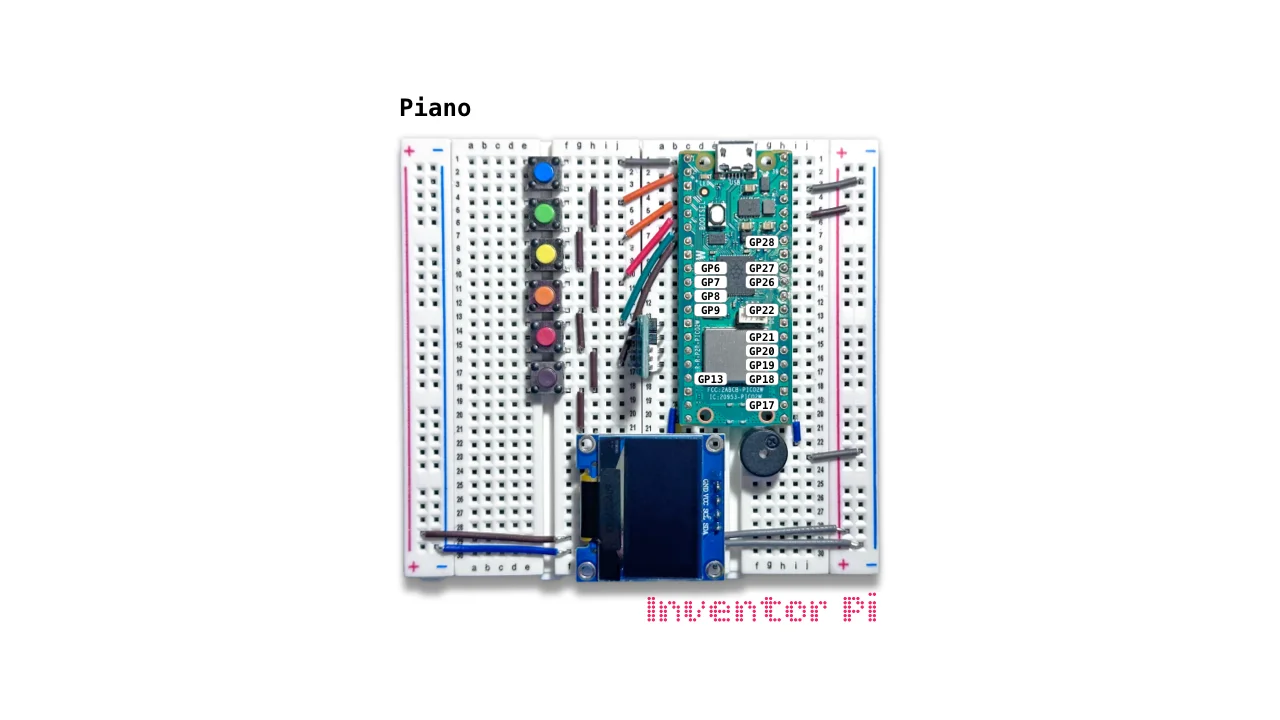
مثال على كود MicroPython يعمل على وحدة تحكم دقيقة Raspberry Pi Pico 2 W متصل بجهاز تنبيه كهرضغطية سلبي، ووحدة عرض OLED (SSD1306)، و6 أزرار ضغط على لوحة تجارب لعزف نغمات موسيقية مختلفة على الجرس، ارسم النوتات الموسيقية وخطوط المدرج الموسيقي على الشاشة، وإعادة تشغيل التسجيل بعد التوقف المؤقت
نستخدم الأزرار لعزف النوتات الموسيقية المختلفة. نتعلم أيضًا كيفية رسم الأشكال على شاشة OLED لرسم النوتات الموسيقية على خطوط المدرج الموسيقي. وأخيرًا، نقوم بحفظ النوتات الموسيقية في list مع مدة عزفها. وعندما يتوقف إدخال المستخدم، نعيد تشغيل النوتات الموسيقية لإنشاء آلة موسيقية ممتعة.
نقرأ 6 مدخلات مختلفة للأزرار الستة. ولهذا الغرض، نستخدم list كما هو موضح أدناه:
1
2
3
4
5
6
7
8
9
10
11
12
13
14
15
16
17
18
19
20
21
22
23
24
25
26
27
28
29
30
31

from machine import Pin
from time import sleep, ticks_ms, ticks_diff
from buzzer import Buzzer

buzzer = Buzzer(pwm_pin=16)

note = "Silence"
notes = []
buttons = []
start_time = ticks_ms()
buzzer.melody_note_gap = 0

# Add buttons for each buzzer note C4, D4, E4, F4, G4, A4
# connected to pins 0, 1, 2, 3, 4, 5 respectively
for i, note in enumerate(buzzer.notes): buttons.append(Pin(i, Pin.IN, Pin.PULL_UP))

def current_note_duration():
    return ticks_diff(ticks_ms(), start_time) / 1000

def current_note():
    note = "Silence"
    for i, key in enumerate(buzzer.notes):
        if buttons[i].value() == 0:
            note = key
    return note

while True:
    note = current_note()
    note_duration = current_note_duration()
    buzzer.play_note(note)
لزيادة تعلم رسم الأشكال على شاشة OLED، نرسم شكل النوتات الموسيقية أثناء عزفها، وذلك بإنشاء دالة draw_notes_on_screen()
1
2
3
4
5
6
7
8
9
10
11
12
13
14
15
16

def draw_notes_on_screen():
    global note, notes
    notes.append(note) # save note in list
    if len(notes) > 7: notes.pop(0) # remove oldest note if list grows past 7 notes
    oled.display.fill(0) # clear display
    for i in range(5): oled.display.hline(0, 8*i + 8, 128, 1) # draw 5 staff lines
    for position, note in enumerate(notes):
        draw_note(position, note) # draw each note at its position
    oled.display.show()

def draw_note(position, note):
    x = 16 + 16*position
    y = 48 - 4 * buzzer.notes.index(note)
    oled.display.ellipse(x - 6, y, 6, 4, 1, True) # note ellipse
    oled.display.vline(x, y - 28, 28, 1) # note vertical line
    if note == "C4": oled.display.hline(x - 16, y, 20, 1) # add a small horizontal line for C4
وأخيرًا، نقوم بحفظ النوتات الموسيقية في list مع مدة عزفها. وعندما يتوقف إدخال المستخدم، نعيد تشغيل النوتات الموسيقية لإنشاء آلة موسيقية ممتعة. ولهذا، نضيف بعض الدوال المساعدة الأخرى أدناه.
1
2
3
4
5
6
7
8
9
10
11
12
13
14
15
16
17
18
19
20
21
22
23
24
25
26

recording = []

def remove_empty_notes_from_start_and_end():
    global recording
    if recording[0].startswith("Silence"): recording.pop(0)
    if recording[-1].startswith("Silence"): recording.pop()

def add_last_note_to_recording():
    global recording, start_time
    last_note = value_filter.previous_value
    last_note_duration = ticks_diff(ticks_ms(), start_time) / 1000
    recording.append(f"{last_note} {last_note_duration}")
    start_time = ticks_ms()

def reset_recording():
    global recording, notes, start_time
    recording.clear()
    notes.clear()
    start_time = ticks_ms()

def replay_recording():
    remove_empty_notes_from_start_and_end()
    oled.print("Replaying...")
    buzzer.play_melody(*recording) # replay recording
    reset_recording() # reset to start recording again
    oled.print("Ready")
مع كل هذه الوظائف، لا تزال حلقتنا الرئيسية سهلة المتابعة.
1
2
3
4
5
6
7
8
9
10
11
12
13
14
15

    while True:
        note = current_note()
        note_duration = current_note_duration()
        buzzer.play_note(note)

        # If stopped playing for 2 seconds, and anything was recorded, replay the recording
        if note == "Silence" and note_duration > 2 and recording: replay_recording()

        if value_filter.did_change(note): # when note changed or ended

            # Save note in recording list to replay later
            add_last_note_to_recording()

            # When a new note is pressed, append to notes and draw notes
            if note != "Silence": draw_notes_on_screen()
لدمج كل ذلك واختباره، أنشئ ملفًا جديدًا في Thony، باسم piano.py. انسخ والصق الكود أدناه في الملف الذي أنشأته.
1
2
3
4
5
6
7
8
9
10
11
12
13
14
15
16
17
18
19
20
21
22
23
24
25
26
27
28
29
30
31
32
33
34
35
36
37
38
39
40
41
42
43
44
45
46
47
48
49
50
51
52
53
54
55
56
57
58
59
60
61
62
63
64
65
66
67
68
69
70
71
72
73
74
75
76
77
78
79
80
81
82
83
84
85
86
87
88
89
90
91
92
93
94
95
96
97
98
99
100
101
102
103
104
105
106
107
108
109
110

print("\nPiano")

# DESCRIPTION

# We use the buttons to play different musical notes. We also learn how to
# draw shapes on the OLED screen to draw the notes on musical staff lines.
# Finally, we save the notes in a list along with their duration played. And
# when user input pauses, we replay the notes to create a fun musical instrument.

# CONNECTIONS REQUIRED

# No additional connections are needed

from time import sleep, ticks_ms, ticks_diff
from buzzer import Buzzer
from oled import OLED
from machine import Pin
from value_filter import ValueFilter

buzzer = Buzzer(pwm_pin=16)
oled = OLED(scl_pin=15, sda_pin=14)
value_filter = ValueFilter(initial_value="Silence")

note = "Silence"
notes = []
buttons = []
recording = []
start_time = ticks_ms()
oled.print("Ready")
buzzer.melody_note_gap = 0

# Add buttons for each buzzer note C4, D4, E4, F4, G4, A4
# connected to pins 0, 1, 2, 3, 4, 5 respectively
for i, note in enumerate(buzzer.notes): buttons.append(Pin(i, Pin.IN, Pin.PULL_UP))

def remove_empty_notes_from_start_and_end():
    global recording
    if recording[0].startswith("Silence"): recording.pop(0)
    if recording[-1].startswith("Silence"): recording.pop()

def add_last_note_to_recording():
    global recording, start_time
    last_note = value_filter.previous_value
    last_note_duration = ticks_diff(ticks_ms(), start_time) / 1000
    recording.append(f"{last_note} {last_note_duration}")
    start_time = ticks_ms()

def reset_recording():
    global recording, notes, start_time
    recording.clear()
    notes.clear()
    start_time = ticks_ms()

def replay_recording():
    remove_empty_notes_from_start_and_end()
    oled.print("Replaying...")
    buzzer.play_melody(*recording) # replay recording
    reset_recording() # reset to start recording again
    oled.print("Ready")

def current_note_duration():
    return ticks_diff(ticks_ms(), start_time) / 1000

def current_note():
    note = "Silence"
    for i, key in enumerate(buzzer.notes):
        if buttons[i].value() == 0:
            note = key
    return note

def draw_notes_on_screen():
    global note, notes
    notes.append(note) # save note in list
    if len(notes) > 7: notes.pop(0) # remove oldest note if list grows past 7 notes
    oled.display.fill(0) # clear display
    for i in range(5): oled.display.hline(0, 8*i + 8, 128, 1) # draw 5 staff lines
    for position, note in enumerate(notes):
        draw_note(position, note) # draw each note at its position
    oled.display.show()

def draw_note(position, note):
    x = 16 + 16*position
    y = 48 - 4 * buzzer.notes.index(note)
    oled.display.ellipse(x - 6, y, 6, 4, 1, True) # note ellipse
    oled.display.vline(x, y - 28, 28, 1) # note vertical line
    if note == "C4": oled.display.hline(x - 16, y, 20, 1) # add a small horizontal line for C4

try:
    while True:
        note = current_note()
        note_duration = current_note_duration()
        buzzer.play_note(note)

        # If stopped playing for 2 seconds, and anything was recorded, replay the recording
        if note == "Silence" and note_duration > 2 and recording: replay_recording()

        if value_filter.did_change(note): # when note changed or ended

            # Save note in recording list to replay later
            add_last_note_to_recording()

            # When a new note is pressed, append to notes and draw notes
            if note != "Silence": draw_notes_on_screen()

except KeyboardInterrupt:
    print("\nInterrupted by user!")

finally:
    oled.reset()
    buzzer.reset()