Joystick et servos
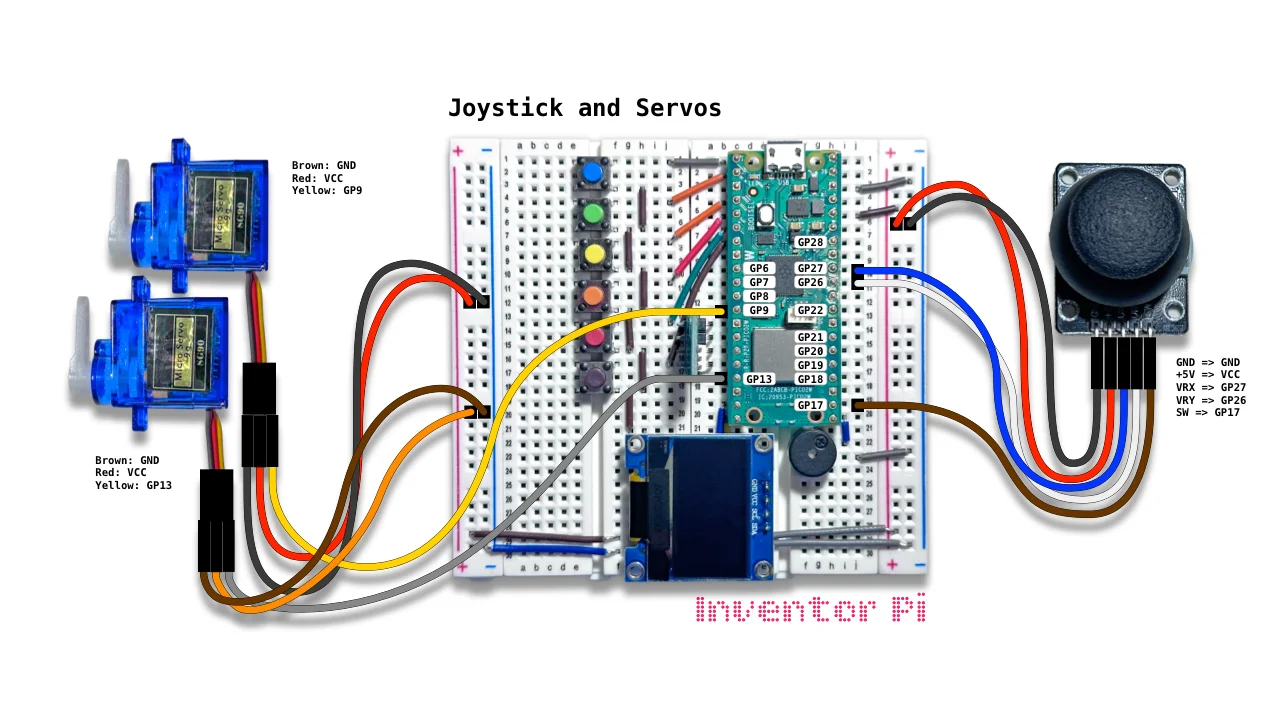
Un exemple de code MicroPython fonctionnant sur un microcontrôleur Raspberry Pi Pico 2 W connecté à un module joystick analogique à 2 axes, à 2 micro-servomoteurs et à un module d'affichage OLED (SSD1306) sur une plaque d'essai contrôler les angles des deux servos à l'aide du joystick et afficher les angles sur l'écran OLED
Le joystick est souvent utilisé pour la navigation des robots, des drones, des navires de croisière et des avions. En robotique FRC, nous utilisons 2 manettes de jeu, avec 2 joysticks par manette. Chaque joystick comprend une commande indépendante des axes X et Y. Ce qui nous donne un total de 8 axes indépendants pour contrôler le robot.
Dans ce script, nous contrôlons l'angle de deux servos à l'aide de différents axes du joystick. En appuyant sur le bouton du joystick, nous basculons en mode de synchronisation d'angle. Nous utilisons maintenant la trigonométrie pour calculer l'angle que forme le levier du joystick, et nous réglons les servos en fonction de cet angle. En robotique, nous utilisons souvent des mathématiques avancées pour contrôler différents mouvements.
Un servomoteur est un moteur dont on peut contrôler l'angle de rotation en modifiant le signal PWM qu'on lui envoie. Contrairement aux moteurs électriques classiques qui tournent en continu, un servomoteur se déplace vers un angle ou une position précise et la maintient fermement.
Créez un nouveau fichier dans Thonny, nommé joystick_and_servos.py. Copiez et collez le code ci-dessous dans le fichier que vous avez créé.
1
2
3
4
5
6
7
8
9
10
11
12
13
14
15
16
17
18
19
20
21
22
23
24
25
26
27
28
29
30
31
32
33
34
35
36
37
38
39
40
41
42
43
44
45
46
47
48
49
50
51
52
53
54
55
56
57
58
59
60
61
62
63
64
65
66
67
68
69
70
71
72
73
74
75
76
77
78
79
80
81
82
83
84
85
86
87
88
89
90
91
92
93
94

print("\nJoystick and Servos")

# DESCRIPTION

# A joystick is often used for navigation in robots, drones, cruise ships and planes.
# In FRC robotics, we use 2 gaming controllers, with 2 joysticks per controller.
# Each joystick includes independent X and Y axis control. Which  gives us a total
# of 8 independent axes to control the robot.

# In this script, we control the angle of two servos using different axes of the joystick.
# By pressing the joystick button, we toggle the mode to Sync Angle Mode. Now we
# use trigonometry to calculate the angle the joystick lever makes, and set the servos to match
# this angle. In robotics, we often use advanced mathematics to control various motions.

# A servo is a motor where we can control the rotation angle by changing the PWM
# signal we send to it. Unlike standard electric motors that spin continuously,
# a servo motor moves to an exact angle or position and holds it firmly.

# CONNECTIONS REQUIRED

# Connect Joystick (KY-023) module
#   Pins: GND => GND, +5V => VCC, VRX => GP27, VRY => GP26, SW => GP17
# Connect Servo 1
#   Pins: Brown: GND, Red: VCC, Yellow: GP9
# Connect Servo 2
#   Pins: Brown: GND, Red: VCC, Yellow: GP13

from time import sleep
from oled import OLED
from servo import Servo
from joystick import Joystick
from math import atan2, degrees
from helper import interpolate

joystick = Joystick(PinX=27, PinY=26, PinButton=17)
servo_x = Servo(servo_pin=9)
servo_y = Servo(servo_pin=13)
oled = OLED(scl_pin=15, sda_pin=14)

modes = ["X-Y Mode", "Sync Angle Mode"]
mode = 0
x = 0
y = 0
x_angle = 0
y_angle = 0

def toggle_mode_if_button_pressed():
    global mode
    if joystick.b:
        while joystick.b: pass # wait till button is released
        mode = 1 - mode # toggle mode

# X-Y Mode: Control one servo with joystick x-axis and the other with joystick y-axis
def x_y_mode():
    # Convert joystick values ranging from -100 to 100 to angle ranging from 0 to 180
    x_angle = interpolate(x, -100, 100, 0, 180)
    y_angle = interpolate(y, -100, 100, 0, 180)
    return x_angle, y_angle

# Sync Angle Mode: Use trigonometry to make servo angle match Joystick direction
def sync_angle_mode():
    angle = degrees(atan2(y, x))
    if abs(x) + abs(y) < 40: angle = 0 # Reset angle for small noisy readings
    angle = abs(90 - angle) # offset to match joystick direction
    if angle > 180: angle = 360 - angle # reverse direction past 180 degrees
    # Set both servos to same angle
    return angle, angle

def read_joystick_value():
    return joystick.x, joystick.y

def calculate_angles():
    if mode == 0:
        return x_y_mode()
    else:
        return sync_angle_mode()

try:
    while True:
        toggle_mode_if_button_pressed()
        x, y = read_joystick_value()
        x_angle, y_angle = calculate_angles()
        servo_x.set_angle(x_angle)
        servo_y.set_angle(y_angle)
        oled.print(f"{modes[mode]}", f"X Angle: {x_angle:0.0f}", f"Y Angle: {y_angle:0.0f}")
        sleep(0.05)

except KeyboardInterrupt:
    print("\nInterrupted by user!")

finally:
    oled.reset()
    servo_x.reset()
    servo_y.reset()