湿度温度センサー
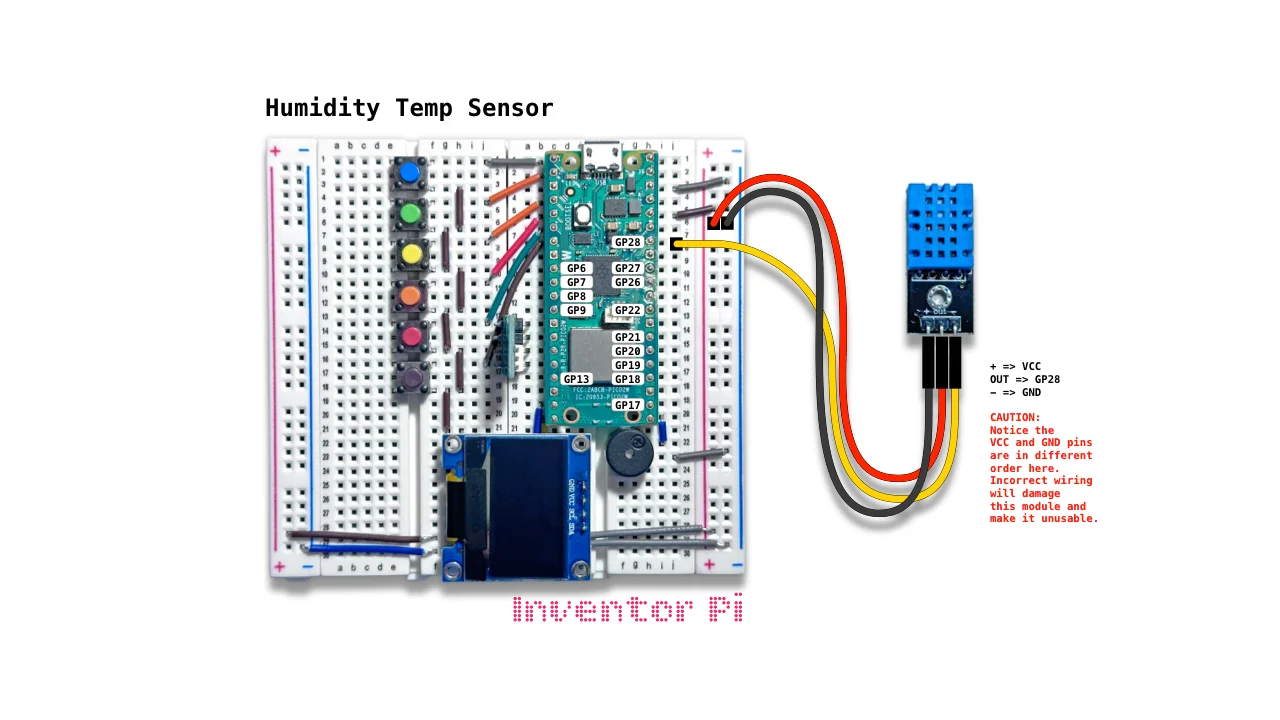
MicroPythonコードの例 ラズベリーパイ ピコ 2Wマイクロコントローラー上で動作 ブレッドボード上の湿度・温度センサーモジュール(DHT11)とOLEDディスプレイモジュール(SSD1306)に接続されています。 相対湿度と周囲温度を摂氏と華氏の両方で測定し表示する
湿度・温度センサーは、周囲の温度と空気中の湿度を測定します。. ロボット工学では、温度センサーはほとんどの電子部品に組み込まれている。. これらは、温度が安全限界を超えた場合にロボットを自動的にシャットダウンするなど、熱保護に使用できます。. スマートフォンには、画面温度、背面温度、バッテリー温度、CPU温度などを測定する約8種類の温度センサーが搭載されていることをご存知ですか?湿度センサーは、スマートフォンやスマートウォッチ内部の結露を監視します。.
これはDHT11センサーです. dhtライブラリをインポートし、以下に示すようにGP28ピンを設定します。
1
2
3
4
5
6

from time import sleep
from machine import Pin
from oled import OLED
from dht import DHT11

humidity_temp_sensor = DHT11(Pin(28))
次に、メインループで、測定関数を使用して温度と湿度を取得します。. 摂氏から華氏への変換には、簡単な数式を使用できます。.
1
2
3
4
5
6
7

while True:
    humidity_temp_sensor.measure()
    humidity = humidity_temp_sensor.humidity()
    temp_c = humidity_temp_sensor.temperature()
    temp_f = temp_c * 9/5 + 32
    oled.print(f"{humidity:.0f}% Humidity", f"{temp_c:.1f} Degrees C", f"{temp_f:.1f} Degrees F")
    sleep(0.5)
スクリプト全体を実行するには、Thonny に humidity_temp_sensor.py という名前の新しいファイルを作成してください。. 以下のコードをコピーして、作成したファイルに貼り付けてください。.
1
2
3
4
5
6
7
8
9
10
11
12
13
14
15
16
17
18
19
20
21
22
23
24
25
26
27
28
29
30
31
32
33
34
35
36
37
38
39
40

print("\nHumidity Temp Sensor")

# DESCRIPTION

# A humidity and temperature sensor measures the ambient temperature and air humidity.
# In robotics, temperature sensors are built into most electronic components.
# They can be used for thermal protection, such as to automatically shutdown a robot
# when temperatures exceed safe limits. Did you know that a smartphone has about 8 different
# temperature sensors in it, measuring screen temperature, back temperature,
# battery temperature, CPU temperature, etc.? Humidity sensors monitor condensation
# inside a smartphone or smartwatch.

# CONNECTIONS REQUIRED

# Connect Humidity and Temperature Sensor (KY-015) module
# (it includes a big blue waffle block)
#   Pins: + => VCC, OUT => GP28, - => GND

from time import sleep
from machine import Pin
from oled import OLED
from dht import DHT11

humidity_temp_sensor = DHT11(Pin(28))
oled = OLED(scl_pin=15, sda_pin=14)

try:
    while True:
        humidity_temp_sensor.measure()
        humidity = humidity_temp_sensor.humidity()
        temp_c = humidity_temp_sensor.temperature()
        temp_f = temp_c * 9/5 + 32
        oled.print(f"{humidity:.0f}% Humidity", f"{temp_c:.1f} Degrees C", f"{temp_f:.1f} Degrees F")
        sleep(0.5)

except KeyboardInterrupt:
    print("\nInterrupted by user!")

finally:
    oled.reset()