フォトインターラプター
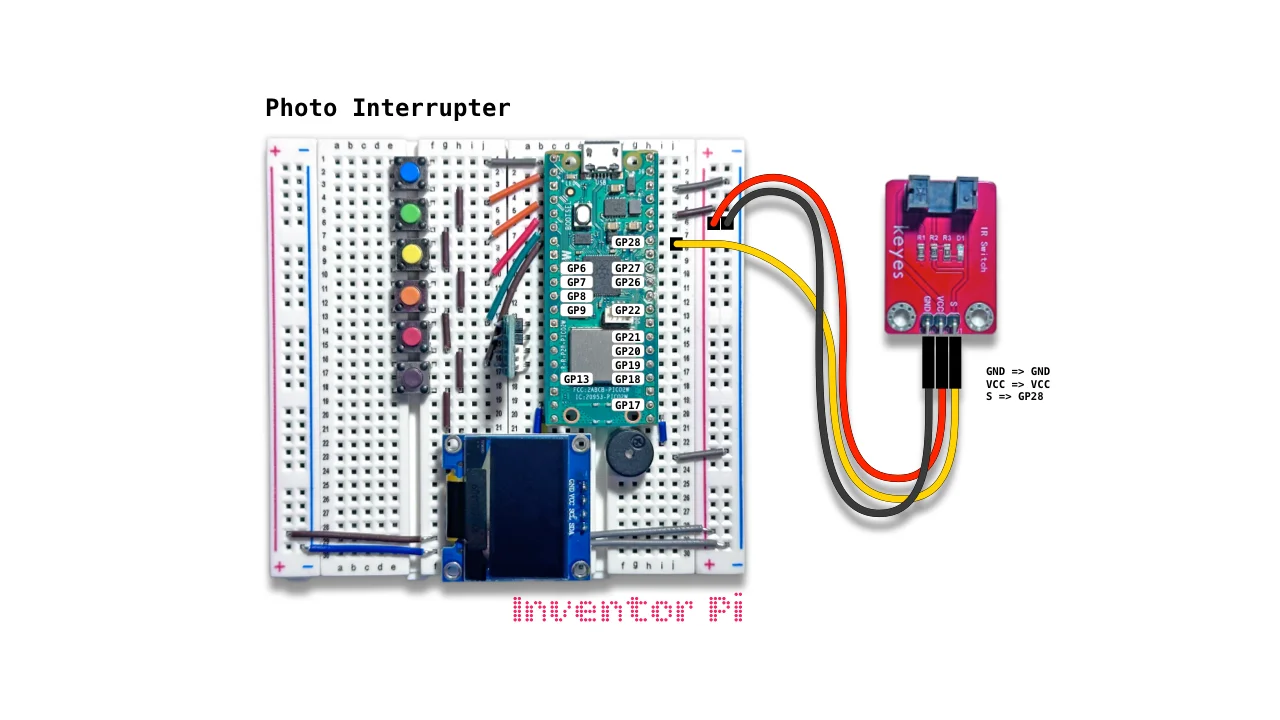
MicroPythonコードの例 ラズベリーパイ ピコ 2Wマイクロコントローラー上で動作 ブレッドボード上のフォトインタラプタモジュール、RGB LEDモジュール、およびOLEDディスプレイモジュール(SSD1306)に接続されています。 フォトインタラプタの光線が遮断されるたびに、ディスプレイ上のカウントをインクリメントする。
フォトインタラプタモジュールは、発光体から受光体(モジュール上の2つの黒いブロック)へ赤外線ビームを送信し、このビームが遮られたことを検出します。. これは、3Dプリンター、CNCマシン、ロボットの移動終端を検出するために使用されます。. また、ロボットやスマートカーにおいて、回転する溝付きディスクのパルス数をカウントしてモーターや車輪の速度を計算するためにも使用されます。. プリンターでは、用紙が存在するかどうかを検知します。.
Thonnyでphoto_interrupter.pyというファイル名の新しいファイルを作成します。. 以下のコードをコピーして、作成したファイルに貼り付けてください。.
1
2
3
4
5
6
7
8
9
10
11
12
13
14
15
16
17
18
19
20
21
22
23
24
25
26
27
28
29
30
31
32
33
34
35
36
37
38
39
40
41
42
43
44
45
46
47
48
49
50

print("\nPhoto Interrupter")

# DESCRIPTION

# A photo interrupter module sends infrared light beam from an emitter to a receiver
# (the two black blocks on the module), and detects when this beam is blocked.
# It is used to detect end-of-travel in 3D printers, CNC machines and robots. It is
# also used to count the pulses of a slotted disc rotating to calculate motor or wheel
# speed in robotics and smart cars. In a printer, it detects when a paper is present.

# CONNECTIONS REQUIRED

# Connect Photo Interrupter (KY-010) module (labeled 'IR Switch')
#   Pins: GND => GND, VCC => VCC, S => GP28

from machine import Pin
from oled import OLED
from rgbled import RGBLED
from buzzer import Buzzer

sensor = Pin(28, Pin.IN, Pin.PULL_UP)
oled = OLED(scl_pin=15, sda_pin=14)
buzzer = Buzzer(pwm_pin=16)
rgbled = RGBLED(red_pin=12, green_pin=11, blue_pin=10)

counter = 0

try:
    while True:
        rgbled.reset()

        # loop while nothing detected
        while sensor.value() == 0: pass

        # sensor value is no longer zero => object detected
        counter += 1
        oled.print(f"Counter: {counter}")
        rgbled.set_color(b=255)
        buzzer.play_tone(600)

        # loop while object is still present
        while sensor.value() == 1: pass

except KeyboardInterrupt:
    print("\nInterrupted by user!")

finally:
    oled.reset()
    rgbled.reset()
    buzzer.reset()