ノックセンサー
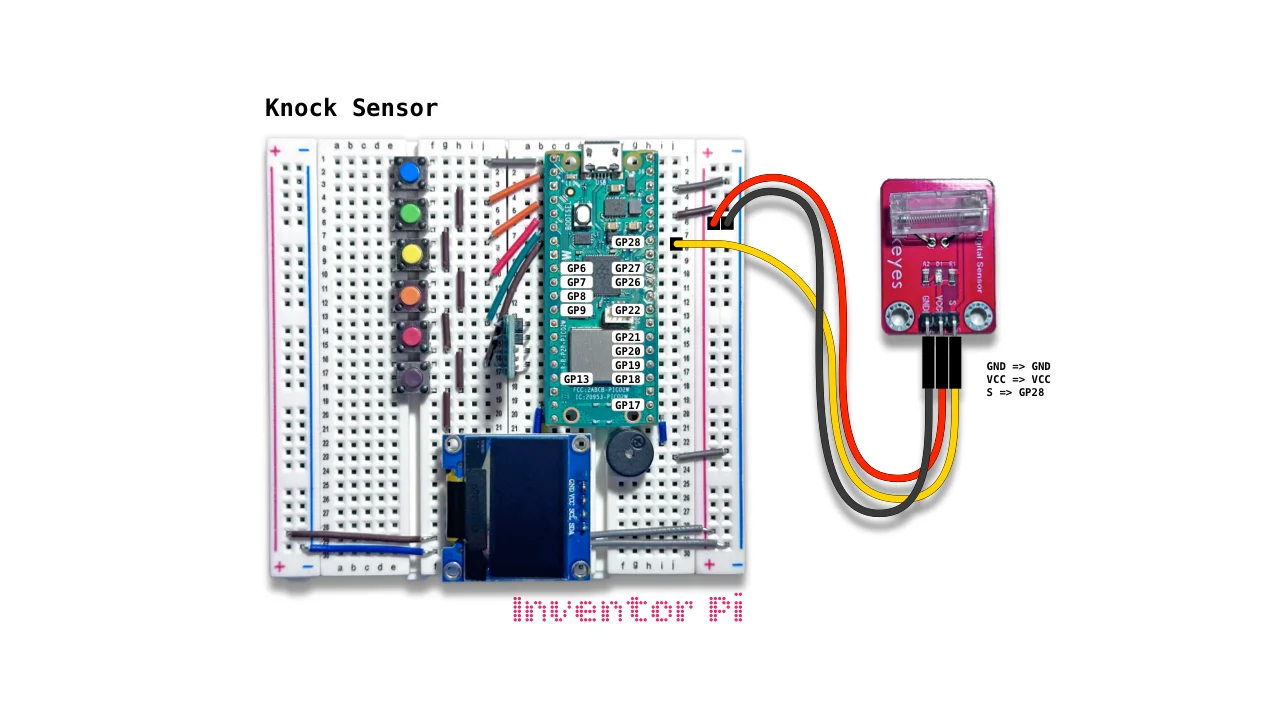
MicroPythonコードの例 ラズベリーパイ ピコ 2Wマイクロコントローラー上で動作 ブレッドボード上に、コイルばね付きノックセンサーモジュール、RGB LEDモジュール、OLEDディスプレイモジュール(SSD1306)を接続した。 急な揺れを検知すると、LEDの色を変えてディスプレイに状態を表示する。
ノックセンサーは振動を検知します. このモジュールはバネ式の振動スイッチを使用しています。. モジュールが静止しているときは、バネは中央のピンに接触しませんが、衝撃や振動を受けると、バネが揺れて中央のピンに当たり、回路が一時的に閉じます。. はしごを登るロボットの場合、ノックセンサーは、伸びたアームがはしごの段に当たったことを検知し、次の動作を開始することができる。. 衝突センサーは衝撃点に設置する必要があるが、ノックセンサーはアーム全体の振動を検出できる。. テストするには、スクリプトを実行した後、ブレッドボード全体とノックセンサーを手に持ち、大きく振って急停止させてください。.
Thonnyでknock_sensor.pyという名前の新しいファイルを作成します。. 以下のコードをコピーして、作成したファイルに貼り付けてください。.
1
2
3
4
5
6
7
8
9
10
11
12
13
14
15
16
17
18
19
20
21
22
23
24
25
26
27
28
29
30
31
32
33
34
35
36
37
38
39
40
41
42
43

print("\nKnock Sensor")

# DESCRIPTION

# A knock sensor detects vibrations. This particular module uses a spring-based vibration switch.
# When the module is still, the spring does not touch the center pin, but when bumped or shaken,
# the spring sways and hits the center pin closing the circuit momentarily. For a ladder climbing robot,
# a knock sensor could detect when an extending arm hits a ladder rung, and then initiate next motion.
# While a crash sensor would need to be placed at the point of impact, a knock sensor could detect
# vibrations across an entire arm. To test, run the script, then hold the entire breadboard along with
# the knock sensor in hand, and give it a big shake bringing it to a sudden stop.

# CONNECTIONS REQUIRED

# Connect Knock Sensor (KY-031) module
# (labeled 'Digital Sensor' with an encased spring)
#   Pins: GND => GND, VCC => VCC, S => GP28

from time import sleep
from machine import Pin
from oled import OLED
from buzzer import Buzzer

knock_sensor = Pin(28, Pin.IN, Pin.PULL_UP)
oled = OLED(scl_pin=15, sda_pin=14)
buzzer = Buzzer(pwm_pin=16)

try:
    while True:
        oled.print("Shake...")

        # Sensor value == 1 => Knock detected, wait 2 seconds
        if knock_sensor.value() == 0:
            buzzer.play_tone(600)
            oled.print("Knock knock!")
            sleep(2)

except KeyboardInterrupt:
    print("\nInterrupted by user!")

finally:
    oled.reset()
    buzzer.reset()