フォトレジスター
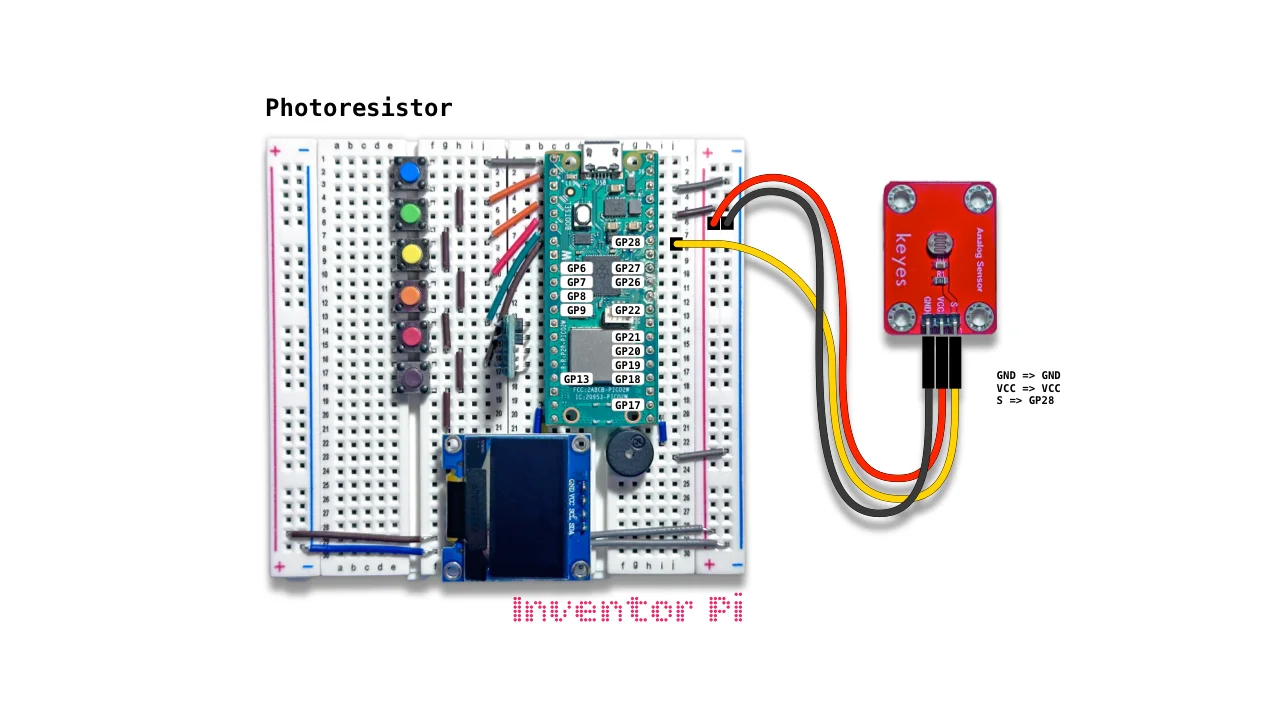
MicroPythonコードの例 ラズベリーパイ ピコ 2Wマイクロコントローラー上で動作 ブレッドボード上にフォトレジストモジュール、RGB LEDモジュール、OLEDディスプレイモジュール(SSD1306)を接続した。 フォトレジストで測定した周囲光の変化に合わせてLEDの明るさを調整する
フォトレジストは、表面に当たる光が多いほど電流が流れやすく、表面に当たる光が少ないほど電流が流れにくくなる。. 暗い場所ではスマートフォンの画面を暗くし、明るい日光の下では画面を明るくするために使用されます。. 一部のテレビでは、画面の明るさを室内の明るさに合わせて調整し、まるで壁に印刷された絵画のように見えるようにするためにこの機能を使用しています。. ライン追跡ロボットは、暗い線と明るい表面を区別するためにこれを使用します。.
Thonnyでphotoresistor.pyという名前の新しいファイルを作成します。. 以下のコードをコピーして、作成したファイルに貼り付けてください。.
1
2
3
4
5
6
7
8
9
10
11
12
13
14
15
16
17
18
19
20
21
22
23
24
25
26
27
28
29
30
31
32
33
34
35
36
37
38
39
40
41
42
43
44
45
46
47
48

print("\nPhotoresistor")

# DESCRIPTION

# A photoresister allows more electricity to flow when more light hits its surface,
# and less electricity to flow when less light hits its surface. It is used to dim a
# phone screen in low light, and brighten it when outdoors under bright sunlight. Some TVs
# use it to dim the display to match the ambient room light, to appear like printed wall art.
# Line tracking robots use it to distinguish between a dark line and a light surface.

# CONNECTIONS REQUIRED

# Connect Photoresistor (KY-018) module
# (labeled 'Analog Sensor' with a small round head with squiggly line)
#   Pins: GND => GND, VCC => VCC, S => GP28

from time import sleep
from machine import Pin, ADC
from oled import OLED
from buzzer import Buzzer
from rgbled import RGBLED
from value_filter import ValueFilter

sensor = ADC(Pin(28))
value_filter = ValueFilter(filter="SMA", window_size=10)
oled = OLED(scl_pin=15, sda_pin=14)
buzzer = Buzzer(pwm_pin=16)
rgbled = RGBLED(red_pin=12, green_pin=11, blue_pin=10)

sensor_max = 65535

try:
    while True:
        # Use Simple Moving Average filter to smooth out readings
        value = value_filter.update(sensor.read_u16())
        fraction = value / sensor_max
        white = round(fraction * fraction * 255) # use fraction squared to visualize change in light
        rgbled.set_color(w=white)
        oled.print(f"Intensity: {fraction * 100:0.0f}%")
        sleep(0.05)

except KeyboardInterrupt:
    print("\nInterrupted by user!")

finally:
    oled.reset()
    rgbled.reset()
    buzzer.reset()