Humidity Temp Sensor
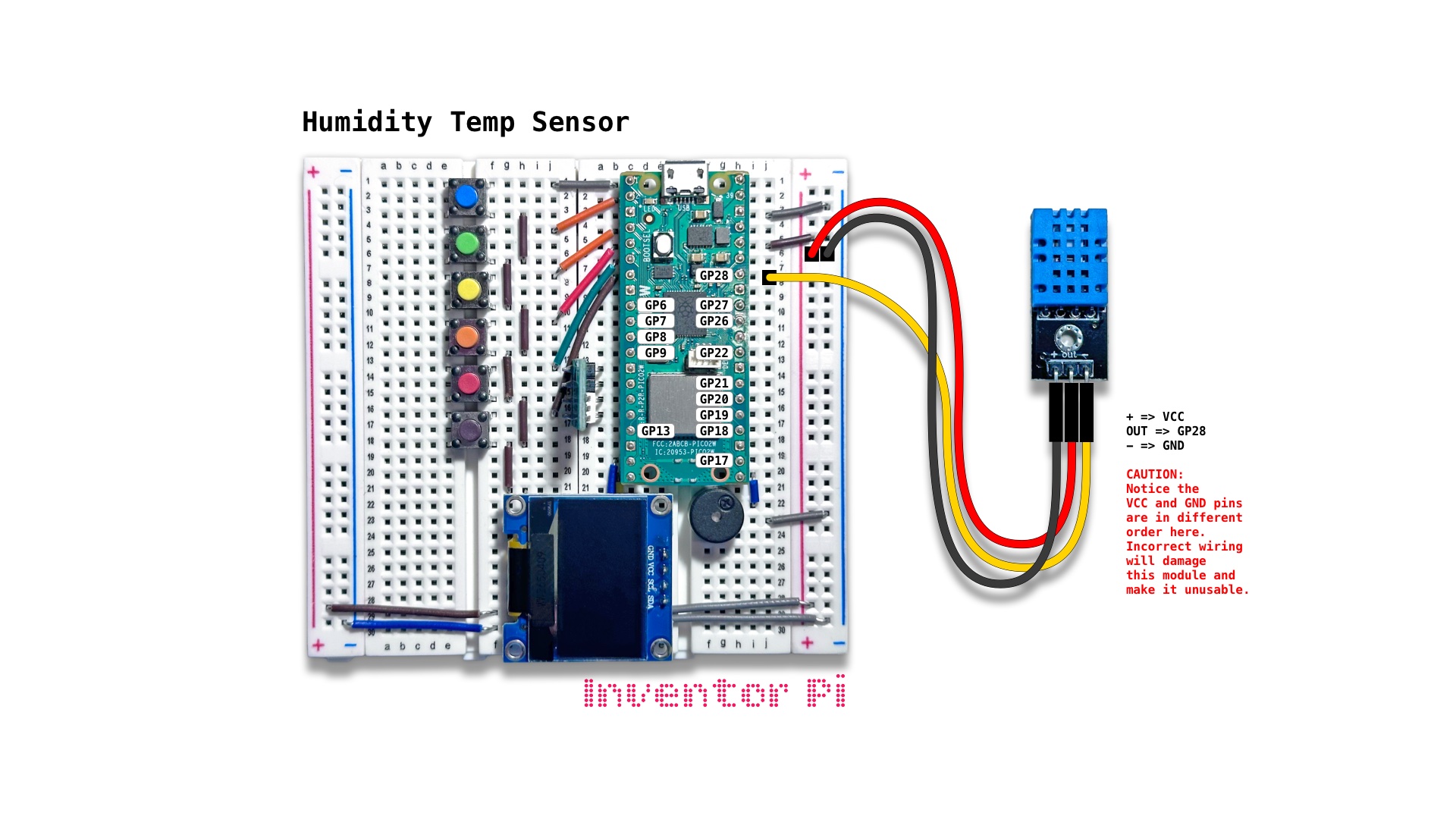
A MicroPython code example running on a Raspberry Pi Pico 2 W microcontroller connected to a humidity and temperature sensor module (DHT11) and an OLED display module (SSD1306) on a breadboard to measure and display the relative humidity and ambient temperature in both celsius and fahrenheit
A humidity and temperature sensor measures the ambient temperature and air humidity. In robotics, temperature sensors are built into most electronic components. They can be used for thermal protection, such as to automatically shutdown a robot when temperatures exceed safe limits. Did you know that a smartphone has about 8 different temperature sensors in it, measuring screen temperature, back temperature, battery temperature, CPU temperature, etc.? Humidity sensors monitor condensation inside a smartphone or smartwatch.
This is a DHT11 sensor. We import the dht library and setup the GP28 pin as shown below:
1
2
3
4
5
6
from time import sleep
from machine import Pin
from oled import OLED
from dht import DHT11

humidity_temp_sensor = DHT11(Pin(28))
Then in the main loop, we use the measure function to get the temperature and humidity. We can use simple math formula to convert from celsius to fahrenheit.
1
2
3
4
5
6
7
while True:
    humidity_temp_sensor.measure()
    humidity = humidity_temp_sensor.humidity()
    temp_c = humidity_temp_sensor.temperature()
    temp_f = temp_c * 9/5 + 32
    oled.print(f"{humidity:.0f}% Humidity", f"{temp_c:.1f} Degrees C", f"{temp_f:.1f} Degrees F")
    sleep(0.5)
To run the full script, create a new file in Thonny, with file name humidity_temp_sensor.py. Copy and paste the code below into the file you created.
1
2
3
4
5
6
7
8
9
10
11
12
13
14
15
16
17
18
19
20
21
22
23
24
25
26
27
28
29
30
31
32
33
34
35
36
37
38
39
40
print("\nHumidity Temp Sensor")

# DESCRIPTION

# A humidity and temperature sensor measures the ambient temperature and air humidity.
# In robotics, temperature sensors are built into most electronic components.
# They can be used for thermal protection, such as to automatically shutdown a robot
# when temperatures exceed safe limits. Did you know that a smartphone has about 8 different
# temperature sensors in it, measuring screen temperature, back temperature,
# battery temperature, CPU temperature, etc.? Humidity sensors monitor condensation
# inside a smartphone or smartwatch.

# CONNECTIONS REQUIRED

# Connect Humidity and Temperature Sensor (KY-015) module
# (it includes a big blue waffle block)
#   Pins: + => VCC, OUT => GP28, - => GND

from time import sleep
from machine import Pin
from oled import OLED
from dht import DHT11

humidity_temp_sensor = DHT11(Pin(28))
oled = OLED(scl_pin=15, sda_pin=14)

try:
    while True:
        humidity_temp_sensor.measure()
        humidity = humidity_temp_sensor.humidity()
        temp_c = humidity_temp_sensor.temperature()
        temp_f = temp_c * 9/5 + 32
        oled.print(f"{humidity:.0f}% Humidity", f"{temp_c:.1f} Degrees C", f"{temp_f:.1f} Degrees F")
        sleep(0.5)

except KeyboardInterrupt:
    print("\nInterrupted by user!")

finally:
    oled.reset()