旋律
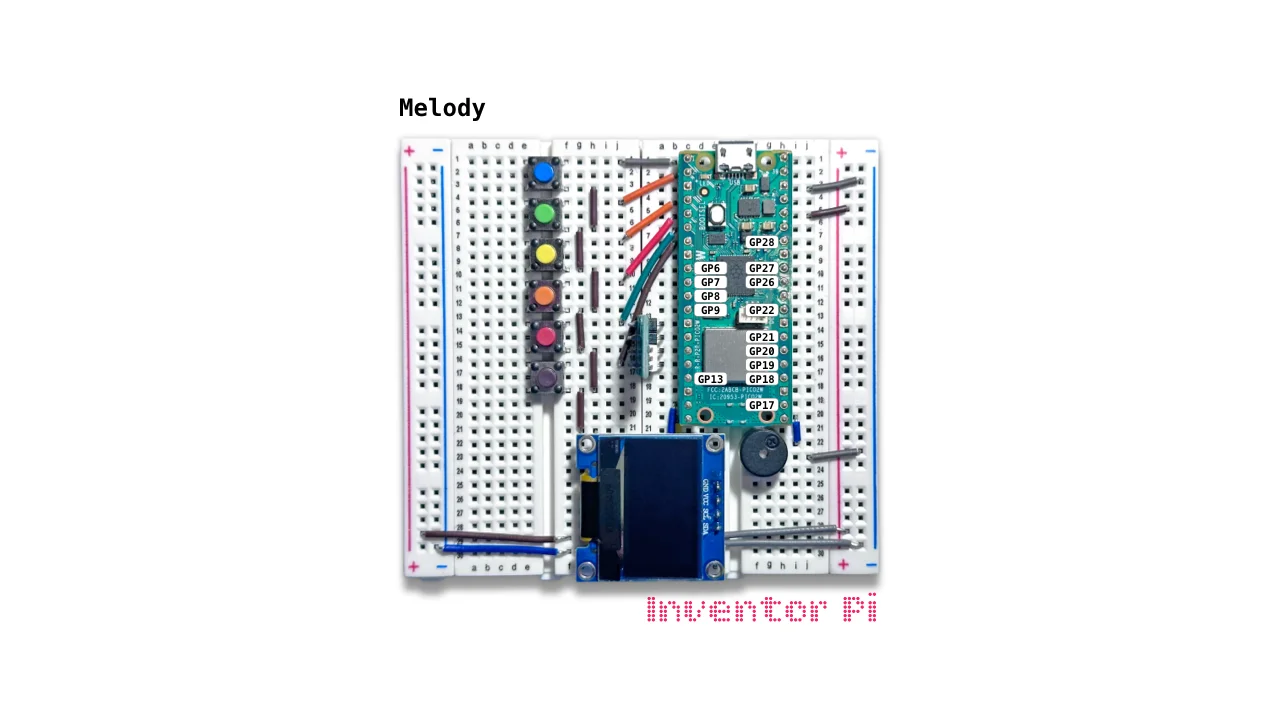
MicroPython 程式碼範例 運行在 Raspberry Pi Pico 2 W 微控制器上 在麵包板上,連接一個被動壓電蜂鳴器、一個RGB LED模組和一個OLED顯示模組(SSD1306)。 蜂鳴器發出與顯示幕上顯示的文字相對應的旋律
壓電蜂鳴器的工作原理是利用壓電效應將電訊號轉換為快速機械振動,從而產生聲波。. 在這個腳本中,我們向壓電蜂鳴器發送不同的頻率,使其播放不同的音符。.
要按特定音程演奏一個音符,我們運行:
1
2
3
4
5
6
7
8

from time import sleep
from buzzer import Buzzer

buzzer = Buzzer(pwm_pin=16)

while True:
    buzzer.play_note("C4")
    sleep(3) # wait 3 seconds, then repeat
要新增函數,我們使用def. 以下函數透過將 LED 燈設為暗白色然後關閉,重複多次,來新增閃爍效果。.
1
2
3
4
5
6

def twinkle(seconds):
    for i in range(seconds * 5):
        rgbled.set_color(w=100)
        sleep(0.01)
        rgbled.reset()
        sleep(0.19)
要在 Thonny 中播放完整的旋律,請建立一個名為 melody.py 的新檔案。. 將以下程式碼複製並貼上到您建立的文件中。.
1
2
3
4
5
6
7
8
9
10
11
12
13
14
15
16
17
18
19
20
21
22
23
24
25
26
27
28
29
30
31
32
33
34
35
36
37
38
39
40
41
42
43
44
45
46
47
48
49
50
51
52
53
54
55
56
57
58
59
60
61
62
63
64
65
66

print("\nMelody")

# DESCRIPTION

# A piezo buzzer works by using the piezoelectric effect to turn electrical signals
# into fast mechanical vibrations that create sound waves. In this script,
# we send different frequencies to a piezo buzzer to play different musical notes.

# CONNECTIONS REQUIRED

# No additional connections are needed

from time import sleep
from buzzer import Buzzer
from oled import OLED
from rgbled import RGBLED

oled = OLED(scl_pin=15, sda_pin=14)
buzzer = Buzzer(pwm_pin=16)
rgbled = RGBLED(red_pin=12, green_pin=11, blue_pin=10)
buzzer.melody_note_gap = 0.5

def twinkle(seconds):
    for i in range(seconds * 5):
        rgbled.set_color(w=100)
        sleep(0.01)
        rgbled.reset()
        sleep(0.19)

try:
    while True:

        twinkle(0.6)
        oled.print("Twinkle,", "twinkle,", "little", "star,")
        buzzer.play_melody("C4", "C4", "G4", "G4", "A4", "A4", "G4 0.6")

        twinkle(0.6)
        oled.print("Yes, sir,", "Yes, sir,", "three bags", "fulllllll!")
        buzzer.play_melody("F4", "F4", "E4", "E4", "D4", "D4", "C4 0.6")

        twinkle(0.6)
        oled.print("Up above the", "world so high,")
        buzzer.play_melody("G4", "G4", "F4", "F4", "E4", "E4", "D4 0.6")

        twinkle(0.6)
        oled.print("Like a", "diamond", "in the sky.")
        buzzer.play_melody("G4", "G4", "F4", "F4", "E4", "E4", "D4 0.6")

        twinkle(0.6)
        oled.print("Ba, ba,", "black sheep,", "have you", "any wool?")
        buzzer.play_melody("C4", "C4", "G4", "G4", "A4", "A4", "G4 0.6")

        twinkle(0.6)
        oled.print("Aitch I jay kay", "el em en o pee")
        buzzer.play_melody("F4", "F4", "E4", "E4", "D4", "D4", "C4 0.6")

        oled.reset()
        sleep(3)

except KeyboardInterrupt:
    print("\nInterrupted by user!")

finally:
    oled.reset()
    rgbled.reset()
    buzzer.reset()