جویاستیک و سروو موتور
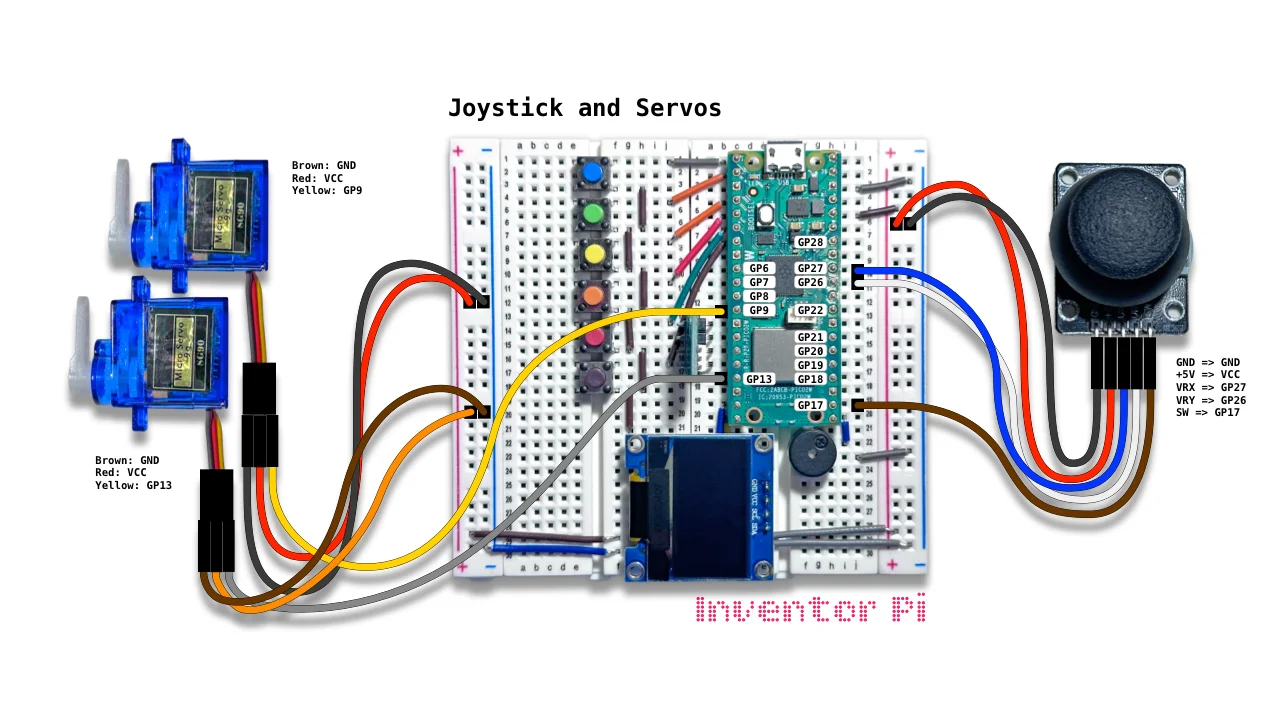
یک نمونه کد میکروپایتون اجرا روی میکروکنترلر Raspberry Pi Pico 2 W متصل به یک ماژول جویاستیک شستی دو محوره آنالوگ، دو میکرو سروو موتور و یک ماژول نمایشگر OLED (SSD1306) روی یک برد بورد برای کنترل زاویه هر دو سروو موتور با استفاده از جویاستیک و نمایش زاویهها روی صفحه نمایش OLED
جویاستیک اغلب برای ناوبری در رباتها، پهپادها، کشتیهای کروز و هواپیماها استفاده میشود. در رباتیک FRC، ما از دو دسته بازی استفاده میکنیم که هر دسته دارای دو جویاستیک است. هر جویاستیک شامل کنترل مستقل محورهای X و Y است. که در مجموع ۸ محور مستقل برای کنترل ربات به ما میدهد.
در این اسکریپت، ما زاویه دو سروو موتور را با استفاده از محورهای مختلف جویاستیک کنترل میکنیم. با فشار دادن دکمه جویاستیک، حالت را به حالت همگامسازی زاویه تغییر میدهیم. حالا از مثلثات برای محاسبه زاویهای که اهرم جویاستیک میسازد استفاده میکنیم و سروو موتورها را طوری تنظیم میکنیم که با این زاویه مطابقت داشته باشند. در رباتیک، ما اغلب از ریاضیات پیشرفته برای کنترل حرکات مختلف استفاده میکنیم.
سروو موتوری است که میتوانیم با تغییر سیگنال PWM که به آن ارسال میکنیم، زاویه چرخش آن را کنترل کنیم. برخلاف موتورهای الکتریکی استاندارد که به طور مداوم میچرخند، یک سروو موتور به یک زاویه یا موقعیت دقیق حرکت میکند و آن را محکم نگه میدارد.
یک فایل جدید در Thonny با نام joystick_and_servos.py ایجاد کنید. کد زیر را کپی کرده و در فایلی که ایجاد کردهاید، قرار دهید.
1
2
3
4
5
6
7
8
9
10
11
12
13
14
15
16
17
18
19
20
21
22
23
24
25
26
27
28
29
30
31
32
33
34
35
36
37
38
39
40
41
42
43
44
45
46
47
48
49
50
51
52
53
54
55
56
57
58
59
60
61
62
63
64
65
66
67
68
69
70
71
72
73
74
75
76
77
78
79
80
81
82
83
84
85
86
87
88
89
90
91
92
93
94

print("\nJoystick and Servos")

# DESCRIPTION

# A joystick is often used for navigation in robots, drones, cruise ships and planes.
# In FRC robotics, we use 2 gaming controllers, with 2 joysticks per controller.
# Each joystick includes independent X and Y axis control. Which  gives us a total
# of 8 independent axes to control the robot.

# In this script, we control the angle of two servos using different axes of the joystick.
# By pressing the joystick button, we toggle the mode to Sync Angle Mode. Now we
# use trigonometry to calculate the angle the joystick lever makes, and set the servos to match
# this angle. In robotics, we often use advanced mathematics to control various motions.

# A servo is a motor where we can control the rotation angle by changing the PWM
# signal we send to it. Unlike standard electric motors that spin continuously,
# a servo motor moves to an exact angle or position and holds it firmly.

# CONNECTIONS REQUIRED

# Connect Joystick (KY-023) module
#   Pins: GND => GND, +5V => VCC, VRX => GP27, VRY => GP26, SW => GP17
# Connect Servo 1
#   Pins: Brown: GND, Red: VCC, Yellow: GP9
# Connect Servo 2
#   Pins: Brown: GND, Red: VCC, Yellow: GP13

from time import sleep
from oled import OLED
from servo import Servo
from joystick import Joystick
from math import atan2, degrees
from helper import interpolate

joystick = Joystick(PinX=27, PinY=26, PinButton=17)
servo_x = Servo(servo_pin=9)
servo_y = Servo(servo_pin=13)
oled = OLED(scl_pin=15, sda_pin=14)

modes = ["X-Y Mode", "Sync Angle Mode"]
mode = 0
x = 0
y = 0
x_angle = 0
y_angle = 0

def toggle_mode_if_button_pressed():
    global mode
    if joystick.b:
        while joystick.b: pass # wait till button is released
        mode = 1 - mode # toggle mode

# X-Y Mode: Control one servo with joystick x-axis and the other with joystick y-axis
def x_y_mode():
    # Convert joystick values ranging from -100 to 100 to angle ranging from 0 to 180
    x_angle = interpolate(x, -100, 100, 0, 180)
    y_angle = interpolate(y, -100, 100, 0, 180)
    return x_angle, y_angle

# Sync Angle Mode: Use trigonometry to make servo angle match Joystick direction
def sync_angle_mode():
    angle = degrees(atan2(y, x))
    if abs(x) + abs(y) < 40: angle = 0 # Reset angle for small noisy readings
    angle = abs(90 - angle) # offset to match joystick direction
    if angle > 180: angle = 360 - angle # reverse direction past 180 degrees
    # Set both servos to same angle
    return angle, angle

def read_joystick_value():
    return joystick.x, joystick.y

def calculate_angles():
    if mode == 0:
        return x_y_mode()
    else:
        return sync_angle_mode()

try:
    while True:
        toggle_mode_if_button_pressed()
        x, y = read_joystick_value()
        x_angle, y_angle = calculate_angles()
        servo_x.set_angle(x_angle)
        servo_y.set_angle(y_angle)
        oled.print(f"{modes[mode]}", f"X Angle: {x_angle:0.0f}", f"Y Angle: {y_angle:0.0f}")
        sleep(0.05)

except KeyboardInterrupt:
    print("\nInterrupted by user!")

finally:
    oled.reset()
    servo_x.reset()
    servo_y.reset()