Joystick e Servos
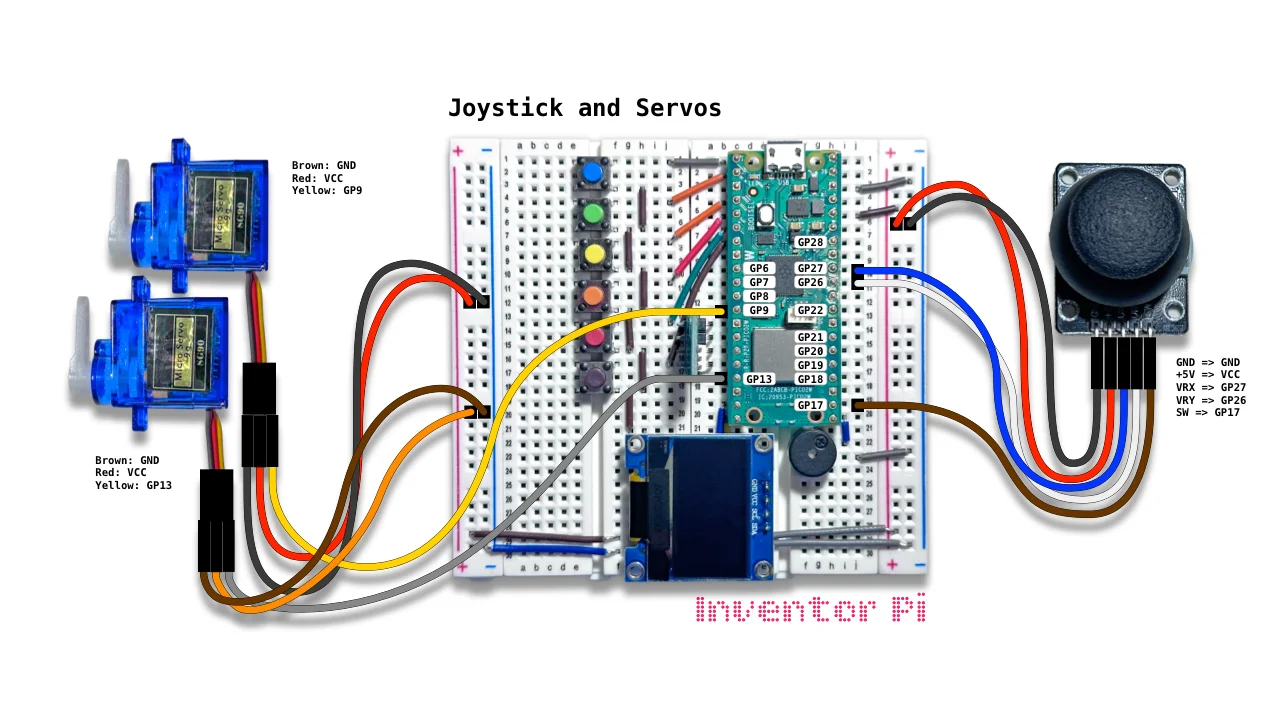
Um exemplo de código MicroPython executado em um microcontrolador Raspberry Pi Pico de 2 W conectado a um módulo de joystick analógico de 2 eixos, 2 micro servomotores e um módulo de display OLED (SSD1306) em uma placa de ensaio Controlar os ângulos de ambos os servos usando o joystick e exibir os ângulos no visor OLED
Um joystick é frequentemente usado para navegação em robôs, drones, navios de cruzeiro e aviões. Na robótica FRC, usamos 2 controladores de jogos, com 2 joysticks em cada controlador. Cada joystick inclui controle independente dos eixos X e Y. Isso nos dá um total de 8 eixos independentes para controlar o robô.
Neste script, controlamos o ângulo de dois servos usando diferentes eixos do joystick. Ao pressionar o botão do joystick, alternamos para o Modo de Sincronização de Ângulo. Agora usamos trigonometria para calcular o ângulo formado pela alavanca do joystick e ajustamos os servos para corresponder a esse ângulo. Em robótica, frequentemente utilizamos matemática avançada para controlar diversos movimentos.
Um servo é um motor no qual podemos controlar o ângulo de rotação alterando o sinal PWM que enviamos a ele. Ao contrário dos motores elétricos comuns que giram continuamente, um servomotor se move para um ângulo ou posição exata e a mantém firme.
Crie um novo arquivo no Thonny com o nome joystick_and_servos.py. Copie e cole o código abaixo no arquivo que você criou.
1
2
3
4
5
6
7
8
9
10
11
12
13
14
15
16
17
18
19
20
21
22
23
24
25
26
27
28
29
30
31
32
33
34
35
36
37
38
39
40
41
42
43
44
45
46
47
48
49
50
51
52
53
54
55
56
57
58
59
60
61
62
63
64
65
66
67
68
69
70
71
72
73
74
75
76
77
78
79
80
81
82
83
84
85
86
87
88
89
90
91
92
93
94

print("\nJoystick and Servos")

# DESCRIPTION

# A joystick is often used for navigation in robots, drones, cruise ships and planes.
# In FRC robotics, we use 2 gaming controllers, with 2 joysticks per controller.
# Each joystick includes independent X and Y axis control. Which  gives us a total
# of 8 independent axes to control the robot.

# In this script, we control the angle of two servos using different axes of the joystick.
# By pressing the joystick button, we toggle the mode to Sync Angle Mode. Now we
# use trigonometry to calculate the angle the joystick lever makes, and set the servos to match
# this angle. In robotics, we often use advanced mathematics to control various motions.

# A servo is a motor where we can control the rotation angle by changing the PWM
# signal we send to it. Unlike standard electric motors that spin continuously,
# a servo motor moves to an exact angle or position and holds it firmly.

# CONNECTIONS REQUIRED

# Connect Joystick (KY-023) module
#   Pins: GND => GND, +5V => VCC, VRX => GP27, VRY => GP26, SW => GP17
# Connect Servo 1
#   Pins: Brown: GND, Red: VCC, Yellow: GP9
# Connect Servo 2
#   Pins: Brown: GND, Red: VCC, Yellow: GP13

from time import sleep
from oled import OLED
from servo import Servo
from joystick import Joystick
from math import atan2, degrees
from helper import interpolate

joystick = Joystick(PinX=27, PinY=26, PinButton=17)
servo_x = Servo(servo_pin=9)
servo_y = Servo(servo_pin=13)
oled = OLED(scl_pin=15, sda_pin=14)

modes = ["X-Y Mode", "Sync Angle Mode"]
mode = 0
x = 0
y = 0
x_angle = 0
y_angle = 0

def toggle_mode_if_button_pressed():
    global mode
    if joystick.b:
        while joystick.b: pass # wait till button is released
        mode = 1 - mode # toggle mode

# X-Y Mode: Control one servo with joystick x-axis and the other with joystick y-axis
def x_y_mode():
    # Convert joystick values ranging from -100 to 100 to angle ranging from 0 to 180
    x_angle = interpolate(x, -100, 100, 0, 180)
    y_angle = interpolate(y, -100, 100, 0, 180)
    return x_angle, y_angle

# Sync Angle Mode: Use trigonometry to make servo angle match Joystick direction
def sync_angle_mode():
    angle = degrees(atan2(y, x))
    if abs(x) + abs(y) < 40: angle = 0 # Reset angle for small noisy readings
    angle = abs(90 - angle) # offset to match joystick direction
    if angle > 180: angle = 360 - angle # reverse direction past 180 degrees
    # Set both servos to same angle
    return angle, angle

def read_joystick_value():
    return joystick.x, joystick.y

def calculate_angles():
    if mode == 0:
        return x_y_mode()
    else:
        return sync_angle_mode()

try:
    while True:
        toggle_mode_if_button_pressed()
        x, y = read_joystick_value()
        x_angle, y_angle = calculate_angles()
        servo_x.set_angle(x_angle)
        servo_y.set_angle(y_angle)
        oled.print(f"{modes[mode]}", f"X Angle: {x_angle:0.0f}", f"Y Angle: {y_angle:0.0f}")
        sleep(0.05)

except KeyboardInterrupt:
    print("\nInterrupted by user!")

finally:
    oled.reset()
    servo_x.reset()
    servo_y.reset()