Joystick e servomotori
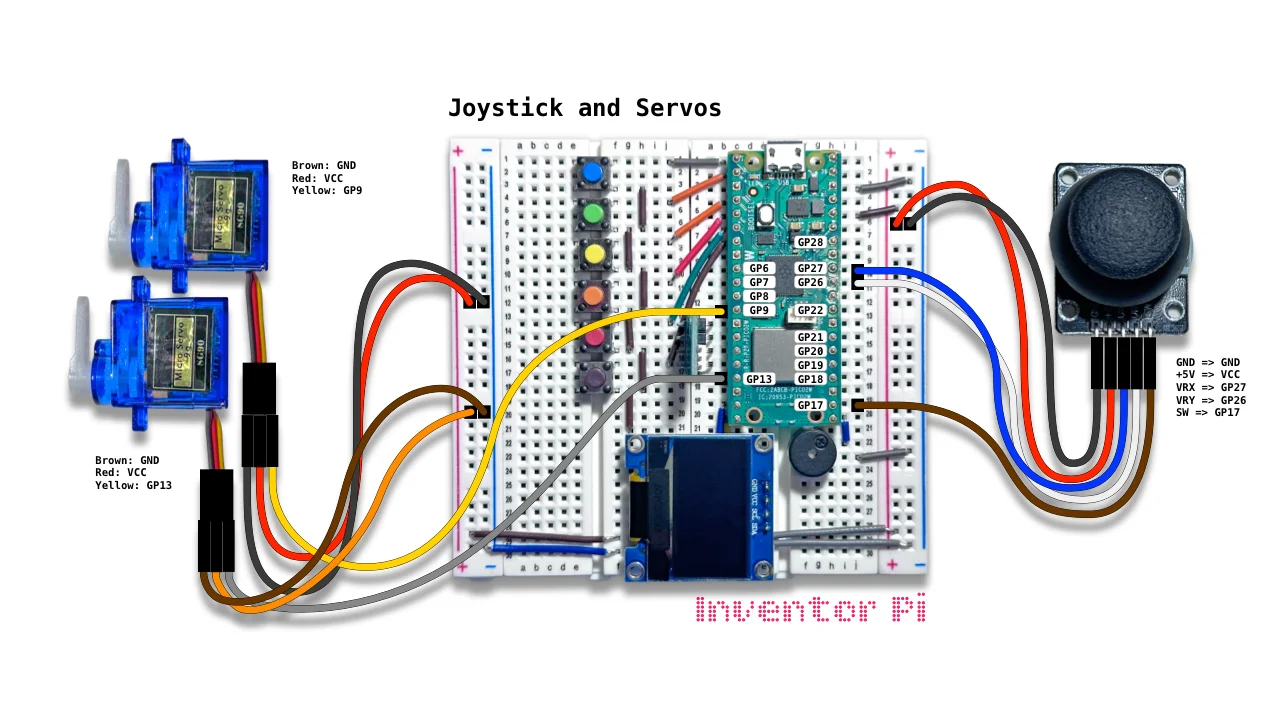
Un esempio di codice MicroPython in esecuzione su un microcontrollore Raspberry Pi Pico 2 W collegato a un modulo joystick analogico a 2 assi, 2 micro servomotori e un modulo display OLED (SSD1306) su una breadboard per controllare gli angoli di entrambi i servomotori tramite il joystick e visualizzare gli angoli sul display OLED
Il joystick viene spesso utilizzato per la navigazione in robot, droni, navi da crociera e aerei. Nel settore della robotica FRC, utilizziamo 2 controller di gioco, con 2 joystick per controller. Ogni joystick include il controllo indipendente degli assi X e Y. Ciò ci fornisce un totale di 8 assi indipendenti per controllare il robot.
In questo script, controlliamo l'angolo di due servomotori utilizzando assi diversi del joystick. Premendo il pulsante del joystick, si attiva la modalità di sincronizzazione dell'angolo. Ora utilizziamo la trigonometria per calcolare l'angolo formato dalla leva del joystick e impostiamo i servomotori in modo che corrispondano a questo angolo. Nella robotica, spesso utilizziamo la matematica avanzata per controllare vari movimenti.
Un servomotore è un motore in cui possiamo controllare l'angolo di rotazione modificando il segnale PWM che gli inviamo. A differenza dei motori elettrici standard che ruotano continuamente, un servomotore si sposta fino a raggiungere un angolo o una posizione precisa e la mantiene saldamente.
Crea un nuovo file in Thonny, con il nome joystick_and_servos.py. Copia e incolla il codice seguente nel file che hai creato.
1
2
3
4
5
6
7
8
9
10
11
12
13
14
15
16
17
18
19
20
21
22
23
24
25
26
27
28
29
30
31
32
33
34
35
36
37
38
39
40
41
42
43
44
45
46
47
48
49
50
51
52
53
54
55
56
57
58
59
60
61
62
63
64
65
66
67
68
69
70
71
72
73
74
75
76
77
78
79
80
81
82
83
84
85
86
87
88
89
90
91
92
93
94

print("\nJoystick and Servos")

# DESCRIPTION

# A joystick is often used for navigation in robots, drones, cruise ships and planes.
# In FRC robotics, we use 2 gaming controllers, with 2 joysticks per controller.
# Each joystick includes independent X and Y axis control. Which  gives us a total
# of 8 independent axes to control the robot.

# In this script, we control the angle of two servos using different axes of the joystick.
# By pressing the joystick button, we toggle the mode to Sync Angle Mode. Now we
# use trigonometry to calculate the angle the joystick lever makes, and set the servos to match
# this angle. In robotics, we often use advanced mathematics to control various motions.

# A servo is a motor where we can control the rotation angle by changing the PWM
# signal we send to it. Unlike standard electric motors that spin continuously,
# a servo motor moves to an exact angle or position and holds it firmly.

# CONNECTIONS REQUIRED

# Connect Joystick (KY-023) module
#   Pins: GND => GND, +5V => VCC, VRX => GP27, VRY => GP26, SW => GP17
# Connect Servo 1
#   Pins: Brown: GND, Red: VCC, Yellow: GP9
# Connect Servo 2
#   Pins: Brown: GND, Red: VCC, Yellow: GP13

from time import sleep
from oled import OLED
from servo import Servo
from joystick import Joystick
from math import atan2, degrees
from helper import interpolate

joystick = Joystick(PinX=27, PinY=26, PinButton=17)
servo_x = Servo(servo_pin=9)
servo_y = Servo(servo_pin=13)
oled = OLED(scl_pin=15, sda_pin=14)

modes = ["X-Y Mode", "Sync Angle Mode"]
mode = 0
x = 0
y = 0
x_angle = 0
y_angle = 0

def toggle_mode_if_button_pressed():
    global mode
    if joystick.b:
        while joystick.b: pass # wait till button is released
        mode = 1 - mode # toggle mode

# X-Y Mode: Control one servo with joystick x-axis and the other with joystick y-axis
def x_y_mode():
    # Convert joystick values ranging from -100 to 100 to angle ranging from 0 to 180
    x_angle = interpolate(x, -100, 100, 0, 180)
    y_angle = interpolate(y, -100, 100, 0, 180)
    return x_angle, y_angle

# Sync Angle Mode: Use trigonometry to make servo angle match Joystick direction
def sync_angle_mode():
    angle = degrees(atan2(y, x))
    if abs(x) + abs(y) < 40: angle = 0 # Reset angle for small noisy readings
    angle = abs(90 - angle) # offset to match joystick direction
    if angle > 180: angle = 360 - angle # reverse direction past 180 degrees
    # Set both servos to same angle
    return angle, angle

def read_joystick_value():
    return joystick.x, joystick.y

def calculate_angles():
    if mode == 0:
        return x_y_mode()
    else:
        return sync_angle_mode()

try:
    while True:
        toggle_mode_if_button_pressed()
        x, y = read_joystick_value()
        x_angle, y_angle = calculate_angles()
        servo_x.set_angle(x_angle)
        servo_y.set_angle(y_angle)
        oled.print(f"{modes[mode]}", f"X Angle: {x_angle:0.0f}", f"Y Angle: {y_angle:0.0f}")
        sleep(0.05)

except KeyboardInterrupt:
    print("\nInterrupted by user!")

finally:
    oled.reset()
    servo_x.reset()
    servo_y.reset()