عصا التحكم والمحركات المؤازرة
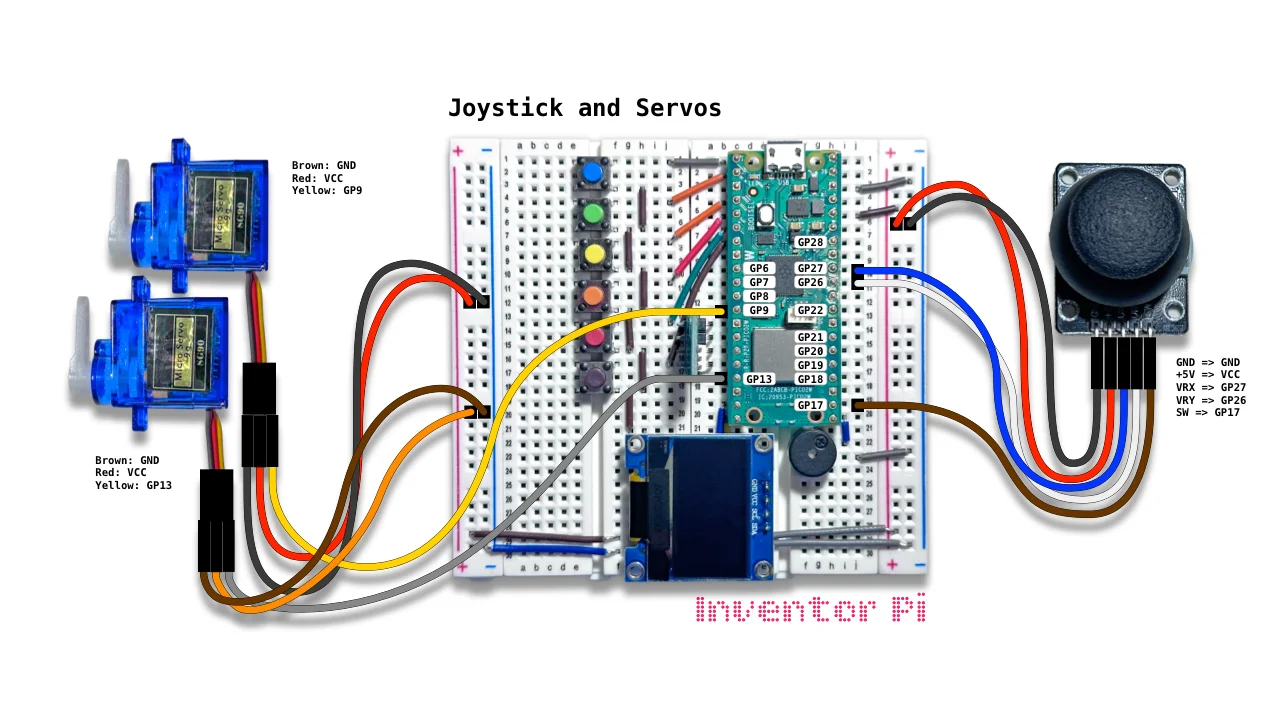
مثال على كود MicroPython يعمل على وحدة تحكم دقيقة Raspberry Pi Pico 2 W متصلة بوحدة عصا تحكم تناظرية ثنائية المحاور، ومحركين سيرفو صغيرين، ووحدة عرض OLED (SSD1306) على لوحة تجارب للتحكم في زوايا كلا المحركين المؤازرين باستخدام عصا التحكم وعرض الزوايا على شاشة OLED
تُستخدم عصا التحكم غالبًا للتنقل في الروبوتات والطائرات بدون طيار والسفن السياحية والطائرات. في مسابقات الروبوتات FRC، نستخدم جهازي تحكم للألعاب، مع عصا تحكم مزدوجة لكل جهاز تحكم. تتضمن كل عصا تحكم مستقلة في المحورين X و Y. وهذا يمنحنا ما مجموعه 8 محاور مستقلة للتحكم في الروبوت.
في هذا البرنامج النصي، نتحكم في زاوية محركين مؤازرين باستخدام محاور مختلفة لعصا التحكم. بالضغط على زر عصا التحكم، نقوم بتبديل الوضع إلى وضع مزامنة الزاوية. نستخدم الآن حساب المثلثات لحساب الزاوية التي يصنعها ذراع عصا التحكم، ونضبط المحركات المؤازرة لتتوافق مع هذه الزاوية. في مجال الروبوتات، نستخدم غالبًا الرياضيات المتقدمة للتحكم في الحركات المختلفة.
المحرك المؤازر هو محرك يمكننا من خلاله التحكم في زاوية الدوران عن طريق تغيير إشارة تعديل عرض النبضة (PWM) التي نرسلها إليه. بخلاف المحركات الكهربائية القياسية التي تدور باستمرار، يتحرك محرك السيرفو إلى زاوية أو موضع محدد ويثبته بإحكام.
أنشئ ملفًا جديدًا في برنامج Thonny، باسم joystick_and_servos.py. انسخ والصق الكود أدناه في الملف الذي أنشأته.
1
2
3
4
5
6
7
8
9
10
11
12
13
14
15
16
17
18
19
20
21
22
23
24
25
26
27
28
29
30
31
32
33
34
35
36
37
38
39
40
41
42
43
44
45
46
47
48
49
50
51
52
53
54
55
56
57
58
59
60
61
62
63
64
65
66
67
68
69
70
71
72
73
74
75
76
77
78
79
80
81
82
83
84
85
86
87
88
89
90
91
92
93
94

print("\nJoystick and Servos")

# DESCRIPTION

# A joystick is often used for navigation in robots, drones, cruise ships and planes.
# In FRC robotics, we use 2 gaming controllers, with 2 joysticks per controller.
# Each joystick includes independent X and Y axis control. Which  gives us a total
# of 8 independent axes to control the robot.

# In this script, we control the angle of two servos using different axes of the joystick.
# By pressing the joystick button, we toggle the mode to Sync Angle Mode. Now we
# use trigonometry to calculate the angle the joystick lever makes, and set the servos to match
# this angle. In robotics, we often use advanced mathematics to control various motions.

# A servo is a motor where we can control the rotation angle by changing the PWM
# signal we send to it. Unlike standard electric motors that spin continuously,
# a servo motor moves to an exact angle or position and holds it firmly.

# CONNECTIONS REQUIRED

# Connect Joystick (KY-023) module
#   Pins: GND => GND, +5V => VCC, VRX => GP27, VRY => GP26, SW => GP17
# Connect Servo 1
#   Pins: Brown: GND, Red: VCC, Yellow: GP9
# Connect Servo 2
#   Pins: Brown: GND, Red: VCC, Yellow: GP13

from time import sleep
from oled import OLED
from servo import Servo
from joystick import Joystick
from math import atan2, degrees
from helper import interpolate

joystick = Joystick(PinX=27, PinY=26, PinButton=17)
servo_x = Servo(servo_pin=9)
servo_y = Servo(servo_pin=13)
oled = OLED(scl_pin=15, sda_pin=14)

modes = ["X-Y Mode", "Sync Angle Mode"]
mode = 0
x = 0
y = 0
x_angle = 0
y_angle = 0

def toggle_mode_if_button_pressed():
    global mode
    if joystick.b:
        while joystick.b: pass # wait till button is released
        mode = 1 - mode # toggle mode

# X-Y Mode: Control one servo with joystick x-axis and the other with joystick y-axis
def x_y_mode():
    # Convert joystick values ranging from -100 to 100 to angle ranging from 0 to 180
    x_angle = interpolate(x, -100, 100, 0, 180)
    y_angle = interpolate(y, -100, 100, 0, 180)
    return x_angle, y_angle

# Sync Angle Mode: Use trigonometry to make servo angle match Joystick direction
def sync_angle_mode():
    angle = degrees(atan2(y, x))
    if abs(x) + abs(y) < 40: angle = 0 # Reset angle for small noisy readings
    angle = abs(90 - angle) # offset to match joystick direction
    if angle > 180: angle = 360 - angle # reverse direction past 180 degrees
    # Set both servos to same angle
    return angle, angle

def read_joystick_value():
    return joystick.x, joystick.y

def calculate_angles():
    if mode == 0:
        return x_y_mode()
    else:
        return sync_angle_mode()

try:
    while True:
        toggle_mode_if_button_pressed()
        x, y = read_joystick_value()
        x_angle, y_angle = calculate_angles()
        servo_x.set_angle(x_angle)
        servo_y.set_angle(y_angle)
        oled.print(f"{modes[mode]}", f"X Angle: {x_angle:0.0f}", f"Y Angle: {y_angle:0.0f}")
        sleep(0.05)

except KeyboardInterrupt:
    print("\nInterrupted by user!")

finally:
    oled.reset()
    servo_x.reset()
    servo_y.reset()