accelerometer
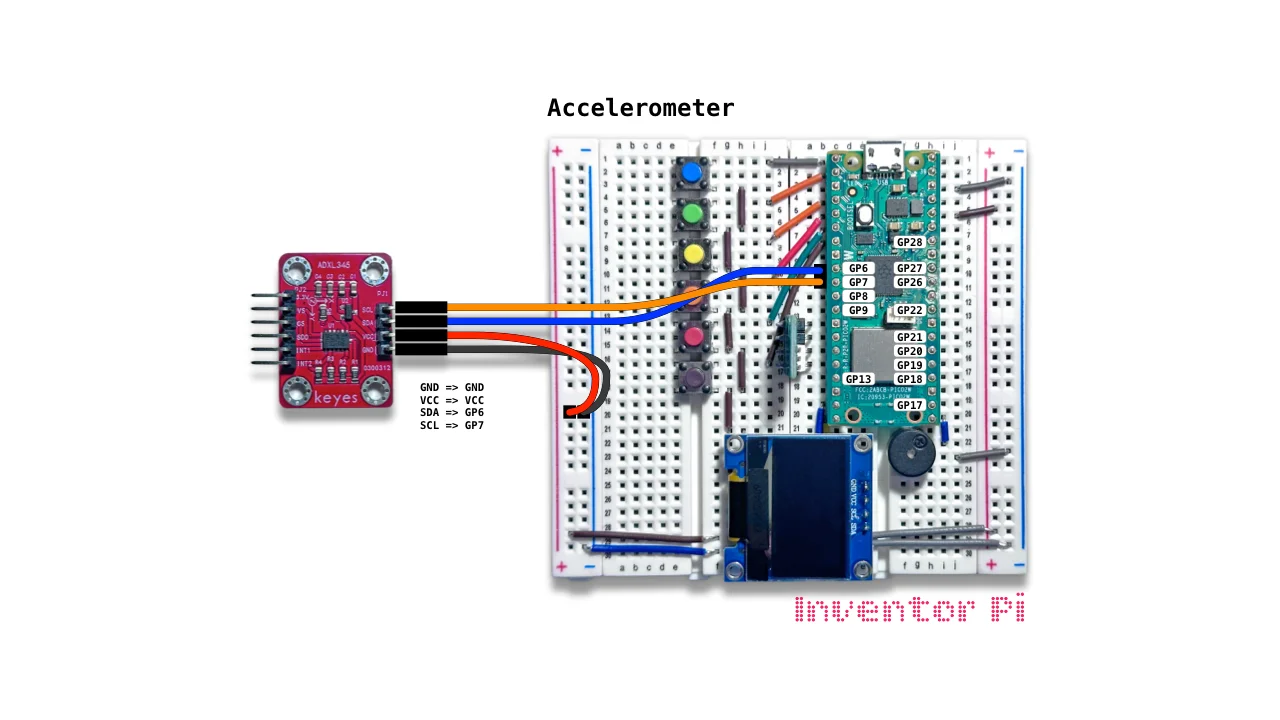
माइक्रो पाइथन कोड का एक उदाहरण Raspberry Pi Pico 2W माइक्रोकंट्रोलर पर चल रहा है ब्रेडबोर्ड पर 3-एक्सिस डिजिटल एक्सेलेरोमीटर मॉड्यूल (ADXL345) और OLED डिस्प्ले मॉड्यूल (SSD1306) से जुड़ा हुआ है। एक्सेलेरोमीटर को उसके X और Y अक्षों के चारों ओर घुमाकर OLED डिस्प्ले पर 3D आकृति को बनाना और घुमाना।
एक त्वरणमापी x, y और z अक्षों के सापेक्ष त्वरण को मापता है।. रोबोटिक्स में, रोबोट की स्थिति और गति निर्धारित करने में यह आवश्यक है।. इस स्क्रिप्ट में, हम एक 3D आकृति बनाते हैं और एक्सेलेरोमीटर का उपयोग करके उसके घूर्णन को नियंत्रित करते हैं।.
Thonny में accelerometer.py नाम से एक नई फ़ाइल बनाएँ।. नीचे दिए गए कोड को कॉपी करके अपनी बनाई गई फ़ाइल में पेस्ट करें।.
1
2
3
4
5
6
7
8
9
10
11
12
13
14
15
16
17
18
19
20
21
22
23
24
25
26
27
28
29
30
31
32
33
34
35
36
37
38
39
40
41
42

print("\nAccelerometer")

# DESCRIPTION

# An accelerometer measures acceleration around the x, y and z axis.
# In robotics, it is essential in determining the robot position and movement.
# In this script, we draw a 3D shape, and control its rotation using the accelerometer.

# CONNECTIONS REQUIRED

# Connect ADXL345 module using only the 4 pins on the right side
#   Pins: GND => GND, VCC => VCC, SDA => GP6, SCL => GP7

from machine import Pin, SoftI2C
from oled import OLED
from adxl345 import ADXL345
from cube import Cube
from math import atan2, sqrt, degrees

accel = ADXL345(SoftI2C(sda=Pin(6), scl=Pin(7)))
oled = OLED(scl_pin=15, sda_pin=14)
cube = Cube(scaleX=1, scaleY=1.4, scaleZ=0.2)

try:
    while True:

        # Calculate pitch (rotation around y-axis, 360 degrees)
        # and roll (rotaton around x-axis, 180 degrees)
        # using x, y and z from the accelerometer.
        # Yaw (rotation around vertical z-axis) needs
        # a different sensor, a magnetometer or a gyroscope.
        x, y, z = accel.read()
        pitch = atan2(-x, sqrt(y*y + z*z))
        roll = atan2(y, z)

        cube.draw(display=oled.display, angleX=-degrees(roll), angleY=-degrees(pitch))

except KeyboardInterrupt:
    print("\nInterrupted by user!")

finally:
    oled.reset()