Beschleunigungsmesser
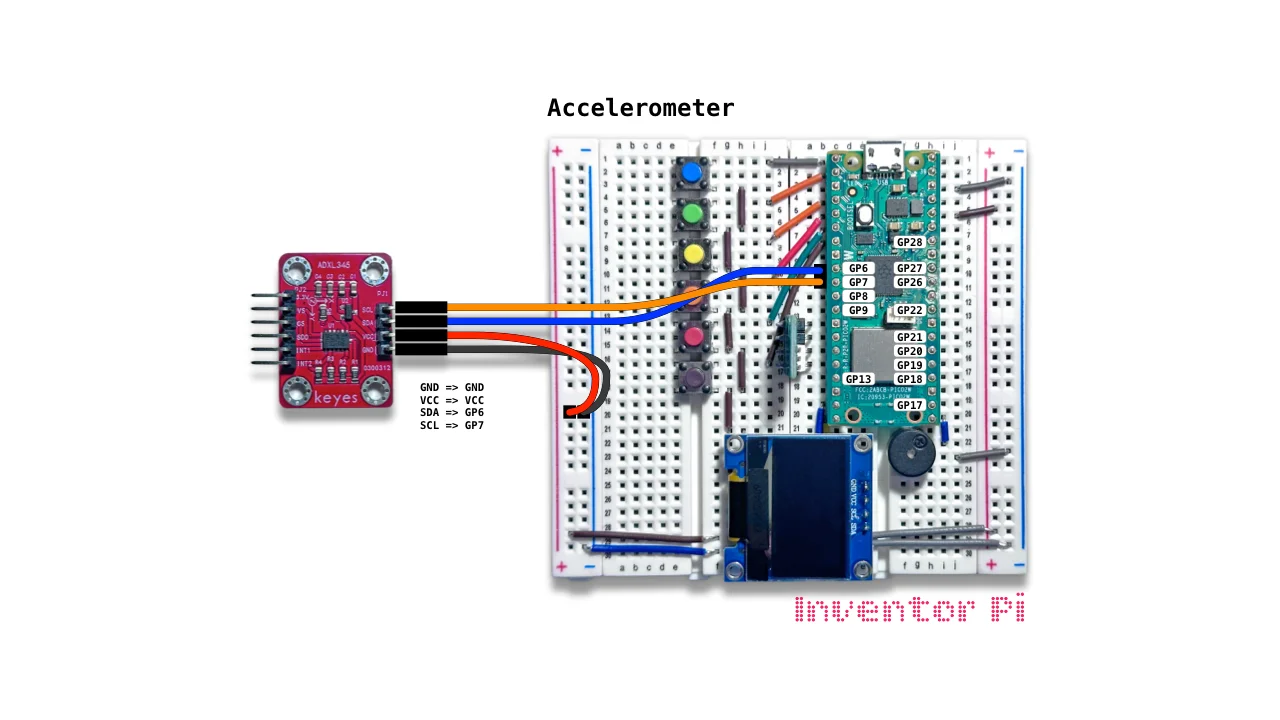
Ein MicroPython-Codebeispiel läuft auf einem Raspberry Pi Pico 2 W Mikrocontroller auf einem Steckbrett mit einem 3-Achsen-Digitalbeschleunigungsmessermodul (ADXL345) und einem OLED-Displaymodul (SSD1306) verbunden Eine 3D-Form auf dem OLED-Display zeichnen und drehen, indem der Beschleunigungsmesser um seine X- und Y-Achse gedreht wird
Ein Beschleunigungsmesser misst die Beschleunigung um die x-, y- und z-Achse. In der Robotik ist es unerlässlich, um die Position und Bewegung des Roboters zu bestimmen. In diesem Skript zeichnen wir eine 3D-Form und steuern deren Rotation mithilfe des Beschleunigungsmessers.
Erstellen Sie in Thonny eine neue Datei mit dem Dateinamen accelerometer.py. Kopieren Sie den unten stehenden Code und fügen Sie ihn in die von Ihnen erstellte Datei ein.
1
2
3
4
5
6
7
8
9
10
11
12
13
14
15
16
17
18
19
20
21
22
23
24
25
26
27
28
29
30
31
32
33
34
35
36
37
38
39
40
41
42

print("\nAccelerometer")

# DESCRIPTION

# An accelerometer measures acceleration around the x, y and z axis.
# In robotics, it is essential in determining the robot position and movement.
# In this script, we draw a 3D shape, and control its rotation using the accelerometer.

# CONNECTIONS REQUIRED

# Connect ADXL345 module using only the 4 pins on the right side
#   Pins: GND => GND, VCC => VCC, SDA => GP6, SCL => GP7

from machine import Pin, SoftI2C
from oled import OLED
from adxl345 import ADXL345
from cube import Cube
from math import atan2, sqrt, degrees

accel = ADXL345(SoftI2C(sda=Pin(6), scl=Pin(7)))
oled = OLED(scl_pin=15, sda_pin=14)
cube = Cube(scaleX=1, scaleY=1.4, scaleZ=0.2)

try:
    while True:

        # Calculate pitch (rotation around y-axis, 360 degrees)
        # and roll (rotaton around x-axis, 180 degrees)
        # using x, y and z from the accelerometer.
        # Yaw (rotation around vertical z-axis) needs
        # a different sensor, a magnetometer or a gyroscope.
        x, y, z = accel.read()
        pitch = atan2(-x, sqrt(y*y + z*z))
        roll = atan2(y, z)

        cube.draw(display=oled.display, angleX=-degrees(roll), angleY=-degrees(pitch))

except KeyboardInterrupt:
    print("\nInterrupted by user!")

finally:
    oled.reset()