مقياس التسارع
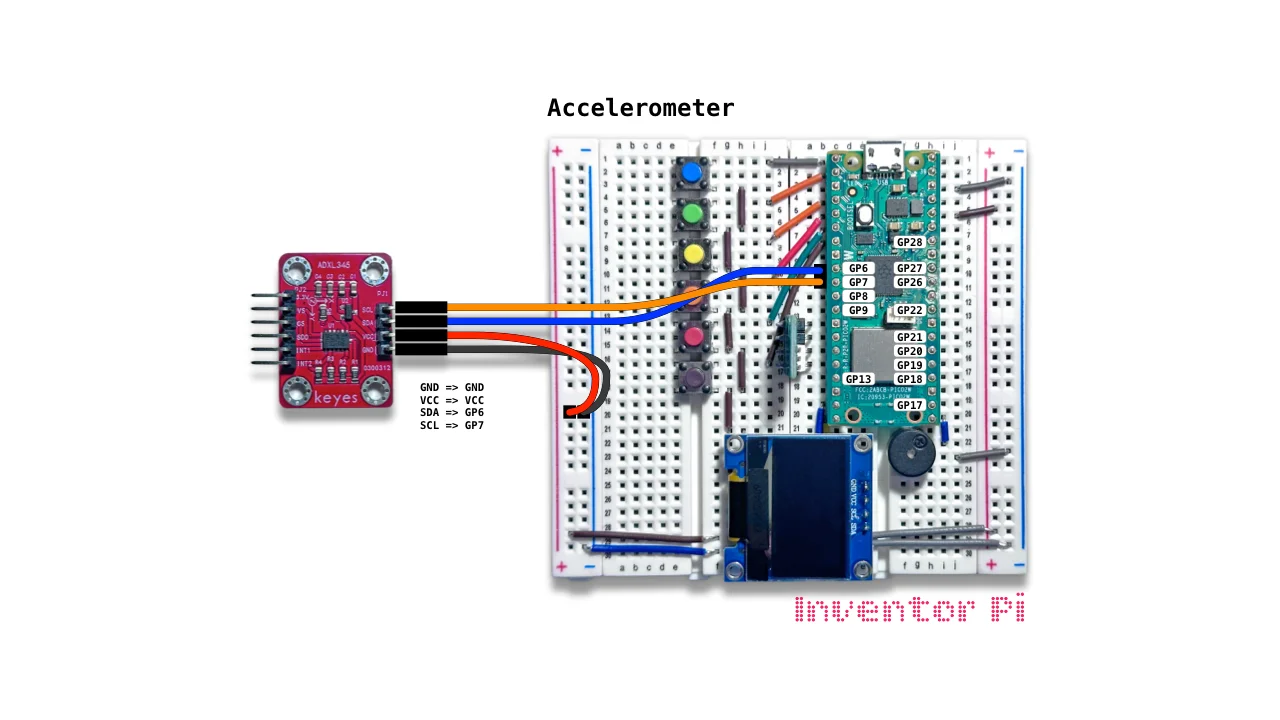
مثال على كود MicroPython يعمل على وحدة تحكم دقيقة Raspberry Pi Pico 2 W متصل بوحدة قياس تسارع رقمية ثلاثية المحاور (ADXL345) ووحدة عرض OLED (SSD1306) على لوحة تجارب رسم وتدوير شكل ثلاثي الأبعاد على شاشة OLED عن طريق تدوير مقياس التسارع حول محوريه X و Y
يقيس مقياس التسارع التسارع حول المحاور س، ص، ع. في مجال الروبوتات، يعد ذلك أمراً أساسياً في تحديد موقع الروبوت وحركته. في هذا البرنامج النصي، نرسم شكلاً ثلاثي الأبعاد، ونتحكم في دورانه باستخدام مقياس التسارع.
أنشئ ملفًا جديدًا في Thonny، باسم accelerometer.py. انسخ والصق الكود أدناه في الملف الذي أنشأته.
1
2
3
4
5
6
7
8
9
10
11
12
13
14
15
16
17
18
19
20
21
22
23
24
25
26
27
28
29
30
31
32
33
34
35
36
37
38
39
40
41
42

print("\nAccelerometer")

# DESCRIPTION

# An accelerometer measures acceleration around the x, y and z axis.
# In robotics, it is essential in determining the robot position and movement.
# In this script, we draw a 3D shape, and control its rotation using the accelerometer.

# CONNECTIONS REQUIRED

# Connect ADXL345 module using only the 4 pins on the right side
#   Pins: GND => GND, VCC => VCC, SDA => GP6, SCL => GP7

from machine import Pin, SoftI2C
from oled import OLED
from adxl345 import ADXL345
from cube import Cube
from math import atan2, sqrt, degrees

accel = ADXL345(SoftI2C(sda=Pin(6), scl=Pin(7)))
oled = OLED(scl_pin=15, sda_pin=14)
cube = Cube(scaleX=1, scaleY=1.4, scaleZ=0.2)

try:
    while True:

        # Calculate pitch (rotation around y-axis, 360 degrees)
        # and roll (rotaton around x-axis, 180 degrees)
        # using x, y and z from the accelerometer.
        # Yaw (rotation around vertical z-axis) needs
        # a different sensor, a magnetometer or a gyroscope.
        x, y, z = accel.read()
        pitch = atan2(-x, sqrt(y*y + z*z))
        roll = atan2(y, z)

        cube.draw(display=oled.display, angleX=-degrees(roll), angleY=-degrees(pitch))

except KeyboardInterrupt:
    print("\nInterrupted by user!")

finally:
    oled.reset()