ایکسلرومیٹر
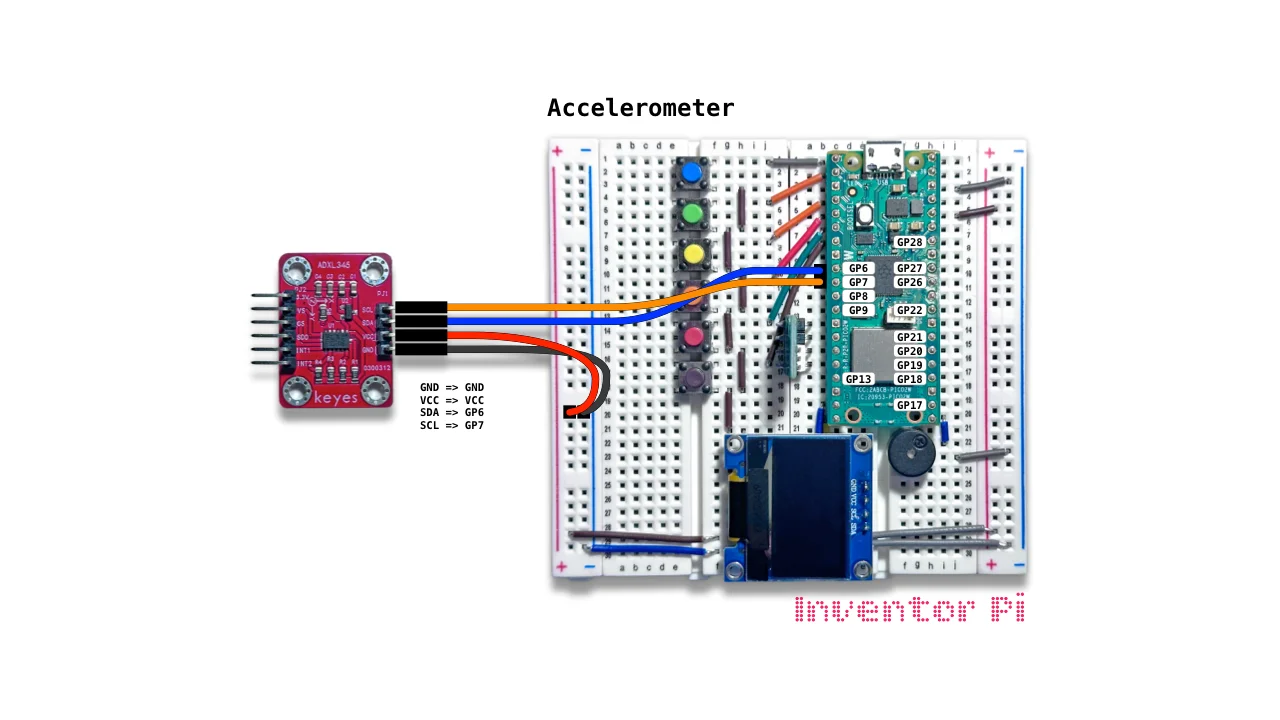
مائیکرو پیتھون کوڈ کی مثال Raspberry Pi Pico 2 W مائکروکنٹرولر پر چل رہا ہے۔ روٹی بورڈ پر 3-axis ڈیجیٹل ایکسلرومیٹر ماڈیول (ADXL345) اور OLED ڈسپلے ماڈیول (SSD1306) سے منسلک ایکسلرومیٹر کو اس کے X اور Y محور کے گرد گھما کر OLED ڈسپلے پر 3D شکل کھینچنا اور گھمانا
ایکسلرومیٹر ایکس، وائی اور زیڈ محور کے گرد سرعت کی پیمائش کرتا ہے۔. روبوٹکس میں، یہ روبوٹ کی پوزیشن اور حرکت کا تعین کرنے کے لیے ضروری ہے۔. اس اسکرپٹ میں، ہم ایک 3D شکل بناتے ہیں، اور ایکسلرومیٹر کا استعمال کرتے ہوئے اس کی گردش کو کنٹرول کرتے ہیں۔.
تھونی میں ایک نئی فائل بنائیں، فائل کا نام accelerometer.py کے ساتھ. نیچے دیے گئے کوڈ کو اپنی بنائی ہوئی فائل میں کاپی اور پیسٹ کریں۔.
1
2
3
4
5
6
7
8
9
10
11
12
13
14
15
16
17
18
19
20
21
22
23
24
25
26
27
28
29
30
31
32
33
34
35
36
37
38
39
40
41
42

print("\nAccelerometer")

# DESCRIPTION

# An accelerometer measures acceleration around the x, y and z axis.
# In robotics, it is essential in determining the robot position and movement.
# In this script, we draw a 3D shape, and control its rotation using the accelerometer.

# CONNECTIONS REQUIRED

# Connect ADXL345 module using only the 4 pins on the right side
#   Pins: GND => GND, VCC => VCC, SDA => GP6, SCL => GP7

from machine import Pin, SoftI2C
from oled import OLED
from adxl345 import ADXL345
from cube import Cube
from math import atan2, sqrt, degrees

accel = ADXL345(SoftI2C(sda=Pin(6), scl=Pin(7)))
oled = OLED(scl_pin=15, sda_pin=14)
cube = Cube(scaleX=1, scaleY=1.4, scaleZ=0.2)

try:
    while True:

        # Calculate pitch (rotation around y-axis, 360 degrees)
        # and roll (rotaton around x-axis, 180 degrees)
        # using x, y and z from the accelerometer.
        # Yaw (rotation around vertical z-axis) needs
        # a different sensor, a magnetometer or a gyroscope.
        x, y, z = accel.read()
        pitch = atan2(-x, sqrt(y*y + z*z))
        roll = atan2(y, z)

        cube.draw(display=oled.display, angleX=-degrees(roll), angleY=-degrees(pitch))

except KeyboardInterrupt:
    print("\nInterrupted by user!")

finally:
    oled.reset()