Abstandssensor
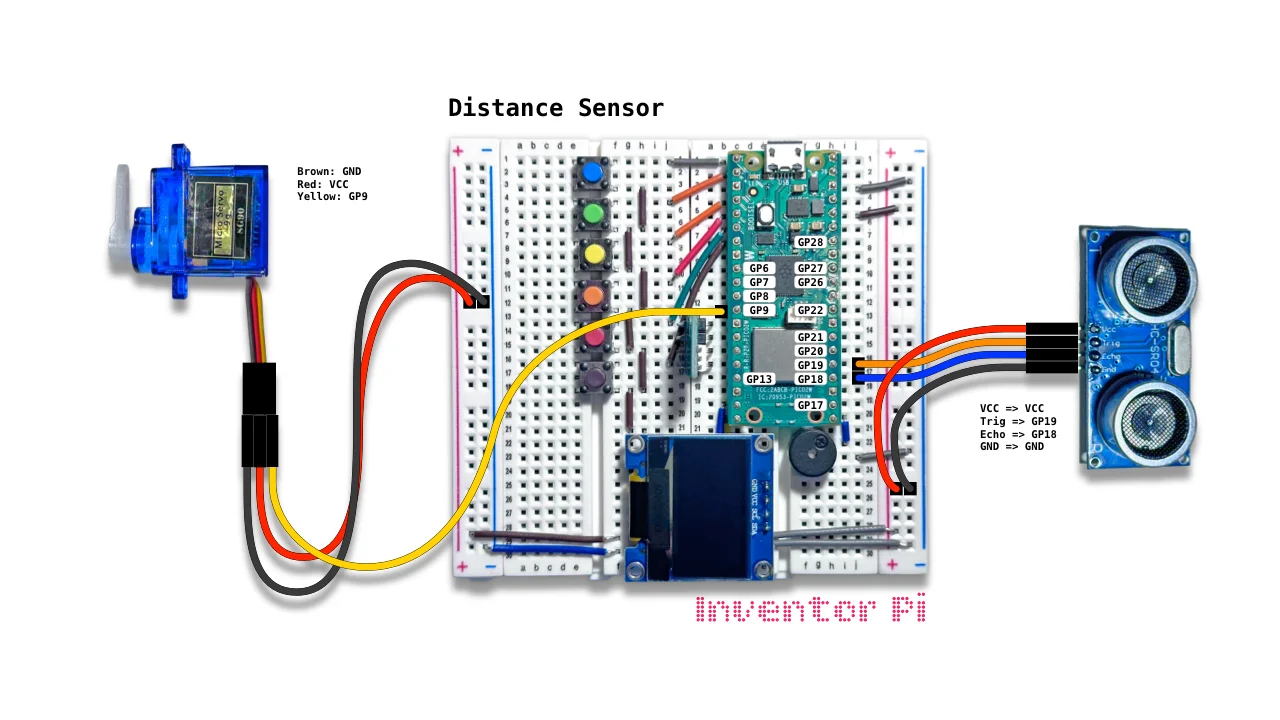
Ein MicroPython-Codebeispiel läuft auf einem Raspberry Pi Pico 2 W Mikrocontroller auf einem Steckbrett verbunden mit einem Ultraschall-Distanzsensormodul (HC-SR04), einem Mikroservomotor, einem passiven Piezo-Summer, einem RGB-LED-Modul und einem OLED-Displaymodul (SSD1306) Ziel ist es, ein gestenbasiertes Klanginstrument zu entwickeln, das die gemessene Entfernung in verschiedene Summerfrequenzen, Servowinkel und LED-Farben umwandelt und die gemessene Entfernung auf dem OLED-Display anzeigt
Ein Abstandssensor misst die Entfernung zu einem Hindernis in der Nähe. Roboter und Autos nutzen solche Sensoren, um vor dem Aufprall auf ein Hindernis anzuhalten. Der hier verwendete Sensor ist ein Ultraschall-Distanzsensor. Wir wandeln die Entfernung in verschiedene RGB-Farben und Summerfrequenzen um, um ein unterhaltsames Musikinstrument zu erschaffen, das man mit Handgesten spielen kann. Wir ändern außerdem den Winkel eines Servomotors basierend auf der erfassten Entfernung.
Ein Servo ist ein Motor, dessen Drehwinkel durch Ändern des an ihn gesendeten PWM-Signals gesteuert werden kann. Im Gegensatz zu herkömmlichen Elektromotoren, die sich kontinuierlich drehen, bewegt sich ein Servomotor auf einen exakten Winkel oder eine Position und hält diese fest.
Erstellen Sie in Thonny eine neue Datei mit dem Dateinamen distance_sensor.py. Kopieren Sie den unten stehenden Code und fügen Sie ihn in die von Ihnen erstellte Datei ein.
1
2
3
4
5
6
7
8
9
10
11
12
13
14
15
16
17
18
19
20
21
22
23
24
25
26
27
28
29
30
31
32
33
34
35
36
37
38
39
40
41
42
43
44
45
46
47
48
49
50
51
52
53
54
55
56
57
58
59
60
61
62
63
64
65
66
67
68
69
70
71
72
73
74
75
76
77
78

print("\nDistance Sensor")

# DESCRIPTION

# A distance sensor measures the distance to any nearby obstruction.
# Robots and cars use such sensors to stop before hitting any obstruction.
# The sensor used here is an ultrasonic distance sensor.
# We convert the distance to different RGB colors and buzzer frequencies
# to create a fun musical instrument that you can play with hand gestures.
# We also change the angle of a servo motor based on the distance detected.

# A servo is a motor where we can control the rotation angle by changing the PWM
# signal we send to it. Unlike standard electric motors that spin continuously,
# a servo motor moves to an exact angle or position and holds it firmly.

# CONNECTIONS REQUIRED

# Connect HC-SR04 module
#   Pins: VCC => VCC, Trig => GP19, Echo => GP18, GND => GND
# Connect Servo
#   Pins: Brown: GND, Red: VCC, Yellow: GP9

from time import sleep
from oled import OLED
from hcsr04 import HCSR04
from rgbled import RGBLED
from buzzer import Buzzer
from servo import Servo
from value_filter import ValueFilter
from helper import interpolate, clamp

distance_sensor = HCSR04(trigger_pin=19, echo_pin=18)
oled = OLED(scl_pin=15, sda_pin=14)
buzzer = Buzzer(pwm_pin=16)
rgbled = RGBLED(red_pin=12, green_pin=11, blue_pin=10)
servo = Servo(servo_pin=9)
distance_filter = ValueFilter()

min_distance = 4
max_distance = 40

try:
    while True:

        # Measure obstacle distance in cm
        distance_cm = distance_sensor.value()

        # Convert distance to discrete numbers with 2 cm interval
        distance = round(distance_cm / 2) * 2
        distance = clamp(distance, min_distance, max_distance)
        distance = distance_filter.update(distance)

        if distance_filter.did_change(): # only if distance has changed by 2 cm

            # Calculate red, green and servo angle using interpolation.
            # Red is 255 and green is 0 at min distance, green is 0.
            # Red is 0 and green is 255 at max distance.
            r = interpolate(distance, min_distance, max_distance, 255, 0)
            g = interpolate(distance, min_distance, max_distance, 0, 255)
            angle = interpolate(distance, min_distance, max_distance, 0, 180)

            rgbled.set_color(r=r, g=g)
            servo.set_angle(angle)

            # Play tone with frequency proportional to distance
            buzzer.play_tone(distance * 50)

        oled.print(f"{distance_cm:0.1f} cm", f"{angle:0.0f} degrees")
        sleep(0.05)

except KeyboardInterrupt:
    print("\nInterrupted by user!")

finally:
    oled.reset()
    rgbled.reset()
    buzzer.reset()
    servo.reset()