Potenciômetro e Servo
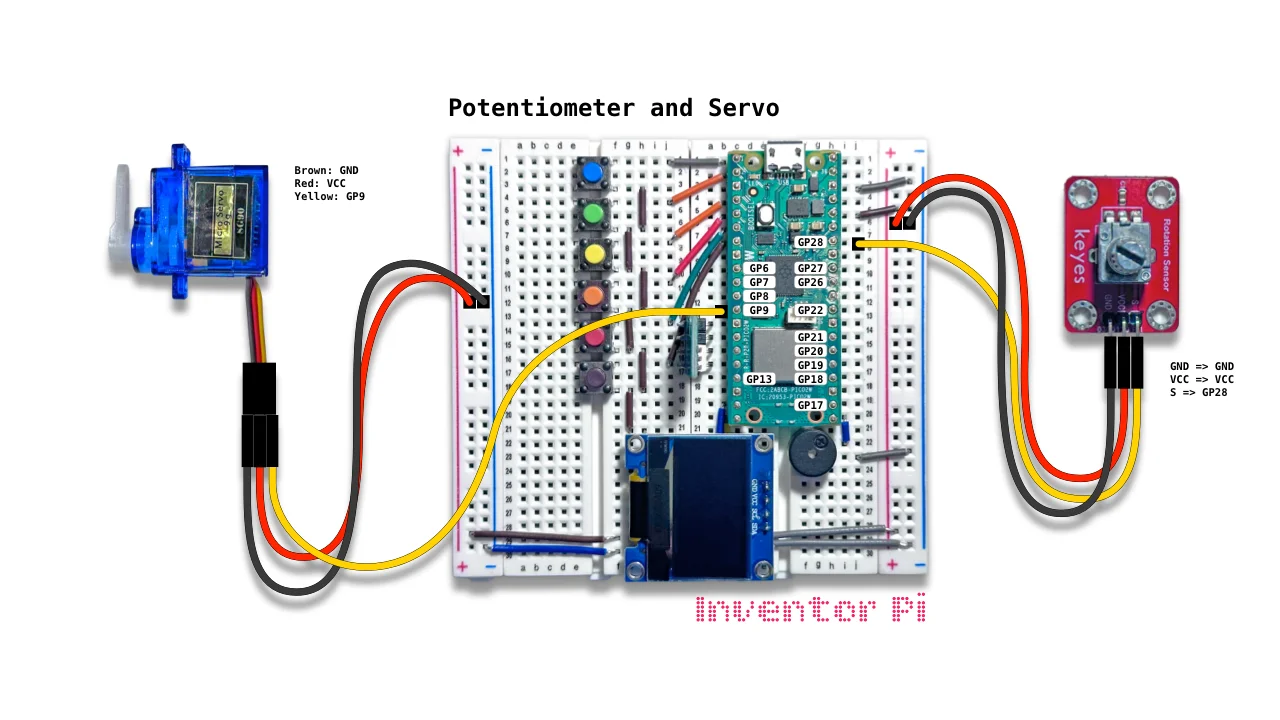
Um exemplo de código MicroPython executado em um microcontrolador Raspberry Pi Pico de 2 W conectado a um micro servomotor, um módulo potenciômetro (sensor de rotação) e um módulo de display OLED (SSD1306) em uma placa de ensaio Para controlar o ângulo do servo, basta girar o botão do potenciômetro e exibir a informação no visor
Os potenciômetros são os botões que giramos para controlar coisas como temperatura ou volume. Eles funcionam variando a resistência elétrica, que interpretamos como variação da tensão em um pino de entrada do microcontrolador. Neste script, usamos essa entrada para controlar o ângulo de um servo.
Um servo é um motor no qual podemos controlar o ângulo de rotação alterando o sinal PWM que enviamos a ele. Ao contrário dos motores elétricos comuns que giram continuamente, um servomotor se move para um ângulo ou posição exata e a mantém firme.
Crie um novo arquivo no Thonny com o nome potentiometer_and_servo.py. Copie e cole o código abaixo no arquivo que você criou.
1
2
3
4
5
6
7
8
9
10
11
12
13
14
15
16
17
18
19
20
21
22
23
24
25
26
27
28
29
30
31
32
33
34
35
36
37
38
39
40
41
42
43
44
45
46
47
48
49
50
51
52
53
54
55
56
57
58
59
60

print("\nPotentiometer and Servo")

# DESCRIPTION

# Potentiometers are the dials we turn to control things like temperature or volume.
# They work by varying the electrical resistance, which we read as varying voltage at a
# microcontroller's input pin. In this script, we use this input to control a servo angle.

# A servo is a motor where we can control the rotation angle by changing the PWM
# signal we send to it. Unlike standard electric motors that spin continuously,
# a servo motor moves to an exact angle or position and holds it firmly.

# CONNECTIONS REQUIRED

# Connect Potentiometer module (labeled 'Rotation Sensor')
#   Pins: GND => GND, VCC => VCC, S => GP28
# Connect Servo
#   Pins: Brown: GND, Red: VCC, Yellow: GP9

from time import sleep
from machine import Pin, ADC
from oled import OLED
from rgbled import RGBLED
from value_filter import ValueFilter
from servo import Servo
from helper import interpolate

potentiometer = ADC(Pin(28))
oled = OLED(scl_pin=15, sda_pin=14)
rgbled = RGBLED(red_pin=12, green_pin=11, blue_pin=10)
value_filter = ValueFilter(filters=["Median", "EMA"], window_size=10, alpha=0.5)
servo = Servo(servo_pin=9)

sensor_max = 65535

try:
    while True:
        # Use Median filter to reduce noise
        # Use Exponential Moving Average filter to smooth out reading
        # giving priority to recent readings over older ones
        value = value_filter.update(potentiometer.read_u16())

        # Interpolate LED from purple to pink: red from 64 to 191 and blue from 191 to 64
        r = interpolate(value, 0, sensor_max, 64, 191)
        b = interpolate(value, 0, sensor_max, 191, 64)
        angle = interpolate(value, 0, sensor_max, 180, 0) # inverted out_min and out_max to match potentiometer rotation direction

        rgbled.set_color(r=r, b=b)
        servo.set_angle(angle)

        oled.print(f"Raw: {value:0.0f}", f"Angle: {angle}")
        sleep(0.005)

except KeyboardInterrupt:
    print("\nInterrupted by user!")

finally:
    oled.reset()
    rgbled.reset()
    servo.reset()