Potenziometro e servo
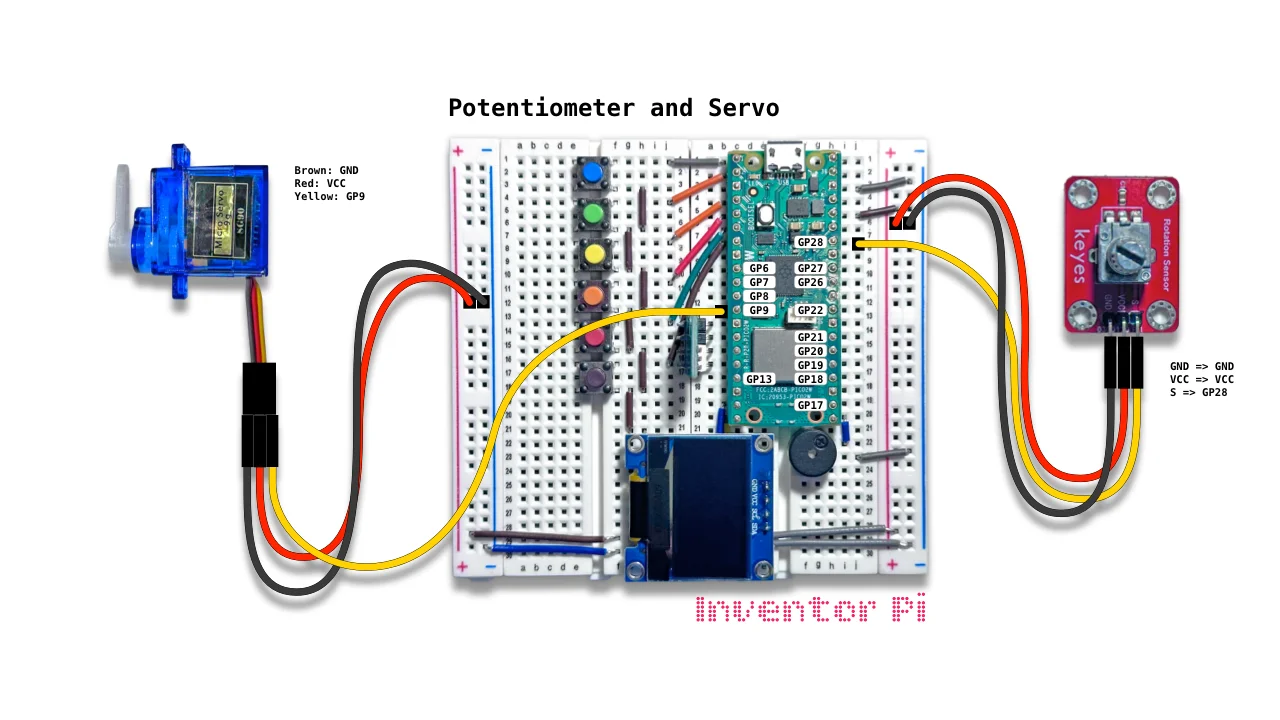
Un esempio di codice MicroPython in esecuzione su un microcontrollore Raspberry Pi Pico 2 W collegato a un micro servomotore, un modulo potenziometro (sensore di rotazione) e un modulo display OLED (SSD1306) su una breadboard per controllare l'angolo del servo ruotando la manopola del potenziometro e visualizzarlo sul display
I potenziometri sono le manopole che giriamo per controllare cose come la temperatura o il volume. Il loro funzionamento si basa sulla variazione della resistenza elettrica, che viene interpretata come una variazione di tensione sul pin di ingresso del microcontrollore. In questo script, utilizziamo questo input per controllare l'angolo di un servomotore.
Un servomotore è un motore in cui possiamo controllare l'angolo di rotazione modificando il segnale PWM che gli inviamo. A differenza dei motori elettrici standard che ruotano continuamente, un servomotore si sposta fino a raggiungere un angolo o una posizione precisa e la mantiene saldamente.
Crea un nuovo file in Thonny, con il nome potenziometro_e_servo.py. Copia e incolla il codice seguente nel file che hai creato.
1
2
3
4
5
6
7
8
9
10
11
12
13
14
15
16
17
18
19
20
21
22
23
24
25
26
27
28
29
30
31
32
33
34
35
36
37
38
39
40
41
42
43
44
45
46
47
48
49
50
51
52
53
54
55
56
57
58
59
60

print("\nPotentiometer and Servo")

# DESCRIPTION

# Potentiometers are the dials we turn to control things like temperature or volume.
# They work by varying the electrical resistance, which we read as varying voltage at a
# microcontroller's input pin. In this script, we use this input to control a servo angle.

# A servo is a motor where we can control the rotation angle by changing the PWM
# signal we send to it. Unlike standard electric motors that spin continuously,
# a servo motor moves to an exact angle or position and holds it firmly.

# CONNECTIONS REQUIRED

# Connect Potentiometer module (labeled 'Rotation Sensor')
#   Pins: GND => GND, VCC => VCC, S => GP28
# Connect Servo
#   Pins: Brown: GND, Red: VCC, Yellow: GP9

from time import sleep
from machine import Pin, ADC
from oled import OLED
from rgbled import RGBLED
from value_filter import ValueFilter
from servo import Servo
from helper import interpolate

potentiometer = ADC(Pin(28))
oled = OLED(scl_pin=15, sda_pin=14)
rgbled = RGBLED(red_pin=12, green_pin=11, blue_pin=10)
value_filter = ValueFilter(filters=["Median", "EMA"], window_size=10, alpha=0.5)
servo = Servo(servo_pin=9)

sensor_max = 65535

try:
    while True:
        # Use Median filter to reduce noise
        # Use Exponential Moving Average filter to smooth out reading
        # giving priority to recent readings over older ones
        value = value_filter.update(potentiometer.read_u16())

        # Interpolate LED from purple to pink: red from 64 to 191 and blue from 191 to 64
        r = interpolate(value, 0, sensor_max, 64, 191)
        b = interpolate(value, 0, sensor_max, 191, 64)
        angle = interpolate(value, 0, sensor_max, 180, 0) # inverted out_min and out_max to match potentiometer rotation direction

        rgbled.set_color(r=r, b=b)
        servo.set_angle(angle)

        oled.print(f"Raw: {value:0.0f}", f"Angle: {angle}")
        sleep(0.005)

except KeyboardInterrupt:
    print("\nInterrupted by user!")

finally:
    oled.reset()
    rgbled.reset()
    servo.reset()