Sensor de movimento
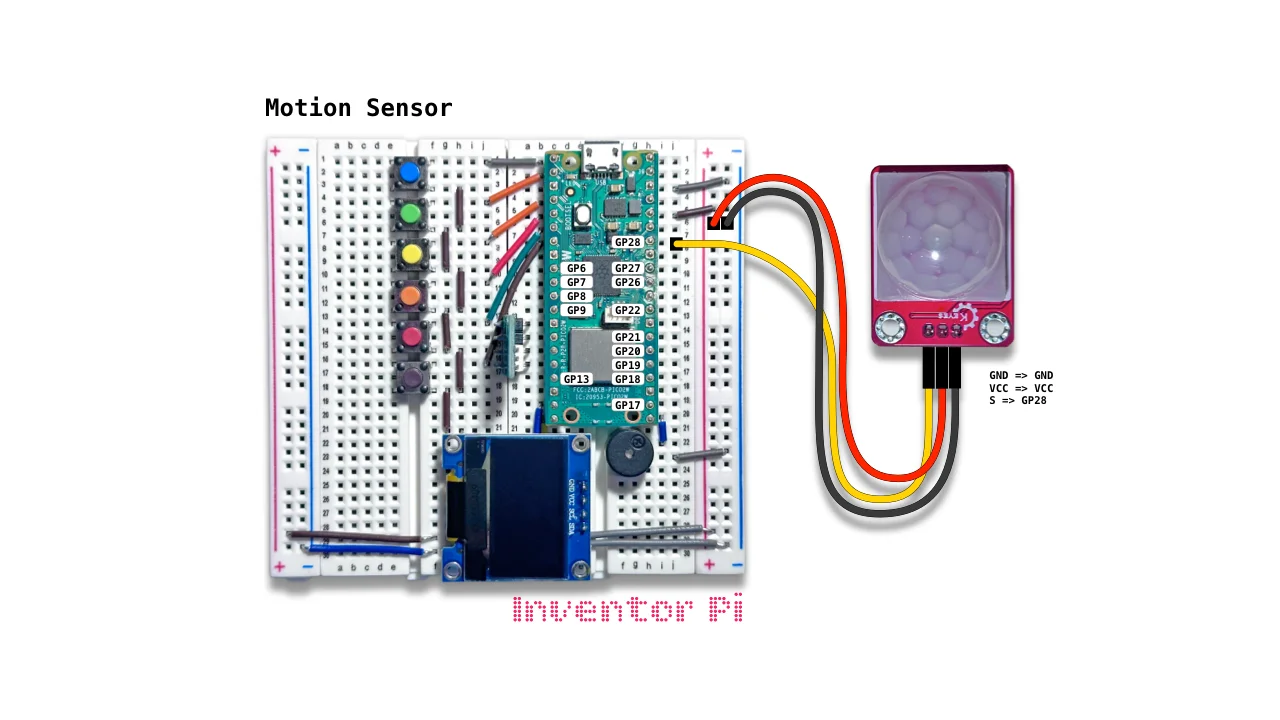
Um exemplo de código MicroPython executado em um microcontrolador Raspberry Pi Pico de 2 W Conectado a um módulo sensor de movimento PIR, um módulo LED RGB e um módulo de display OLED (SSD1306) em uma placa de ensaio Alterar a cor do LED e exibir o status no visor quando houver detecção de movimento
Um sensor de movimento PIR detecta movimento medindo as mudanças na radiação infravermelha (calor) emitida pelos objetos ao redor. Quando um corpo quente (como um humano ou um animal) se move pelo campo, ele intercepta primeiro uma metade do sensor e depois a outra, criando um pulso de voltagem diferencial que sinaliza movimento. É utilizado em alarmes de segurança e automação residencial inteligente.
Ao executar este script em sala de aula, cubra completamente o sensor com um livro ou folhas de papel dobradas e aguarde até que o sensor reinicie e exiba No motion. Em seguida, retire o livro e aguarde o sensor detectar movimento.
Crie um novo arquivo no Thonny com o nome motion_sensor.py. Copie e cole o código abaixo no arquivo que você criou.
1
2
3
4
5
6
7
8
9
10
11
12
13
14
15
16
17
18
19
20
21
22
23
24
25
26
27
28
29
30
31
32
33
34
35
36
37
38
39
40
41
42
43
44
45
46
47
48
49
50
51

print("\nMotion Sensor")

# DESCRIPTION

# A PIR motion sensor detects movement by measuring changes in
# infrared (heat) radiation emitted by surrounding objects.
# When a warm body (like a human or animal) moves across the field,
# it intercepts one half of the sensor first and then the other,
# creating a differential voltage pulse that signals motion.
# It is used in security alarms and smart home automation.

# When running this script in a classroom, cover the sensor completely with
# a book or folded sheets of paper, then wait for sensor to reset and display
# "No motion". Then remove the book and wait for the sensor to detect motion.

# CONNECTIONS REQUIRED

# Connect PIR Motion Sensor (HC-SR501) module
#   Pins: GND => GND, VCC => VCC, S => GP28

from time import sleep
from machine import Pin
from oled import OLED
from rgbled import RGBLED

motion_sensor = Pin(28, Pin.IN)
oled = OLED(scl_pin=15, sda_pin=14)
rgbled = RGBLED(red_pin=12, green_pin=11, blue_pin=10)

try:
    while True:

        # When motion_sensor value is 1, motion is detected.
        # It resets to 0 after some time if no motion is detected.
        # Wait until value has settled and does not change for one
        # full second, to reduce sensor noise.
        if motion_sensor.value() == 1:
            oled.print("Motion detected")
            rgbled.set_color(r=255)
        else:
            oled.print("No motion")
            rgbled.set_color(g=255)

        sleep(0.1)

except KeyboardInterrupt:
    print("\nInterrupted by user!")

finally:
    oled.reset()
    rgbled.reset()