Fotorresistor
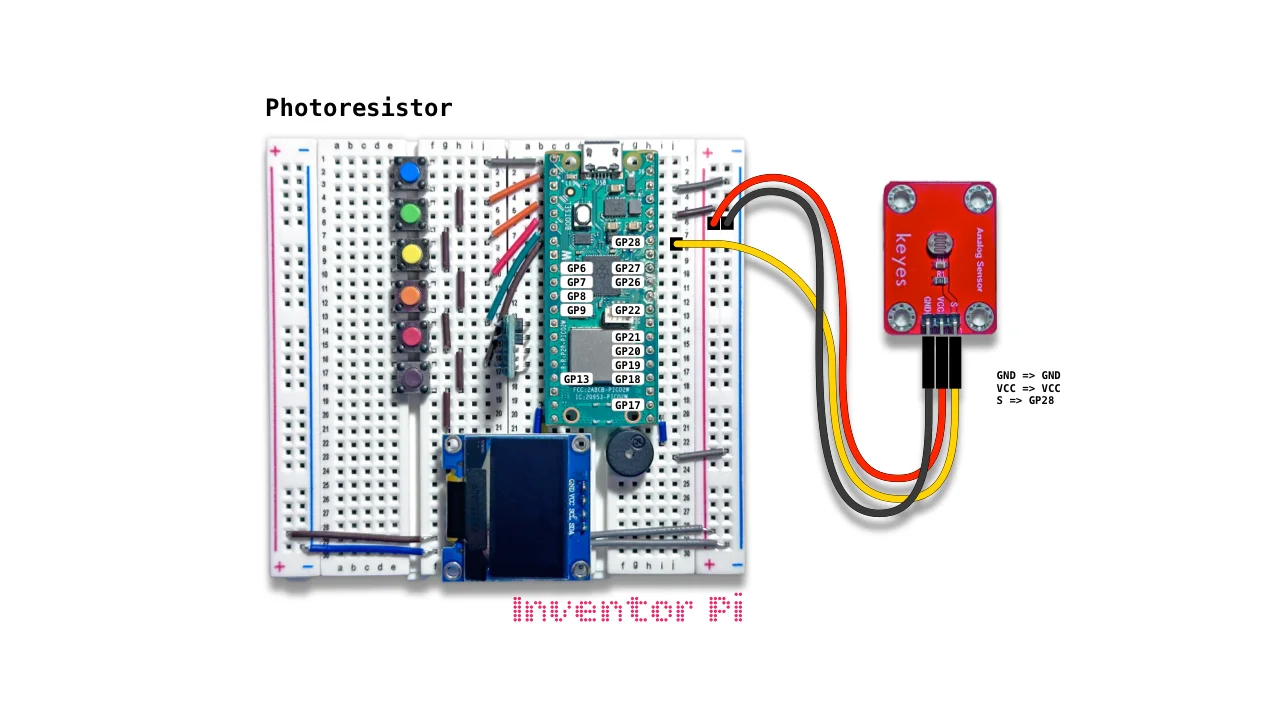
Um exemplo de código MicroPython executado em um microcontrolador Raspberry Pi Pico de 2 W Conectados a um módulo de fotorresistor, um módulo de LED RGB e um módulo de display OLED (SSD1306) em uma placa de ensaio para diminuir ou aumentar o brilho do LED de acordo com a mudança na luz ambiente medida pelo fotorresistor
Um fotorresistor permite que mais eletricidade flua quando mais luz incide sobre sua superfície e que menos eletricidade flua quando menos luz incide sobre sua superfície. É usado para diminuir o brilho da tela do celular em ambientes com pouca luz e aumentá-lo quando estiver ao ar livre sob a luz solar intensa. Algumas TVs usam essa função para diminuir o brilho da tela e combiná-lo com a luz ambiente, dando a impressão de ser uma obra de arte impressa na parede. Robôs rastreadores de linha usam isso para distinguir entre uma linha escura e uma superfície clara.
Crie um novo arquivo no Thonny com o nome photoresistor.py. Copie e cole o código abaixo no arquivo que você criou.
1
2
3
4
5
6
7
8
9
10
11
12
13
14
15
16
17
18
19
20
21
22
23
24
25
26
27
28
29
30
31
32
33
34
35
36
37
38
39
40
41
42
43
44
45
46
47
48

print("\nPhotoresistor")

# DESCRIPTION

# A photoresister allows more electricity to flow when more light hits its surface,
# and less electricity to flow when less light hits its surface. It is used to dim a
# phone screen in low light, and brighten it when outdoors under bright sunlight. Some TVs
# use it to dim the display to match the ambient room light, to appear like printed wall art.
# Line tracking robots use it to distinguish between a dark line and a light surface.

# CONNECTIONS REQUIRED

# Connect Photoresistor (KY-018) module
# (labeled 'Analog Sensor' with a small round head with squiggly line)
#   Pins: GND => GND, VCC => VCC, S => GP28

from time import sleep
from machine import Pin, ADC
from oled import OLED
from buzzer import Buzzer
from rgbled import RGBLED
from value_filter import ValueFilter

sensor = ADC(Pin(28))
value_filter = ValueFilter(filter="SMA", window_size=10)
oled = OLED(scl_pin=15, sda_pin=14)
buzzer = Buzzer(pwm_pin=16)
rgbled = RGBLED(red_pin=12, green_pin=11, blue_pin=10)

sensor_max = 65535

try:
    while True:
        # Use Simple Moving Average filter to smooth out readings
        value = value_filter.update(sensor.read_u16())
        fraction = value / sensor_max
        white = round(fraction * fraction * 255) # use fraction squared to visualize change in light
        rgbled.set_color(w=white)
        oled.print(f"Intensity: {fraction * 100:0.0f}%")
        sleep(0.05)

except KeyboardInterrupt:
    print("\nInterrupted by user!")

finally:
    oled.reset()
    rgbled.reset()
    buzzer.reset()