Interruptor de fotocélula
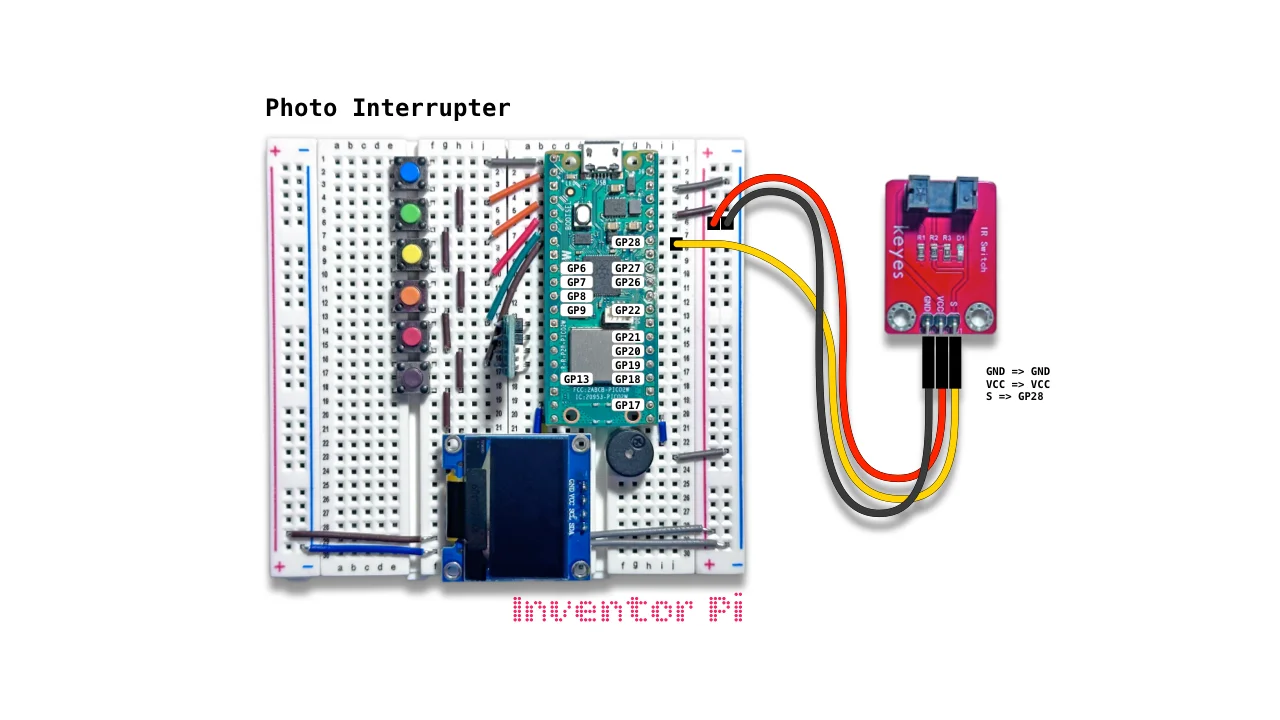
Um exemplo de código MicroPython executado em um microcontrolador Raspberry Pi Pico de 2 W Conectado a um módulo fotointerruptor, um módulo LED RGB e um módulo de display OLED (SSD1306) em uma placa de ensaio para incrementar a contagem no visor cada vez que o feixe de luz do fotointerruptor for interrompido
Um módulo fotointerruptor envia um feixe de luz infravermelha de um emissor para um receptor (os dois blocos pretos no módulo) e detecta quando esse feixe é bloqueado. É utilizado para detectar o fim do curso em impressoras 3D, máquinas CNC e robôs. Também é usado para contar os pulsos de um disco ranhurado em rotação, para calcular a velocidade do motor ou da roda em robótica e carros inteligentes. Em uma impressora, o sensor detecta quando há papel presente.
Crie um novo arquivo no Thonny com o nome photo_interrupter.py. Copie e cole o código abaixo no arquivo que você criou.
1
2
3
4
5
6
7
8
9
10
11
12
13
14
15
16
17
18
19
20
21
22
23
24
25
26
27
28
29
30
31
32
33
34
35
36
37
38
39
40
41
42
43
44
45
46
47
48
49
50

print("\nPhoto Interrupter")

# DESCRIPTION

# A photo interrupter module sends infrared light beam from an emitter to a receiver
# (the two black blocks on the module), and detects when this beam is blocked.
# It is used to detect end-of-travel in 3D printers, CNC machines and robots. It is
# also used to count the pulses of a slotted disc rotating to calculate motor or wheel
# speed in robotics and smart cars. In a printer, it detects when a paper is present.

# CONNECTIONS REQUIRED

# Connect Photo Interrupter (KY-010) module (labeled 'IR Switch')
#   Pins: GND => GND, VCC => VCC, S => GP28

from machine import Pin
from oled import OLED
from rgbled import RGBLED
from buzzer import Buzzer

sensor = Pin(28, Pin.IN, Pin.PULL_UP)
oled = OLED(scl_pin=15, sda_pin=14)
buzzer = Buzzer(pwm_pin=16)
rgbled = RGBLED(red_pin=12, green_pin=11, blue_pin=10)

counter = 0

try:
    while True:
        rgbled.reset()

        # loop while nothing detected
        while sensor.value() == 0: pass

        # sensor value is no longer zero => object detected
        counter += 1
        oled.print(f"Counter: {counter}")
        rgbled.set_color(b=255)
        buzzer.play_tone(600)

        # loop while object is still present
        while sensor.value() == 1: pass

except KeyboardInterrupt:
    print("\nInterrupted by user!")

finally:
    oled.reset()
    rgbled.reset()
    buzzer.reset()