Potentiometer and Servo
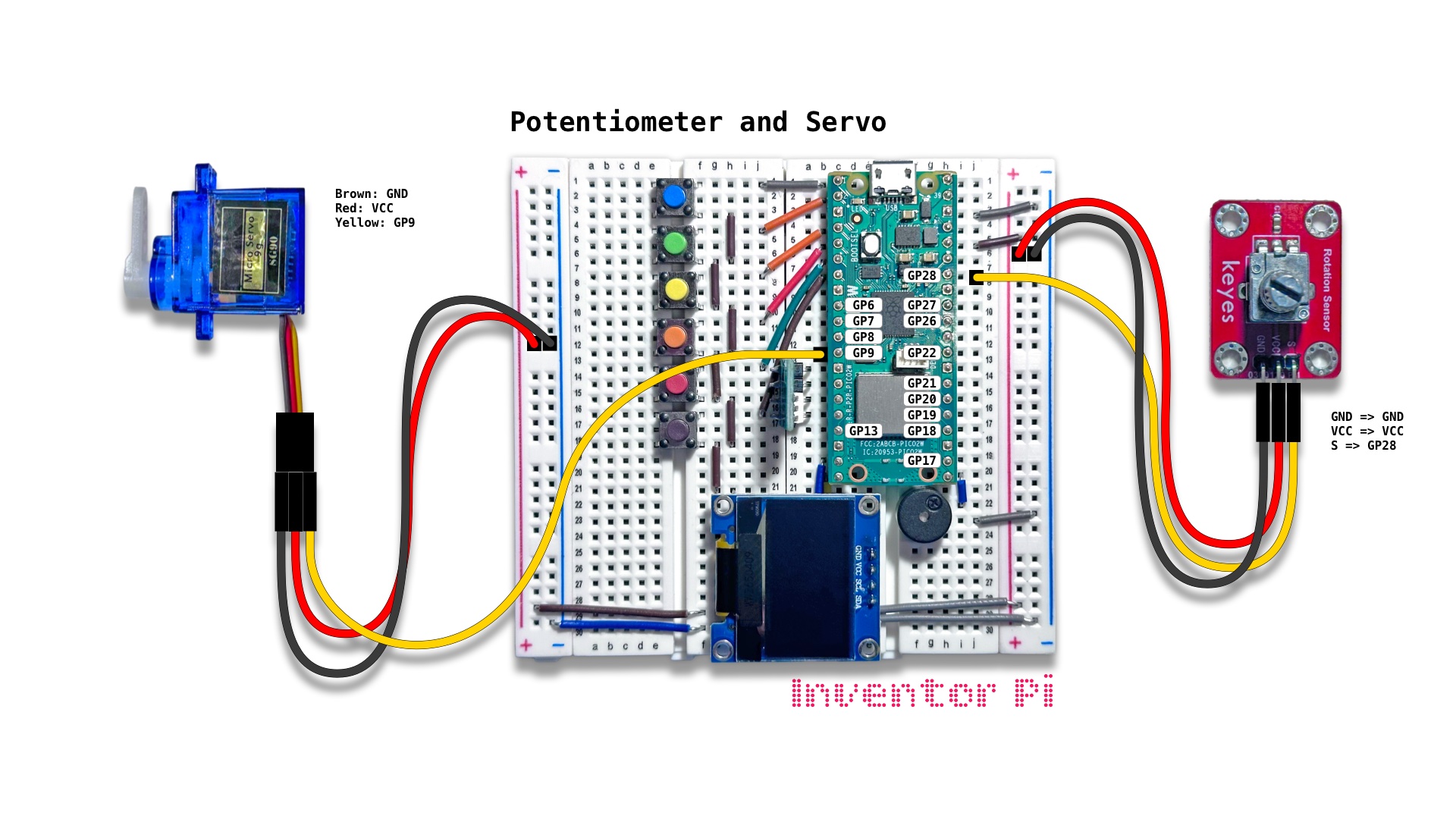
A MicroPython code example running on a Raspberry Pi Pico 2 W microcontroller connected to a micro servo motor, a potentiometer (rotation sensor) module and an OLED display module (SSD1306) on a breadboard to control the angle of the servo by rotating the potentiometer knob and display it on the display
Potentiometers are the dials we turn to control things like temperature or volume. They work by varying the electrical resistance, which we read as varying voltage at a microcontroller’s input pin. In this script, we use this input to control a servo angle.
A servo is a motor where we can control the rotation angle by changing the PWM signal we send to it. Unlike standard electric motors that spin continuously, a servo motor moves to an exact angle or position and holds it firmly.
Create a new file in Thonny, with file name potentiometer_and_servo.py. Copy and paste the code below into the file you created.
1
2
3
4
5
6
7
8
9
10
11
12
13
14
15
16
17
18
19
20
21
22
23
24
25
26
27
28
29
30
31
32
33
34
35
36
37
38
39
40
41
42
43
44
45
46
47
48
49
50
51
52
53
54
55
56
57
58
59
60
print("\nPotentiometer and Servo")

# DESCRIPTION

# Potentiometers are the dials we turn to control things like temperature or volume.
# They work by varying the electrical resistance, which we read as varying voltage at a
# microcontroller's input pin. In this script, we use this input to control a servo angle.

# A servo is a motor where we can control the rotation angle by changing the PWM
# signal we send to it. Unlike standard electric motors that spin continuously,
# a servo motor moves to an exact angle or position and holds it firmly.

# CONNECTIONS REQUIRED

# Connect Potentiometer module (labeled 'Rotation Sensor')
#   Pins: GND => GND, VCC => VCC, S => GP28
# Connect Servo
#   Pins: Brown: GND, Red: VCC, Yellow: GP9

from time import sleep
from machine import Pin, ADC
from oled import OLED
from rgbled import RGBLED
from value_filter import ValueFilter
from servo import Servo
from helper import interpolate

potentiometer = ADC(Pin(28))
oled = OLED(scl_pin=15, sda_pin=14)
rgbled = RGBLED(red_pin=12, green_pin=11, blue_pin=10)
value_filter = ValueFilter(filters=["Median", "EMA"], window_size=10, alpha=0.5)
servo = Servo(servo_pin=9)

sensor_max = 65535

try:
    while True:
        # Use Median filter to reduce noise
        # Use Exponential Moving Average filter to smooth out reading
        # giving priority to recent readings over older ones
        value = value_filter.update(potentiometer.read_u16())

        # Interpolate LED from purple to pink: red from 64 to 191 and blue from 191 to 64
        r = interpolate(value, 0, sensor_max, 64, 191)
        b = interpolate(value, 0, sensor_max, 191, 64)
        angle = interpolate(value, 0, sensor_max, 180, 0) # inverted out_min and out_max to match potentiometer rotation direction

        rgbled.set_color(r=r, b=b)
        servo.set_angle(angle)

        oled.print(f"Raw: {value:0.0f}", f"Angle: {angle}")
        sleep(0.005)

except KeyboardInterrupt:
    print("\nInterrupted by user!")

finally:
    oled.reset()
    rgbled.reset()
    servo.reset()