মোশন সেন্সর
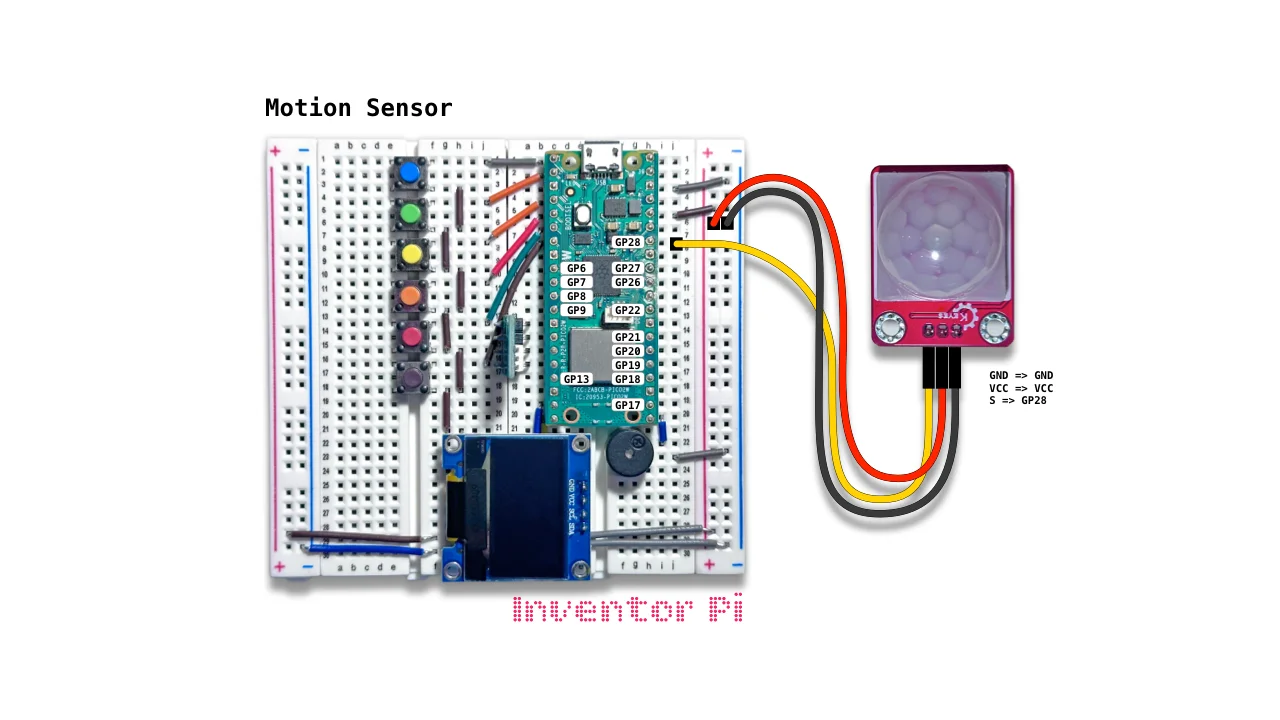
একটি মাইক্রোপাইথন কোডের উদাহরণ রাস্পবেরি পাই পিকো ২ ওয়াট মাইক্রোকন্ট্রোলারে চালিত একটি ব্রেডবোর্ডে একটি PIR মোশন সেন্সর মডিউল, একটি আরজিবি এলইডি মডিউল এবং একটি OLED ডিসপ্লে মডিউলের (SSD1306) সাথে সংযুক্ত। গতি শনাক্ত হলে LED-র রঙ পরিবর্তন করতে এবং ডিসপ্লেতে অবস্থা দেখাতে।
একটি পিআইআর মোশন সেন্সর আশেপাশের বস্তু থেকে নির্গত ইনফ্রারেড (তাপ) বিকিরণের পরিবর্তন পরিমাপ করে নড়াচড়া শনাক্ত করে।. যখন কোনো উষ্ণ বস্তু (যেমন মানুষ বা প্রাণী) ক্ষেত্রটির উপর দিয়ে চলাচল করে, তখন এটি প্রথমে সেন্সরটির এক অর্ধাংশ এবং তারপর অন্য অর্ধাংশকে স্পর্শ করে, যা একটি ডিফারেনশিয়াল ভোল্টেজ পালস তৈরি করে এবং এই পালসটি গতির সংকেত দেয়।. এটি নিরাপত্তা অ্যালার্ম এবং স্মার্ট হোম অটোমেশনে ব্যবহৃত হয়।.
শ্রেণীকক্ষে এই স্ক্রিপ্টটি চালানোর সময়, একটি বই বা ভাঁজ করা কাগজ দিয়ে সেন্সরটি সম্পূর্ণভাবে ঢেকে দিন, তারপর সেন্সরটি রিসেট হওয়া এবং No motion প্রদর্শন করা পর্যন্ত অপেক্ষা করুন।. তারপর বইটি সরিয়ে ফেলুন এবং সেন্সরটি গতি শনাক্ত করার জন্য অপেক্ষা করুন।.
Thonny-তে motion_sensor.py নামে একটি নতুন ফাইল তৈরি করুন।. আপনার তৈরি করা ফাইলে নিচের কোডটি কপি করে পেস্ট করুন।.
1
2
3
4
5
6
7
8
9
10
11
12
13
14
15
16
17
18
19
20
21
22
23
24
25
26
27
28
29
30
31
32
33
34
35
36
37
38
39
40
41
42
43
44
45
46
47
48
49
50
51

print("\nMotion Sensor")

# DESCRIPTION

# A PIR motion sensor detects movement by measuring changes in
# infrared (heat) radiation emitted by surrounding objects.
# When a warm body (like a human or animal) moves across the field,
# it intercepts one half of the sensor first and then the other,
# creating a differential voltage pulse that signals motion.
# It is used in security alarms and smart home automation.

# When running this script in a classroom, cover the sensor completely with
# a book or folded sheets of paper, then wait for sensor to reset and display
# "No motion". Then remove the book and wait for the sensor to detect motion.

# CONNECTIONS REQUIRED

# Connect PIR Motion Sensor (HC-SR501) module
#   Pins: GND => GND, VCC => VCC, S => GP28

from time import sleep
from machine import Pin
from oled import OLED
from rgbled import RGBLED

motion_sensor = Pin(28, Pin.IN)
oled = OLED(scl_pin=15, sda_pin=14)
rgbled = RGBLED(red_pin=12, green_pin=11, blue_pin=10)

try:
    while True:

        # When motion_sensor value is 1, motion is detected.
        # It resets to 0 after some time if no motion is detected.
        # Wait until value has settled and does not change for one
        # full second, to reduce sensor noise.
        if motion_sensor.value() == 1:
            oled.print("Motion detected")
            rgbled.set_color(r=255)
        else:
            oled.print("No motion")
            rgbled.set_color(g=255)

        sleep(0.1)

except KeyboardInterrupt:
    print("\nInterrupted by user!")

finally:
    oled.reset()
    rgbled.reset()