运动传感器
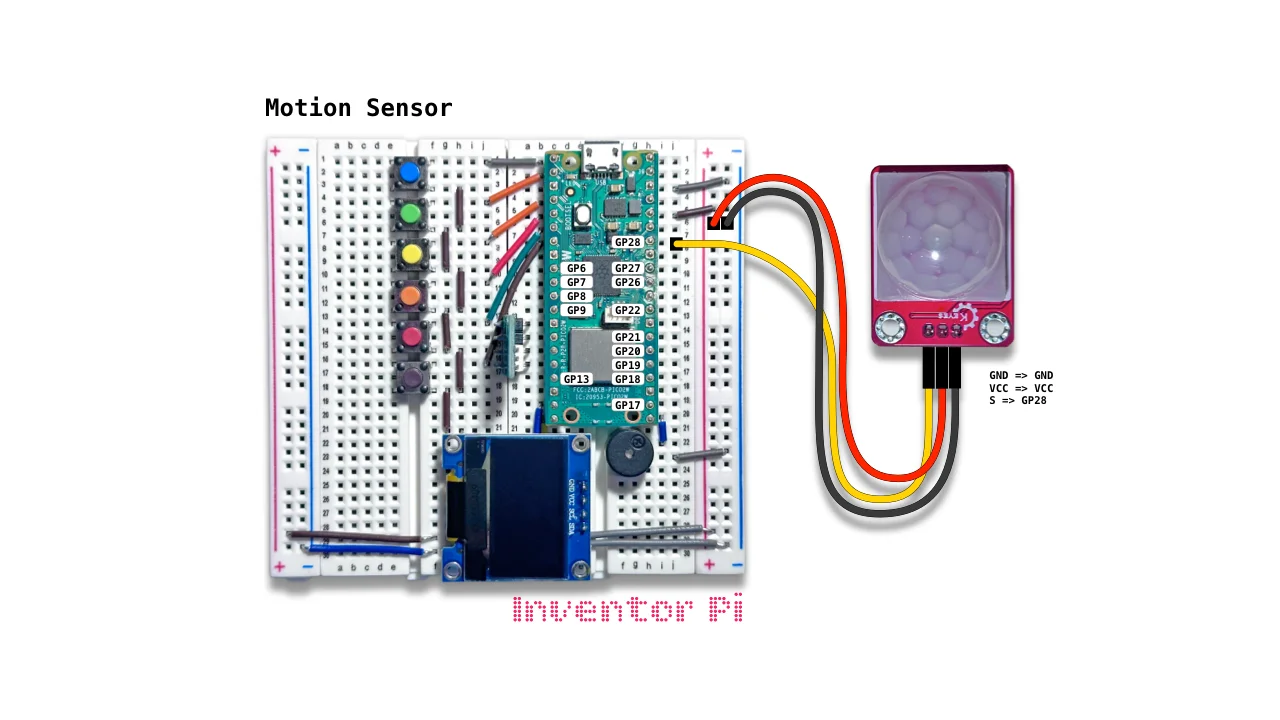
MicroPython 代码示例 运行在 Raspberry Pi Pico 2 W 微控制器上 在面包板上连接 PIR 运动传感器模块、RGB LED 模块和 OLED 显示模块 (SSD1306)。 检测到运动时,改变 LED 灯颜色并在显示屏上显示状态。
PIR运动传感器通过测量周围物体发出的红外(热)辐射的变化来检测运动。. 当一个温暖的物体(例如人或动物)穿过传感器区域时,它会先与传感器的一半接触,然后再与另一半接触,从而产生一个差分电压脉冲,该脉冲指示了运动情况。. 它用于安全警报和智能家居自动化。.
在教室运行此脚本时,请用书本或折叠的纸张完全遮盖传感器,然后等待传感器重置并显示No motion. 然后移开书,等待传感器检测到运动。.
在 Thonny 中创建一个名为 motion_sensor.py 的新文件。. 将以下代码复制并粘贴到您创建的文件中。.
1
2
3
4
5
6
7
8
9
10
11
12
13
14
15
16
17
18
19
20
21
22
23
24
25
26
27
28
29
30
31
32
33
34
35
36
37
38
39
40
41
42
43
44
45
46
47
48
49
50
51

print("\nMotion Sensor")

# DESCRIPTION

# A PIR motion sensor detects movement by measuring changes in
# infrared (heat) radiation emitted by surrounding objects.
# When a warm body (like a human or animal) moves across the field,
# it intercepts one half of the sensor first and then the other,
# creating a differential voltage pulse that signals motion.
# It is used in security alarms and smart home automation.

# When running this script in a classroom, cover the sensor completely with
# a book or folded sheets of paper, then wait for sensor to reset and display
# "No motion". Then remove the book and wait for the sensor to detect motion.

# CONNECTIONS REQUIRED

# Connect PIR Motion Sensor (HC-SR501) module
#   Pins: GND => GND, VCC => VCC, S => GP28

from time import sleep
from machine import Pin
from oled import OLED
from rgbled import RGBLED

motion_sensor = Pin(28, Pin.IN)
oled = OLED(scl_pin=15, sda_pin=14)
rgbled = RGBLED(red_pin=12, green_pin=11, blue_pin=10)

try:
    while True:

        # When motion_sensor value is 1, motion is detected.
        # It resets to 0 after some time if no motion is detected.
        # Wait until value has settled and does not change for one
        # full second, to reduce sensor noise.
        if motion_sensor.value() == 1:
            oled.print("Motion detected")
            rgbled.set_color(r=255)
        else:
            oled.print("No motion")
            rgbled.set_color(g=255)

        sleep(0.1)

except KeyboardInterrupt:
    print("\nInterrupted by user!")

finally:
    oled.reset()
    rgbled.reset()