حسگر حرکت
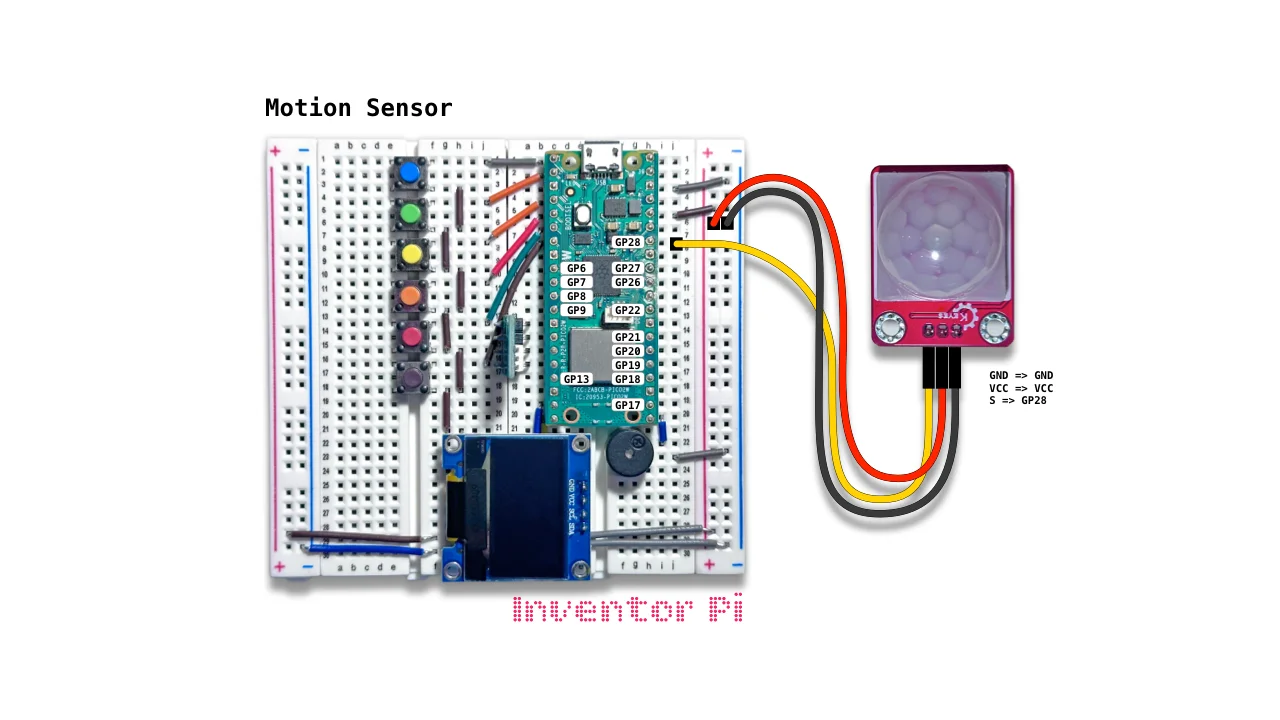
یک نمونه کد میکروپایتون اجرا روی میکروکنترلر Raspberry Pi Pico 2 W متصل به یک ماژول حسگر حرکت PIR، یک ماژول LED RGB و یک ماژول نمایشگر OLED (SSD1306) روی یک برد بورد برای تغییر رنگ LED و نمایش وضعیت روی صفحه نمایش هنگام تشخیص حرکت
یک سنسور حرکت PIR با اندازهگیری تغییرات تابش مادون قرمز (گرما) ساطع شده از اشیاء اطراف، حرکت را تشخیص میدهد. وقتی یک جسم گرم (مانند انسان یا حیوان) در میدان حرکت میکند، ابتدا نیمی از حسگر و سپس نیمی دیگر را قطع میکند و یک پالس ولتاژ تفاضلی ایجاد میکند که حرکت را نشان میدهد. در دزدگیرهای امنیتی و اتوماسیون خانه هوشمند استفاده میشود.
هنگام اجرای این اسکریپت در کلاس درس، حسگر را به طور کامل با یک کتاب یا ورقهای کاغذ تا شده بپوشانید، سپس منتظر بمانید تا حسگر ریست شود و No motion را نمایش دهد. سپس کتاب را بردارید و صبر کنید تا حسگر حرکت را تشخیص دهد.
یک فایل جدید در Thonny با نام motion_sensor.py ایجاد کنید. کد زیر را کپی کرده و در فایلی که ایجاد کردهاید، قرار دهید.
1
2
3
4
5
6
7
8
9
10
11
12
13
14
15
16
17
18
19
20
21
22
23
24
25
26
27
28
29
30
31
32
33
34
35
36
37
38
39
40
41
42
43
44
45
46
47
48
49
50
51

print("\nMotion Sensor")

# DESCRIPTION

# A PIR motion sensor detects movement by measuring changes in
# infrared (heat) radiation emitted by surrounding objects.
# When a warm body (like a human or animal) moves across the field,
# it intercepts one half of the sensor first and then the other,
# creating a differential voltage pulse that signals motion.
# It is used in security alarms and smart home automation.

# When running this script in a classroom, cover the sensor completely with
# a book or folded sheets of paper, then wait for sensor to reset and display
# "No motion". Then remove the book and wait for the sensor to detect motion.

# CONNECTIONS REQUIRED

# Connect PIR Motion Sensor (HC-SR501) module
#   Pins: GND => GND, VCC => VCC, S => GP28

from time import sleep
from machine import Pin
from oled import OLED
from rgbled import RGBLED

motion_sensor = Pin(28, Pin.IN)
oled = OLED(scl_pin=15, sda_pin=14)
rgbled = RGBLED(red_pin=12, green_pin=11, blue_pin=10)

try:
    while True:

        # When motion_sensor value is 1, motion is detected.
        # It resets to 0 after some time if no motion is detected.
        # Wait until value has settled and does not change for one
        # full second, to reduce sensor noise.
        if motion_sensor.value() == 1:
            oled.print("Motion detected")
            rgbled.set_color(r=255)
        else:
            oled.print("No motion")
            rgbled.set_color(g=255)

        sleep(0.1)

except KeyboardInterrupt:
    print("\nInterrupted by user!")

finally:
    oled.reset()
    rgbled.reset()