Motion Sensor
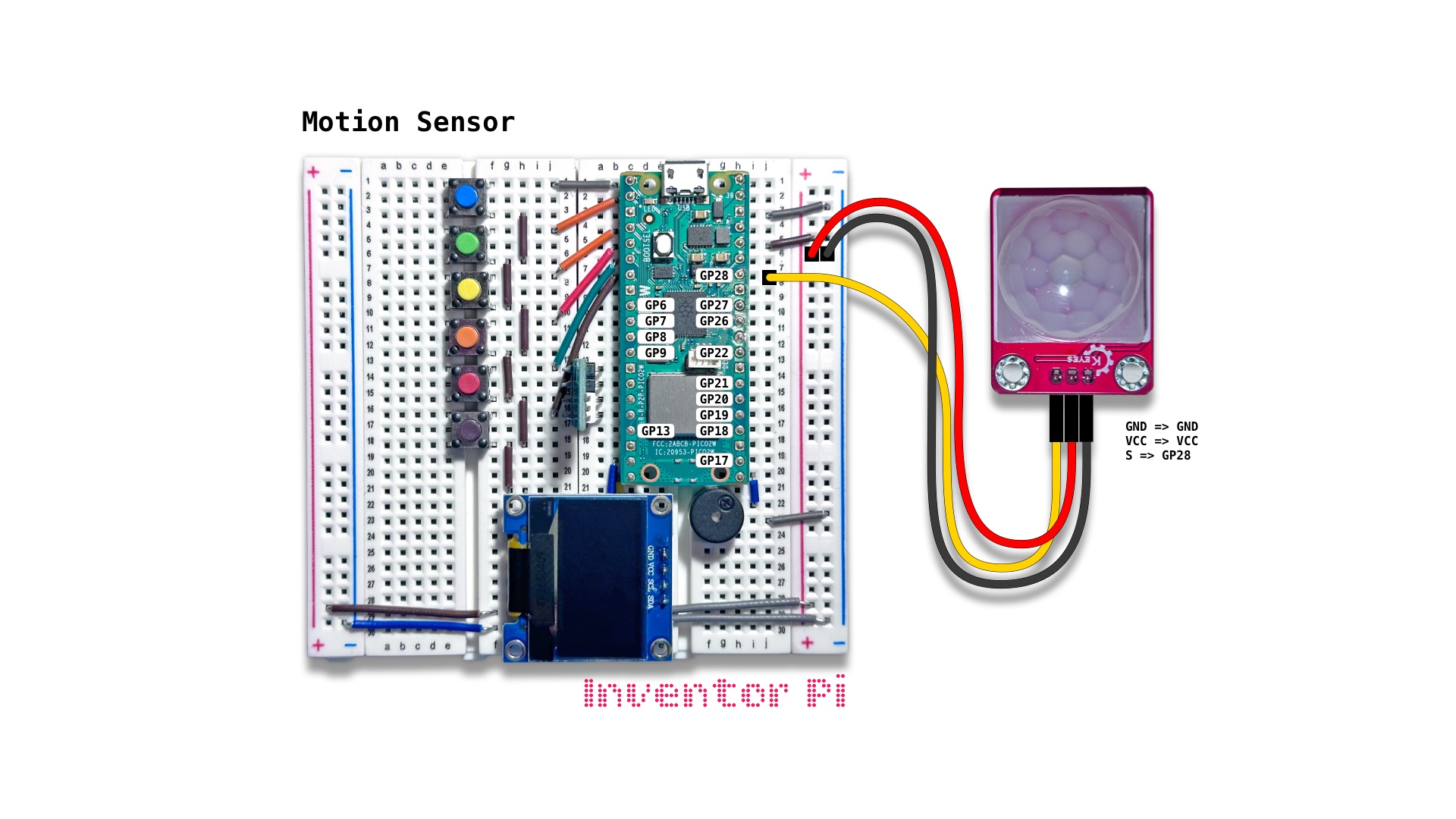
A MicroPython code example running on a Raspberry Pi Pico 2 W microcontroller connected to a PIR motion sensor module, an RGB LED module and an OLED display module (SSD1306) on a breadboard to change the LED color and show the status on the display when motion is detected
A PIR motion sensor detects movement by measuring changes in infrared (heat) radiation emitted by surrounding objects. When a warm body (like a human or animal) moves across the field, it intercepts one half of the sensor first and then the other, creating a differential voltage pulse that signals motion. It is used in security alarms and smart home automation.
When running this script in a classroom, cover the sensor completely with a book or folded sheets of paper, then wait for sensor to reset and display “No motion”. Then remove the book and wait for the sensor to detect motion.
Create a new file in Thonny, with file name motion_sensor.py. Copy and paste the code below into the file you created.
1
2
3
4
5
6
7
8
9
10
11
12
13
14
15
16
17
18
19
20
21
22
23
24
25
26
27
28
29
30
31
32
33
34
35
36
37
38
39
40
41
42
43
44
45
46
47
48
49
50
51
print("\nMotion Sensor")

# DESCRIPTION

# A PIR motion sensor detects movement by measuring changes in
# infrared (heat) radiation emitted by surrounding objects.
# When a warm body (like a human or animal) moves across the field,
# it intercepts one half of the sensor first and then the other,
# creating a differential voltage pulse that signals motion.
# It is used in security alarms and smart home automation.

# When running this script in a classroom, cover the sensor completely with
# a book or folded sheets of paper, then wait for sensor to reset and display
# "No motion". Then remove the book and wait for the sensor to detect motion.

# CONNECTIONS REQUIRED

# Connect PIR Motion Sensor (HC-SR501) module
#   Pins: GND => GND, VCC => VCC, S => GP28

from time import sleep
from machine import Pin
from oled import OLED
from rgbled import RGBLED

motion_sensor = Pin(28, Pin.IN)
oled = OLED(scl_pin=15, sda_pin=14)
rgbled = RGBLED(red_pin=12, green_pin=11, blue_pin=10)

try:
    while True:

        # When motion_sensor value is 1, motion is detected.
        # It resets to 0 after some time if no motion is detected.
        # Wait until value has settled and does not change for one
        # full second, to reduce sensor noise.
        if motion_sensor.value() == 1:
            oled.print("Motion detected")
            rgbled.set_color(r=255)
        else:
            oled.print("No motion")
            rgbled.set_color(g=255)

        sleep(0.1)

except KeyboardInterrupt:
    print("\nInterrupted by user!")

finally:
    oled.reset()
    rgbled.reset()