موشن سینسر
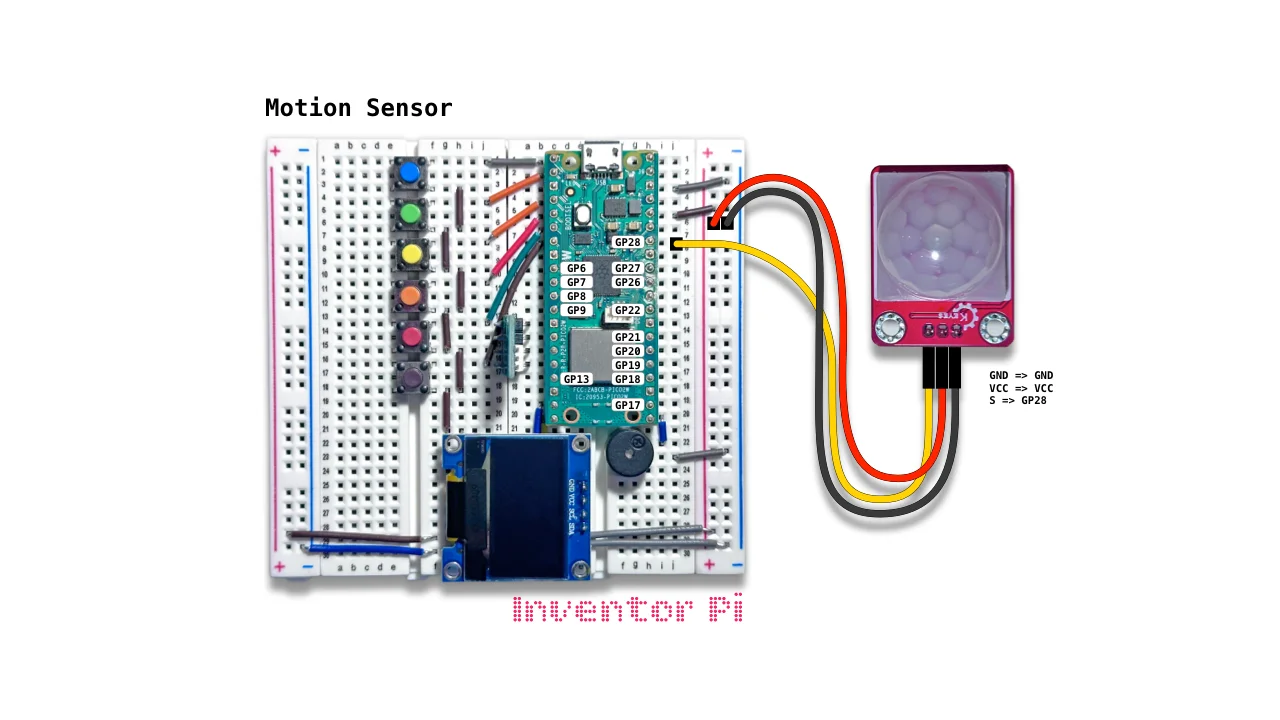
مائیکرو پیتھون کوڈ کی مثال Raspberry Pi Pico 2 W مائکروکنٹرولر پر چل رہا ہے۔ بریڈ بورڈ پر ایک PIR موشن سینسر ماڈیول، ایک آرجیبی ایل ای ڈی ماڈیول اور OLED ڈسپلے ماڈیول (SSD1306) سے منسلک ایل ای ڈی کا رنگ تبدیل کرنے اور حرکت کا پتہ چلنے پر ڈسپلے پر اسٹیٹس دکھانے کے لیے
ایک PIR موشن سینسر ارد گرد کی اشیاء سے خارج ہونے والی انفراریڈ (گرمی) تابکاری میں تبدیلیوں کی پیمائش کرکے حرکت کا پتہ لگاتا ہے۔. جب ایک گرم جسم (جیسے انسان یا جانور) میدان کے اس پار حرکت کرتا ہے، تو یہ پہلے سینسر کے ایک آدھے حصے کو روکتا ہے اور پھر دوسرے کو، ایک تفریق وولٹیج پلس بناتا ہے جو حرکت کا اشارہ دیتا ہے۔. یہ سیکیورٹی الارم اور سمارٹ ہوم آٹومیشن میں استعمال ہوتا ہے۔.
کلاس روم میں اس اسکرپٹ کو چلاتے وقت، سینسر کو کسی کتاب یا فولڈ شدہ کاغذ سے مکمل طور پر ڈھانپیں، پھر سینسر کے ری سیٹ ہونے کا انتظار کریں اور No motion دکھائی دے گی۔. پھر کتاب کو ہٹا دیں اور سینسر کے حرکت کا پتہ لگانے کا انتظار کریں۔.
Thonny میں ایک نئی فائل بنائیں، فائل کا نام motion_sensor.py کے ساتھ. نیچے دیے گئے کوڈ کو اپنی بنائی ہوئی فائل میں کاپی اور پیسٹ کریں۔.
1
2
3
4
5
6
7
8
9
10
11
12
13
14
15
16
17
18
19
20
21
22
23
24
25
26
27
28
29
30
31
32
33
34
35
36
37
38
39
40
41
42
43
44
45
46
47
48
49
50
51

print("\nMotion Sensor")

# DESCRIPTION

# A PIR motion sensor detects movement by measuring changes in
# infrared (heat) radiation emitted by surrounding objects.
# When a warm body (like a human or animal) moves across the field,
# it intercepts one half of the sensor first and then the other,
# creating a differential voltage pulse that signals motion.
# It is used in security alarms and smart home automation.

# When running this script in a classroom, cover the sensor completely with
# a book or folded sheets of paper, then wait for sensor to reset and display
# "No motion". Then remove the book and wait for the sensor to detect motion.

# CONNECTIONS REQUIRED

# Connect PIR Motion Sensor (HC-SR501) module
#   Pins: GND => GND, VCC => VCC, S => GP28

from time import sleep
from machine import Pin
from oled import OLED
from rgbled import RGBLED

motion_sensor = Pin(28, Pin.IN)
oled = OLED(scl_pin=15, sda_pin=14)
rgbled = RGBLED(red_pin=12, green_pin=11, blue_pin=10)

try:
    while True:

        # When motion_sensor value is 1, motion is detected.
        # It resets to 0 after some time if no motion is detected.
        # Wait until value has settled and does not change for one
        # full second, to reduce sensor noise.
        if motion_sensor.value() == 1:
            oled.print("Motion detected")
            rgbled.set_color(r=255)
        else:
            oled.print("No motion")
            rgbled.set_color(g=255)

        sleep(0.1)

except KeyboardInterrupt:
    print("\nInterrupted by user!")

finally:
    oled.reset()
    rgbled.reset()