مستشعر الحركة
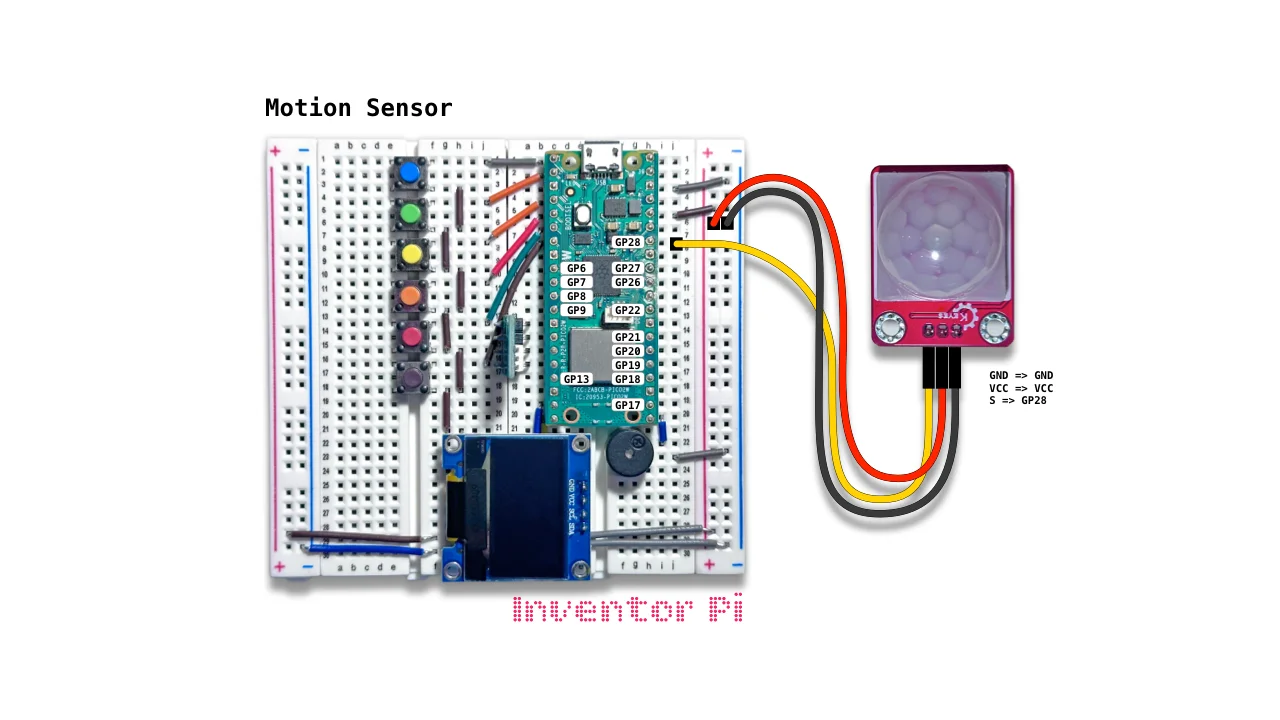
مثال على كود MicroPython يعمل على وحدة تحكم دقيقة Raspberry Pi Pico 2 W متصلة بوحدة استشعار حركة PIR، ووحدة LED RGB، ووحدة عرض OLED (SSD1306) على لوحة تجارب لتغيير لون مؤشر LED وعرض الحالة على الشاشة عند اكتشاف الحركة
يستشعر مستشعر الحركة بالأشعة تحت الحمراء السلبية الحركة عن طريق قياس التغيرات في الإشعاع تحت الأحمر (الحراري) المنبعث من الأجسام المحيطة. عندما يتحرك جسم دافئ (مثل الإنسان أو الحيوان) عبر المجال، فإنه يعترض نصف المستشعر أولاً ثم النصف الآخر، مما يخلق نبضة جهد تفاضلي تشير إلى الحركة. يُستخدم في أنظمة الإنذار الأمني وأنظمة التشغيل الآلي للمنازل الذكية.
عند تشغيل هذا البرنامج النصي في الفصل الدراسي، قم بتغطية المستشعر بالكامل بكتاب أو أوراق مطوية، ثم انتظر حتى تتم إعادة ضبط المستشعر وعرض No motion. ثم أزل الكتاب وانتظر حتى يستشعر المستشعر الحركة.
أنشئ ملفًا جديدًا في Thonny، باسم motion_sensor.py. انسخ والصق الكود أدناه في الملف الذي أنشأته.
1
2
3
4
5
6
7
8
9
10
11
12
13
14
15
16
17
18
19
20
21
22
23
24
25
26
27
28
29
30
31
32
33
34
35
36
37
38
39
40
41
42
43
44
45
46
47
48
49
50
51

print("\nMotion Sensor")

# DESCRIPTION

# A PIR motion sensor detects movement by measuring changes in
# infrared (heat) radiation emitted by surrounding objects.
# When a warm body (like a human or animal) moves across the field,
# it intercepts one half of the sensor first and then the other,
# creating a differential voltage pulse that signals motion.
# It is used in security alarms and smart home automation.

# When running this script in a classroom, cover the sensor completely with
# a book or folded sheets of paper, then wait for sensor to reset and display
# "No motion". Then remove the book and wait for the sensor to detect motion.

# CONNECTIONS REQUIRED

# Connect PIR Motion Sensor (HC-SR501) module
#   Pins: GND => GND, VCC => VCC, S => GP28

from time import sleep
from machine import Pin
from oled import OLED
from rgbled import RGBLED

motion_sensor = Pin(28, Pin.IN)
oled = OLED(scl_pin=15, sda_pin=14)
rgbled = RGBLED(red_pin=12, green_pin=11, blue_pin=10)

try:
    while True:

        # When motion_sensor value is 1, motion is detected.
        # It resets to 0 after some time if no motion is detected.
        # Wait until value has settled and does not change for one
        # full second, to reduce sensor noise.
        if motion_sensor.value() == 1:
            oled.print("Motion detected")
            rgbled.set_color(r=255)
        else:
            oled.print("No motion")
            rgbled.set_color(g=255)

        sleep(0.1)

except KeyboardInterrupt:
    print("\nInterrupted by user!")

finally:
    oled.reset()
    rgbled.reset()