Sensore di movimento
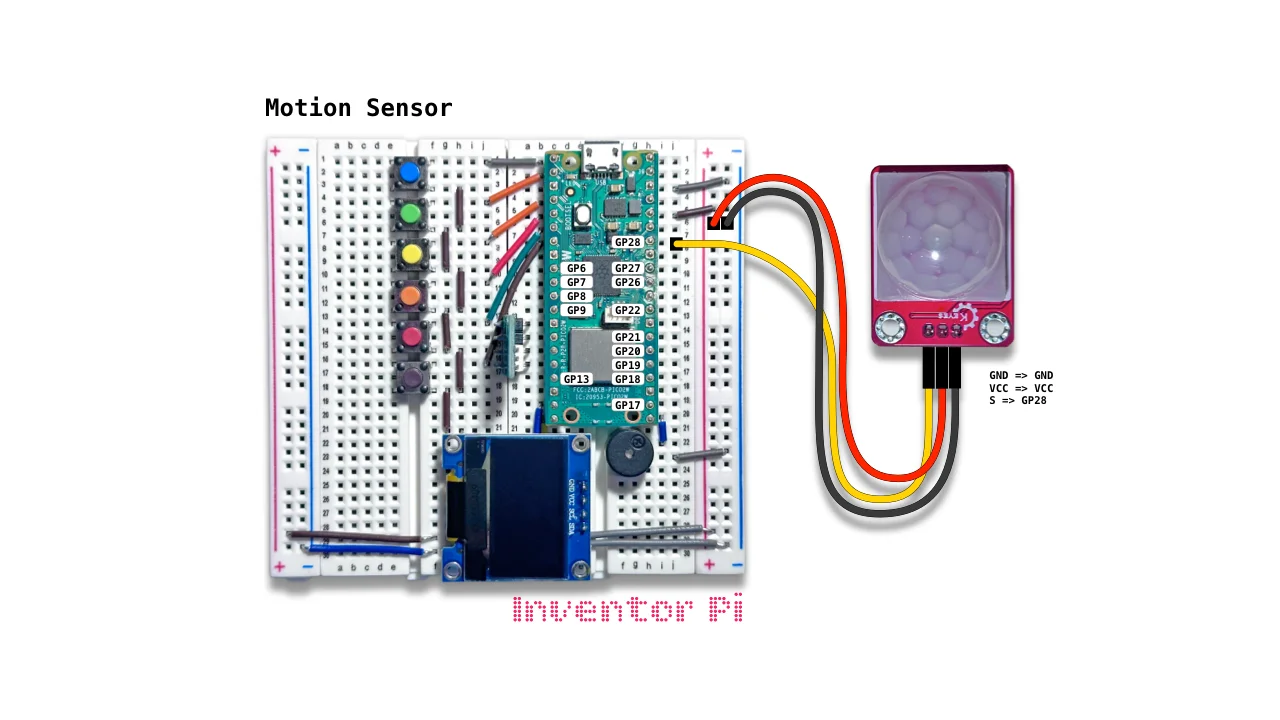
Un esempio di codice MicroPython in esecuzione su un microcontrollore Raspberry Pi Pico 2 W collegato a un modulo sensore di movimento PIR, un modulo LED RGB e un modulo display OLED (SSD1306) su una breadboard per cambiare il colore del LED e mostrare lo stato sul display quando viene rilevato un movimento
Un sensore di movimento PIR rileva il movimento misurando le variazioni della radiazione infrarossa (calore) emessa dagli oggetti circostanti. Quando un corpo caldo (come un essere umano o un animale) si muove attraverso il campo, intercetta prima una metà del sensore e poi l'altra, creando un impulso di tensione differenziale che segnala il movimento. Viene utilizzato nei sistemi di allarme e nell'automazione domestica intelligente.
Quando si esegue questo script in un'aula, coprire completamente il sensore con un libro o dei fogli di carta piegati, quindi attendere che il sensore si ripristini e visualizzi No motion. Quindi rimuovi il libro e attendi che il sensore rilevi il movimento.
Crea un nuovo file in Thonny, con il nome motion_sensor.py. Copia e incolla il codice seguente nel file che hai creato.
1
2
3
4
5
6
7
8
9
10
11
12
13
14
15
16
17
18
19
20
21
22
23
24
25
26
27
28
29
30
31
32
33
34
35
36
37
38
39
40
41
42
43
44
45
46
47
48
49
50
51

print("\nMotion Sensor")

# DESCRIPTION

# A PIR motion sensor detects movement by measuring changes in
# infrared (heat) radiation emitted by surrounding objects.
# When a warm body (like a human or animal) moves across the field,
# it intercepts one half of the sensor first and then the other,
# creating a differential voltage pulse that signals motion.
# It is used in security alarms and smart home automation.

# When running this script in a classroom, cover the sensor completely with
# a book or folded sheets of paper, then wait for sensor to reset and display
# "No motion". Then remove the book and wait for the sensor to detect motion.

# CONNECTIONS REQUIRED

# Connect PIR Motion Sensor (HC-SR501) module
#   Pins: GND => GND, VCC => VCC, S => GP28

from time import sleep
from machine import Pin
from oled import OLED
from rgbled import RGBLED

motion_sensor = Pin(28, Pin.IN)
oled = OLED(scl_pin=15, sda_pin=14)
rgbled = RGBLED(red_pin=12, green_pin=11, blue_pin=10)

try:
    while True:

        # When motion_sensor value is 1, motion is detected.
        # It resets to 0 after some time if no motion is detected.
        # Wait until value has settled and does not change for one
        # full second, to reduce sensor noise.
        if motion_sensor.value() == 1:
            oled.print("Motion detected")
            rgbled.set_color(r=255)
        else:
            oled.print("No motion")
            rgbled.set_color(g=255)

        sleep(0.1)

except KeyboardInterrupt:
    print("\nInterrupted by user!")

finally:
    oled.reset()
    rgbled.reset()