मोशन सेंसर
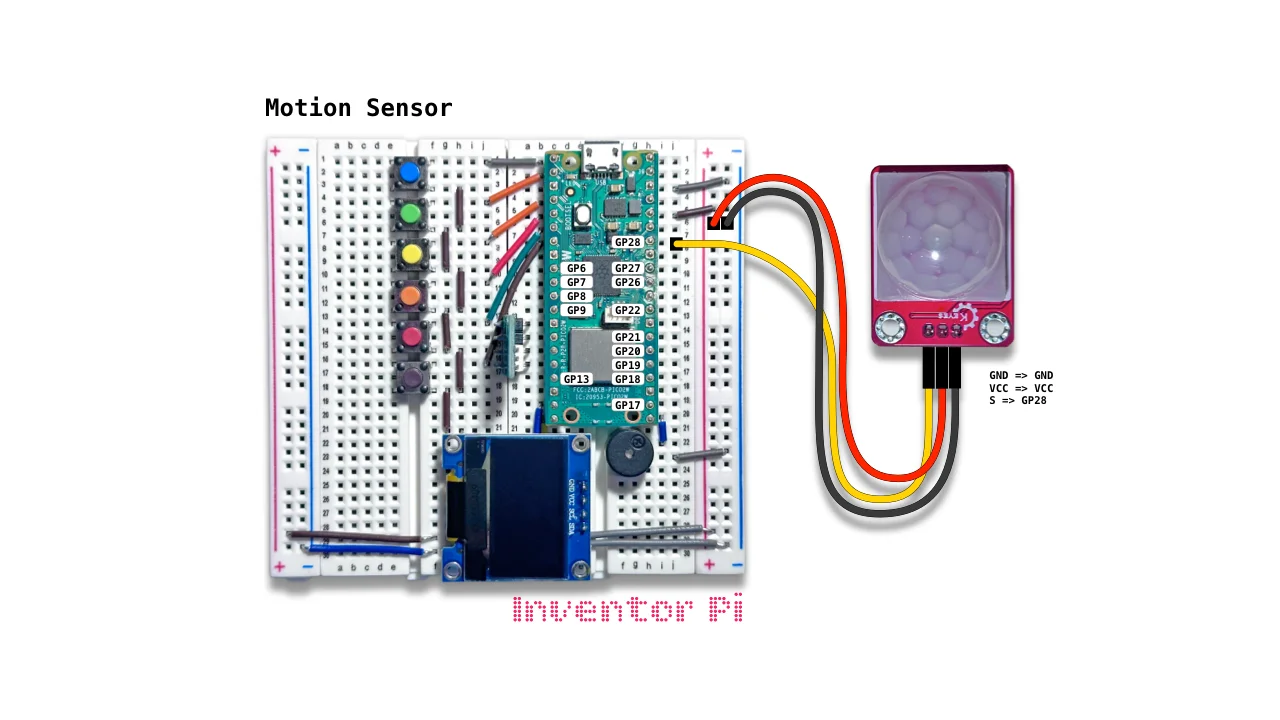
माइक्रो पाइथन कोड का एक उदाहरण Raspberry Pi Pico 2W माइक्रोकंट्रोलर पर चल रहा है ब्रेडबोर्ड पर पीआईआर मोशन सेंसर मॉड्यूल, आरजीबी एलईडी मॉड्यूल और ओएलईडी डिस्प्ले मॉड्यूल (एसएसडी1306) से जुड़ा हुआ है। गति का पता चलने पर एलईडी का रंग बदलने और डिस्प्ले पर स्थिति दिखाने के लिए।
पीआईआर मोशन सेंसर आसपास की वस्तुओं द्वारा उत्सर्जित अवरक्त (ऊष्मा) विकिरण में होने वाले परिवर्तनों को मापकर गति का पता लगाता है।. जब कोई गर्म वस्तु (जैसे मनुष्य या जानवर) क्षेत्र में चलती है, तो वह पहले सेंसर के एक हिस्से को और फिर दूसरे हिस्से को बाधित करती है, जिससे एक विभेदक वोल्टेज पल्स उत्पन्न होता है जो गति का संकेत देता है।. इसका उपयोग सुरक्षा अलार्म और स्मार्ट होम ऑटोमेशन में किया जाता है।.
कक्षा में इस स्क्रिप्ट को चलाते समय, सेंसर को पूरी तरह से एक किताब या मुड़े हुए कागज़ के पन्नों से ढक दें, फिर सेंसर के रीसेट होने और No motion प्रदर्शित होने तक प्रतीक्षा करें।. फिर किताब को हटा दें और सेंसर द्वारा गति का पता लगाने की प्रतीक्षा करें।.
Thonny में motion_sensor.py नाम से एक नई फ़ाइल बनाएँ।. नीचे दिए गए कोड को कॉपी करके अपनी बनाई गई फ़ाइल में पेस्ट करें।.
1
2
3
4
5
6
7
8
9
10
11
12
13
14
15
16
17
18
19
20
21
22
23
24
25
26
27
28
29
30
31
32
33
34
35
36
37
38
39
40
41
42
43
44
45
46
47
48
49
50
51

print("\nMotion Sensor")

# DESCRIPTION

# A PIR motion sensor detects movement by measuring changes in
# infrared (heat) radiation emitted by surrounding objects.
# When a warm body (like a human or animal) moves across the field,
# it intercepts one half of the sensor first and then the other,
# creating a differential voltage pulse that signals motion.
# It is used in security alarms and smart home automation.

# When running this script in a classroom, cover the sensor completely with
# a book or folded sheets of paper, then wait for sensor to reset and display
# "No motion". Then remove the book and wait for the sensor to detect motion.

# CONNECTIONS REQUIRED

# Connect PIR Motion Sensor (HC-SR501) module
#   Pins: GND => GND, VCC => VCC, S => GP28

from time import sleep
from machine import Pin
from oled import OLED
from rgbled import RGBLED

motion_sensor = Pin(28, Pin.IN)
oled = OLED(scl_pin=15, sda_pin=14)
rgbled = RGBLED(red_pin=12, green_pin=11, blue_pin=10)

try:
    while True:

        # When motion_sensor value is 1, motion is detected.
        # It resets to 0 after some time if no motion is detected.
        # Wait until value has settled and does not change for one
        # full second, to reduce sensor noise.
        if motion_sensor.value() == 1:
            oled.print("Motion detected")
            rgbled.set_color(r=255)
        else:
            oled.print("No motion")
            rgbled.set_color(g=255)

        sleep(0.1)

except KeyboardInterrupt:
    print("\nInterrupted by user!")

finally:
    oled.reset()
    rgbled.reset()