Fotorresistencia
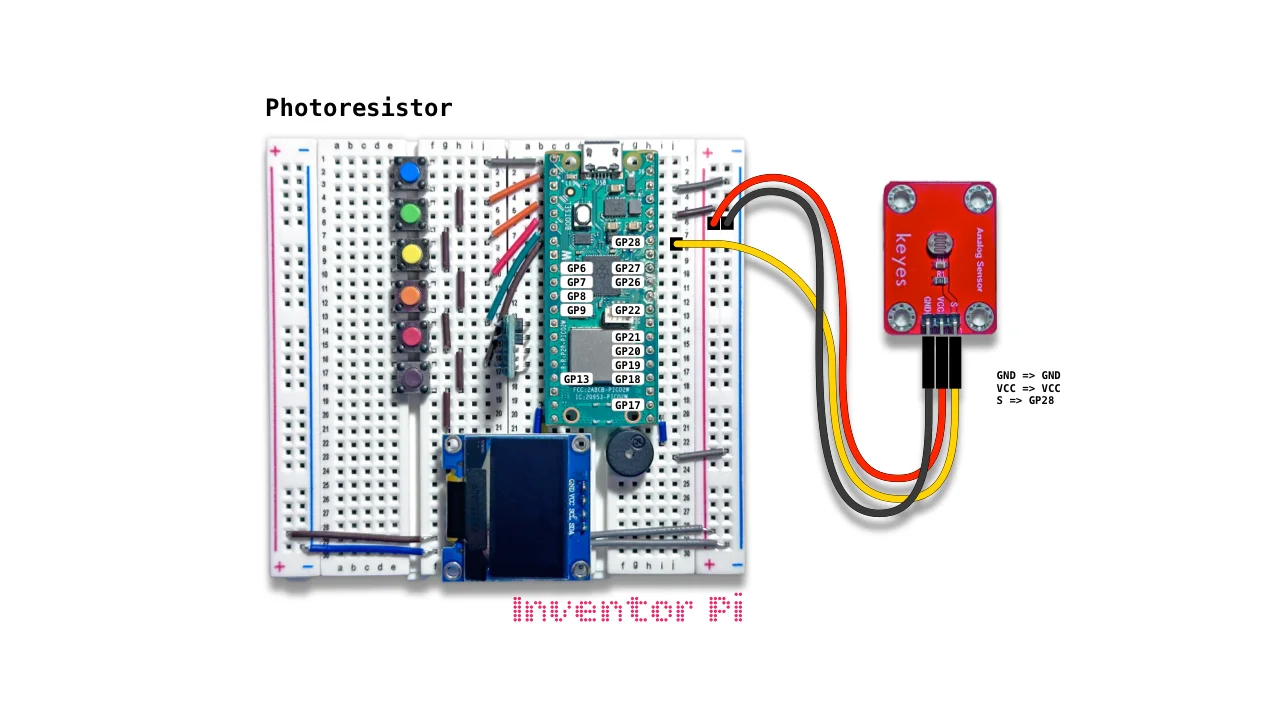
Un ejemplo de código MicroPython Funciona con un microcontrolador Raspberry Pi Pi Pico 2 W conectado a un módulo fotorresistor, un módulo LED RGB y un módulo de pantalla OLED (SSD1306) en una placa de prototipos para atenuar o aumentar el brillo del LED para que coincida con el cambio en la luz ambiental medido por la fotorresistencia
Una fotorresistencia permite que fluya más electricidad cuando incide más luz en su superficie, y que fluya menos electricidad cuando incide menos luz en su superficie. Se utiliza para atenuar la pantalla del teléfono en condiciones de poca luz y para iluminarla al aire libre bajo la luz del sol. Algunos televisores lo utilizan para atenuar la pantalla y adaptarla a la luz ambiental de la habitación, para que parezca un cuadro impreso. Los robots de seguimiento de línea lo utilizan para distinguir entre una línea oscura y una superficie clara.
Crea un nuevo archivo en Thonny con el nombre photoresistor.py. Copia y pega el código que aparece a continuación en el archivo que creaste.
1
2
3
4
5
6
7
8
9
10
11
12
13
14
15
16
17
18
19
20
21
22
23
24
25
26
27
28
29
30
31
32
33
34
35
36
37
38
39
40
41
42
43
44
45
46
47
48

print("\nPhotoresistor")

# DESCRIPTION

# A photoresister allows more electricity to flow when more light hits its surface,
# and less electricity to flow when less light hits its surface. It is used to dim a
# phone screen in low light, and brighten it when outdoors under bright sunlight. Some TVs
# use it to dim the display to match the ambient room light, to appear like printed wall art.
# Line tracking robots use it to distinguish between a dark line and a light surface.

# CONNECTIONS REQUIRED

# Connect Photoresistor (KY-018) module
# (labeled 'Analog Sensor' with a small round head with squiggly line)
#   Pins: GND => GND, VCC => VCC, S => GP28

from time import sleep
from machine import Pin, ADC
from oled import OLED
from buzzer import Buzzer
from rgbled import RGBLED
from value_filter import ValueFilter

sensor = ADC(Pin(28))
value_filter = ValueFilter(filter="SMA", window_size=10)
oled = OLED(scl_pin=15, sda_pin=14)
buzzer = Buzzer(pwm_pin=16)
rgbled = RGBLED(red_pin=12, green_pin=11, blue_pin=10)

sensor_max = 65535

try:
    while True:
        # Use Simple Moving Average filter to smooth out readings
        value = value_filter.update(sensor.read_u16())
        fraction = value / sensor_max
        white = round(fraction * fraction * 255) # use fraction squared to visualize change in light
        rgbled.set_color(w=white)
        oled.print(f"Intensity: {fraction * 100:0.0f}%")
        sleep(0.05)

except KeyboardInterrupt:
    print("\nInterrupted by user!")

finally:
    oled.reset()
    rgbled.reset()
    buzzer.reset()