Fotoresistore
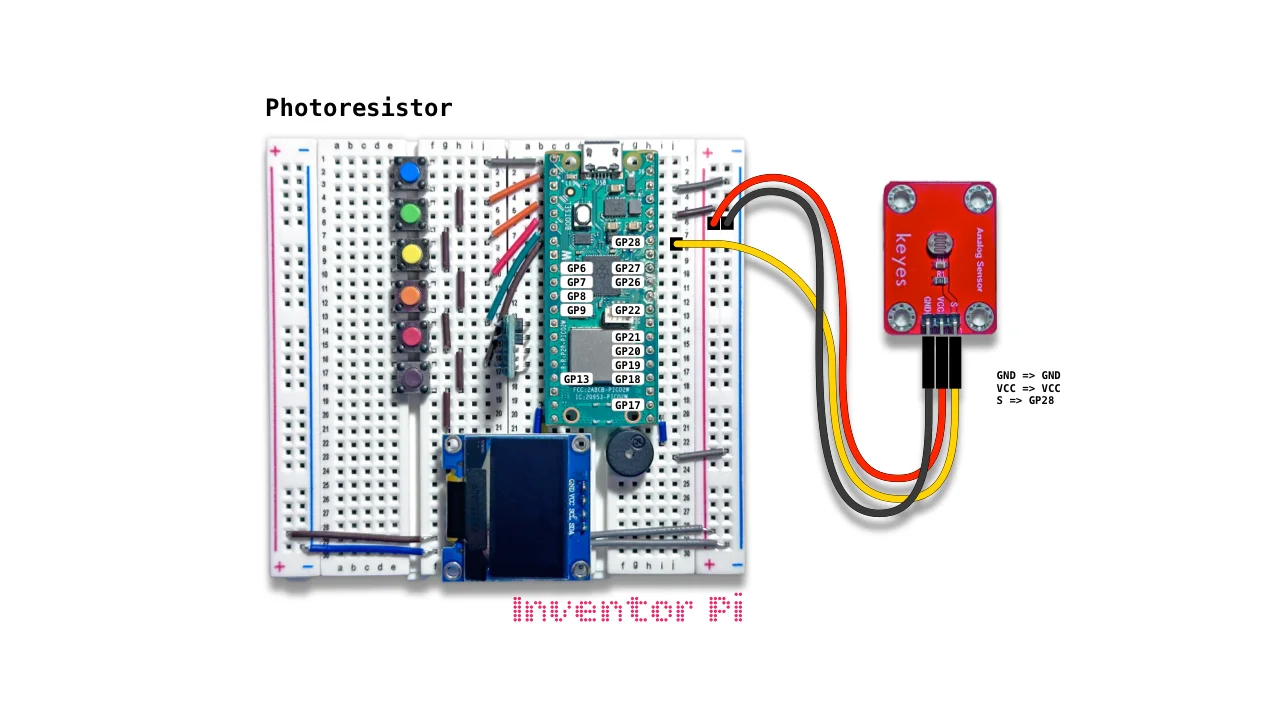
Un esempio di codice MicroPython in esecuzione su un microcontrollore Raspberry Pi Pico 2 W collegato a un modulo fotoresistore, un modulo LED RGB e un modulo display OLED (SSD1306) su una breadboard attenuare o intensificare la luminosità del LED per adattarla alla variazione della luce ambientale misurata dal fotoresistore
Un fotoresist permette il passaggio di una maggiore quantità di elettricità quando la sua superficie è colpita da più luce, e di una minore quantità quando la sua superficie è colpita da meno luce. Si usa per attenuare la luminosità dello schermo del telefono in condizioni di scarsa illuminazione e per aumentarla all'aperto sotto la luce diretta del sole. Alcuni televisori lo usano per attenuare la luminosità dello schermo in modo che si adatti alla luce ambientale della stanza, per apparire come un'opera d'arte stampata sul muro. I robot che seguono le linee lo utilizzano per distinguere tra una linea scura e una superficie chiara.
Crea un nuovo file in Thonny, con il nome photoresistor.py. Copia e incolla il codice seguente nel file che hai creato.
1
2
3
4
5
6
7
8
9
10
11
12
13
14
15
16
17
18
19
20
21
22
23
24
25
26
27
28
29
30
31
32
33
34
35
36
37
38
39
40
41
42
43
44
45
46
47
48

print("\nPhotoresistor")

# DESCRIPTION

# A photoresister allows more electricity to flow when more light hits its surface,
# and less electricity to flow when less light hits its surface. It is used to dim a
# phone screen in low light, and brighten it when outdoors under bright sunlight. Some TVs
# use it to dim the display to match the ambient room light, to appear like printed wall art.
# Line tracking robots use it to distinguish between a dark line and a light surface.

# CONNECTIONS REQUIRED

# Connect Photoresistor (KY-018) module
# (labeled 'Analog Sensor' with a small round head with squiggly line)
#   Pins: GND => GND, VCC => VCC, S => GP28

from time import sleep
from machine import Pin, ADC
from oled import OLED
from buzzer import Buzzer
from rgbled import RGBLED
from value_filter import ValueFilter

sensor = ADC(Pin(28))
value_filter = ValueFilter(filter="SMA", window_size=10)
oled = OLED(scl_pin=15, sda_pin=14)
buzzer = Buzzer(pwm_pin=16)
rgbled = RGBLED(red_pin=12, green_pin=11, blue_pin=10)

sensor_max = 65535

try:
    while True:
        # Use Simple Moving Average filter to smooth out readings
        value = value_filter.update(sensor.read_u16())
        fraction = value / sensor_max
        white = round(fraction * fraction * 255) # use fraction squared to visualize change in light
        rgbled.set_color(w=white)
        oled.print(f"Intensity: {fraction * 100:0.0f}%")
        sleep(0.05)

except KeyboardInterrupt:
    print("\nInterrupted by user!")

finally:
    oled.reset()
    rgbled.reset()
    buzzer.reset()