Photoresistor
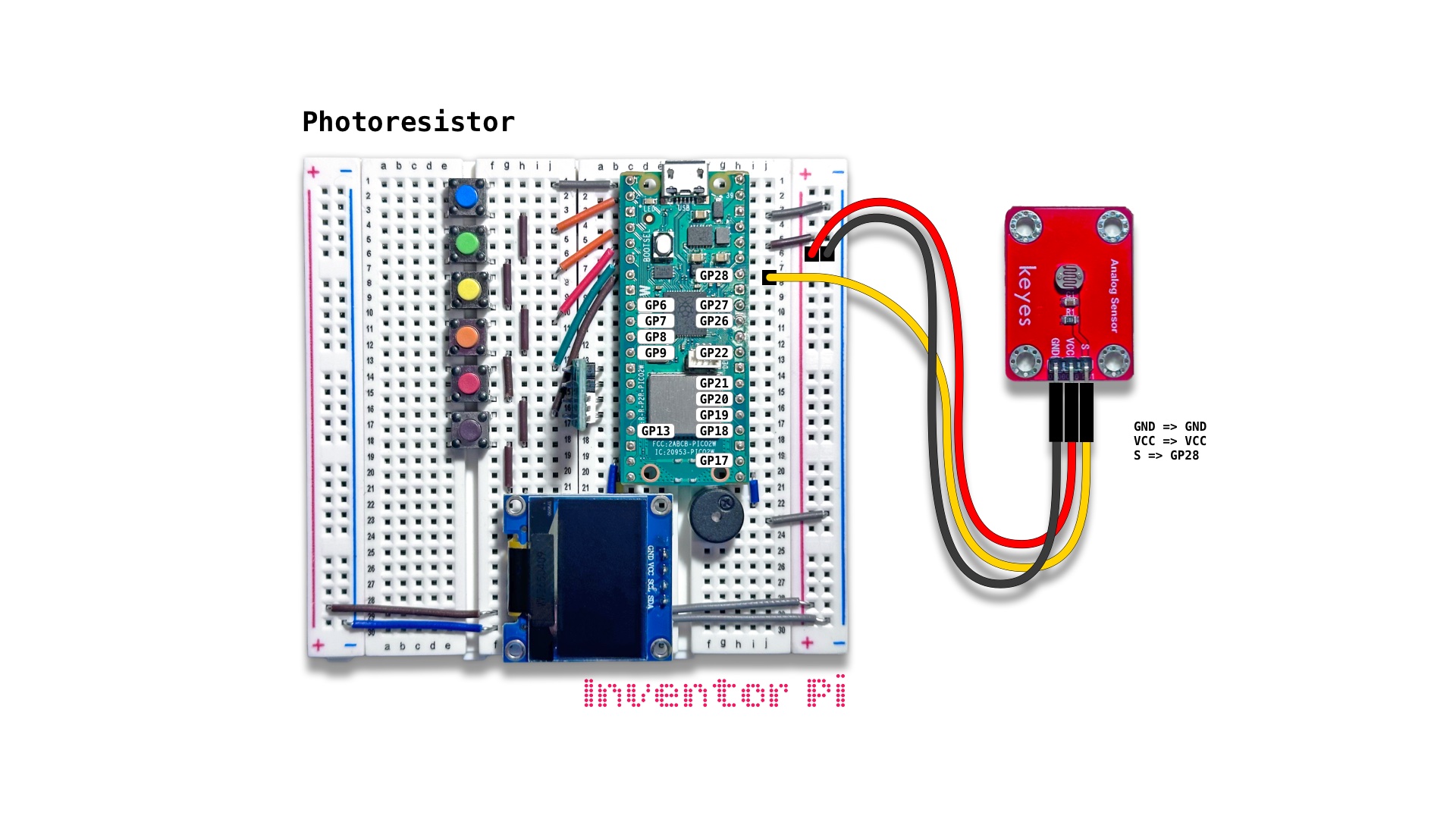
A MicroPython code example running on a Raspberry Pi Pico 2 W microcontroller connected to a photoresister module, an RGB LED module and an OLED display module (SSD1306) on a breadboard to dim or brighten the LED to match the change in ambient light measured by the photoresister
A photoresister allows more electricity to flow when more light hits its surface, and less electricity to flow when less light hits its surface. It is used to dim a phone screen in low light, and brighten it when outdoors under bright sunlight. Some TVs use it to dim the display to match the ambient room light, to appear like printed wall art. Line tracking robots use it to distinguish between a dark line and a light surface.
Create a new file in Thonny, with file name photoresistor.py. Copy and paste the code below into the file you created.
1
2
3
4
5
6
7
8
9
10
11
12
13
14
15
16
17
18
19
20
21
22
23
24
25
26
27
28
29
30
31
32
33
34
35
36
37
38
39
40
41
42
43
44
45
46
47
48
print("\nPhotoresistor")

# DESCRIPTION

# A photoresister allows more electricity to flow when more light hits its surface,
# and less electricity to flow when less light hits its surface. It is used to dim a
# phone screen in low light, and brighten it when outdoors under bright sunlight. Some TVs
# use it to dim the display to match the ambient room light, to appear like printed wall art.
# Line tracking robots use it to distinguish between a dark line and a light surface.

# CONNECTIONS REQUIRED

# Connect Photoresistor (KY-018) module
# (labeled 'Analog Sensor' with a small round head with squiggly line)
#   Pins: GND => GND, VCC => VCC, S => GP28

from time import sleep
from machine import Pin, ADC
from oled import OLED
from buzzer import Buzzer
from rgbled import RGBLED
from value_filter import ValueFilter

sensor = ADC(Pin(28))
value_filter = ValueFilter(filter="SMA", window_size=10)
oled = OLED(scl_pin=15, sda_pin=14)
buzzer = Buzzer(pwm_pin=16)
rgbled = RGBLED(red_pin=12, green_pin=11, blue_pin=10)

sensor_max = 65535

try:
    while True:
        # Use Simple Moving Average filter to smooth out readings
        value = value_filter.update(sensor.read_u16())
        fraction = value / sensor_max
        white = round(fraction * fraction * 255) # use fraction squared to visualize change in light
        rgbled.set_color(w=white)
        oled.print(f"Intensity: {fraction * 100:0.0f}%")
        sleep(0.05)

except KeyboardInterrupt:
    print("\nInterrupted by user!")

finally:
    oled.reset()
    rgbled.reset()
    buzzer.reset()