Fotointerruptor
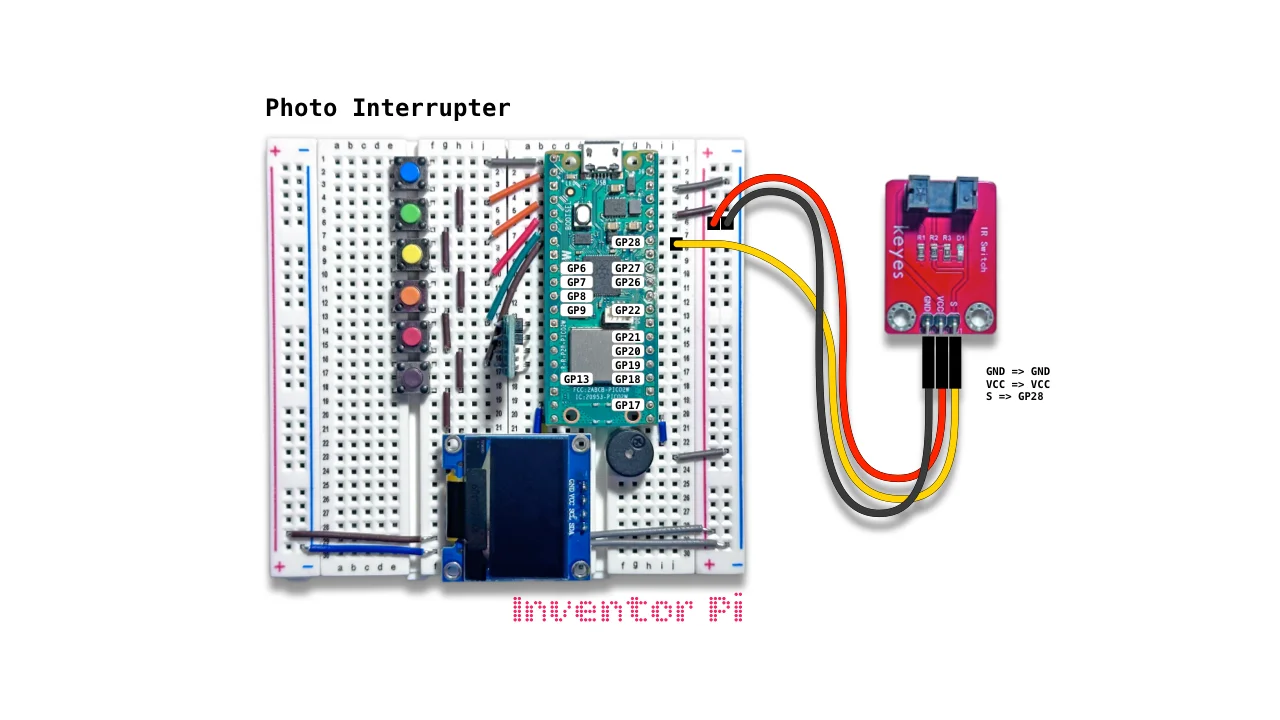
Un ejemplo de código MicroPython Funciona con un microcontrolador Raspberry Pi Pi Pico 2 W conectado a un módulo fotointerruptor, un módulo LED RGB y un módulo de pantalla OLED (SSD1306) en una placa de pruebas para incrementar el contador en la pantalla cada vez que se interrumpe el haz de luz del fotointerruptor
Un módulo fotointerruptor envía un haz de luz infrarroja desde un emisor a un receptor (los dos bloques negros del módulo) y detecta cuándo se bloquea dicho haz. Se utiliza para detectar el final del recorrido en impresoras 3D, máquinas CNC y robots. También se utiliza para contar los pulsos de un disco ranurado giratorio para calcular la velocidad del motor o de la rueda en robótica y coches inteligentes. En una impresora, detecta cuando hay papel presente.
Crea un nuevo archivo en Thonny con el nombre photo_interrupter.py. Copia y pega el código que aparece a continuación en el archivo que creaste.
1
2
3
4
5
6
7
8
9
10
11
12
13
14
15
16
17
18
19
20
21
22
23
24
25
26
27
28
29
30
31
32
33
34
35
36
37
38
39
40
41
42
43
44
45
46
47
48
49
50

print("\nPhoto Interrupter")

# DESCRIPTION

# A photo interrupter module sends infrared light beam from an emitter to a receiver
# (the two black blocks on the module), and detects when this beam is blocked.
# It is used to detect end-of-travel in 3D printers, CNC machines and robots. It is
# also used to count the pulses of a slotted disc rotating to calculate motor or wheel
# speed in robotics and smart cars. In a printer, it detects when a paper is present.

# CONNECTIONS REQUIRED

# Connect Photo Interrupter (KY-010) module (labeled 'IR Switch')
#   Pins: GND => GND, VCC => VCC, S => GP28

from machine import Pin
from oled import OLED
from rgbled import RGBLED
from buzzer import Buzzer

sensor = Pin(28, Pin.IN, Pin.PULL_UP)
oled = OLED(scl_pin=15, sda_pin=14)
buzzer = Buzzer(pwm_pin=16)
rgbled = RGBLED(red_pin=12, green_pin=11, blue_pin=10)

counter = 0

try:
    while True:
        rgbled.reset()

        # loop while nothing detected
        while sensor.value() == 0: pass

        # sensor value is no longer zero => object detected
        counter += 1
        oled.print(f"Counter: {counter}")
        rgbled.set_color(b=255)
        buzzer.play_tone(600)

        # loop while object is still present
        while sensor.value() == 1: pass

except KeyboardInterrupt:
    print("\nInterrupted by user!")

finally:
    oled.reset()
    rgbled.reset()
    buzzer.reset()