سنسور ضربه
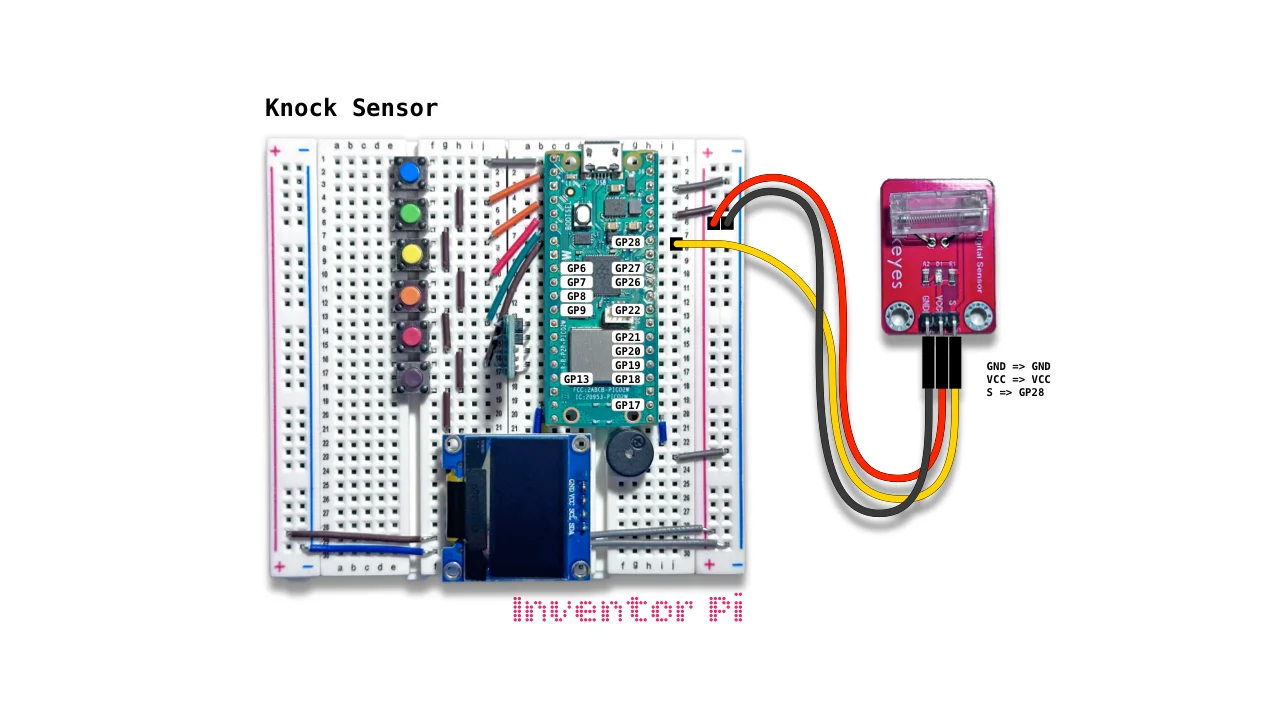
یک نمونه کد میکروپایتون اجرا روی میکروکنترلر Raspberry Pi Pico 2 W متصل به یک ماژول حسگر ضربه با یک فنر مارپیچی، یک ماژول LED RGB و یک ماژول نمایشگر OLED (SSD1306) روی یک برد بورد برای تغییر رنگ LED و نمایش وضعیت روی صفحه نمایش هنگام تشخیص لرزش ناگهانی
حسگر ضربه، ارتعاشات را تشخیص میدهد. این ماژول خاص از یک سوئیچ ارتعاشی فنری استفاده میکند. وقتی ماژول ثابت است، فنر به پین مرکزی برخورد نمیکند، اما وقتی ضربه یا تکان میخورد، فنر تاب میخورد و به پین مرکزی برخورد میکند و مدار را برای لحظهای میبندد. برای یک ربات بالارونده از نردبان، یک حسگر ضربه میتواند تشخیص دهد که چه زمانی بازوی کشیده شده به پله نردبان برخورد میکند و سپس حرکت بعدی را آغاز کند. در حالی که یک حسگر تصادف باید در نقطه برخورد قرار گیرد، یک حسگر ضربه میتواند ارتعاشات را در کل بازو تشخیص دهد. برای آزمایش، اسکریپت را اجرا کنید، سپس کل برد بورد را به همراه سنسور ضربه در دست بگیرید و آن را به شدت تکان دهید تا ناگهان متوقف شود.
یک فایل جدید در Thonny با نام knock_sensor.py ایجاد کنید. کد زیر را کپی کرده و در فایلی که ایجاد کردهاید، قرار دهید.
1
2
3
4
5
6
7
8
9
10
11
12
13
14
15
16
17
18
19
20
21
22
23
24
25
26
27
28
29
30
31
32
33
34
35
36
37
38
39
40
41
42
43

print("\nKnock Sensor")

# DESCRIPTION

# A knock sensor detects vibrations. This particular module uses a spring-based vibration switch.
# When the module is still, the spring does not touch the center pin, but when bumped or shaken,
# the spring sways and hits the center pin closing the circuit momentarily. For a ladder climbing robot,
# a knock sensor could detect when an extending arm hits a ladder rung, and then initiate next motion.
# While a crash sensor would need to be placed at the point of impact, a knock sensor could detect
# vibrations across an entire arm. To test, run the script, then hold the entire breadboard along with
# the knock sensor in hand, and give it a big shake bringing it to a sudden stop.

# CONNECTIONS REQUIRED

# Connect Knock Sensor (KY-031) module
# (labeled 'Digital Sensor' with an encased spring)
#   Pins: GND => GND, VCC => VCC, S => GP28

from time import sleep
from machine import Pin
from oled import OLED
from buzzer import Buzzer

knock_sensor = Pin(28, Pin.IN, Pin.PULL_UP)
oled = OLED(scl_pin=15, sda_pin=14)
buzzer = Buzzer(pwm_pin=16)

try:
    while True:
        oled.print("Shake...")

        # Sensor value == 1 => Knock detected, wait 2 seconds
        if knock_sensor.value() == 0:
            buzzer.play_tone(600)
            oled.print("Knock knock!")
            sleep(2)

except KeyboardInterrupt:
    print("\nInterrupted by user!")

finally:
    oled.reset()
    buzzer.reset()