قطع کننده عکس
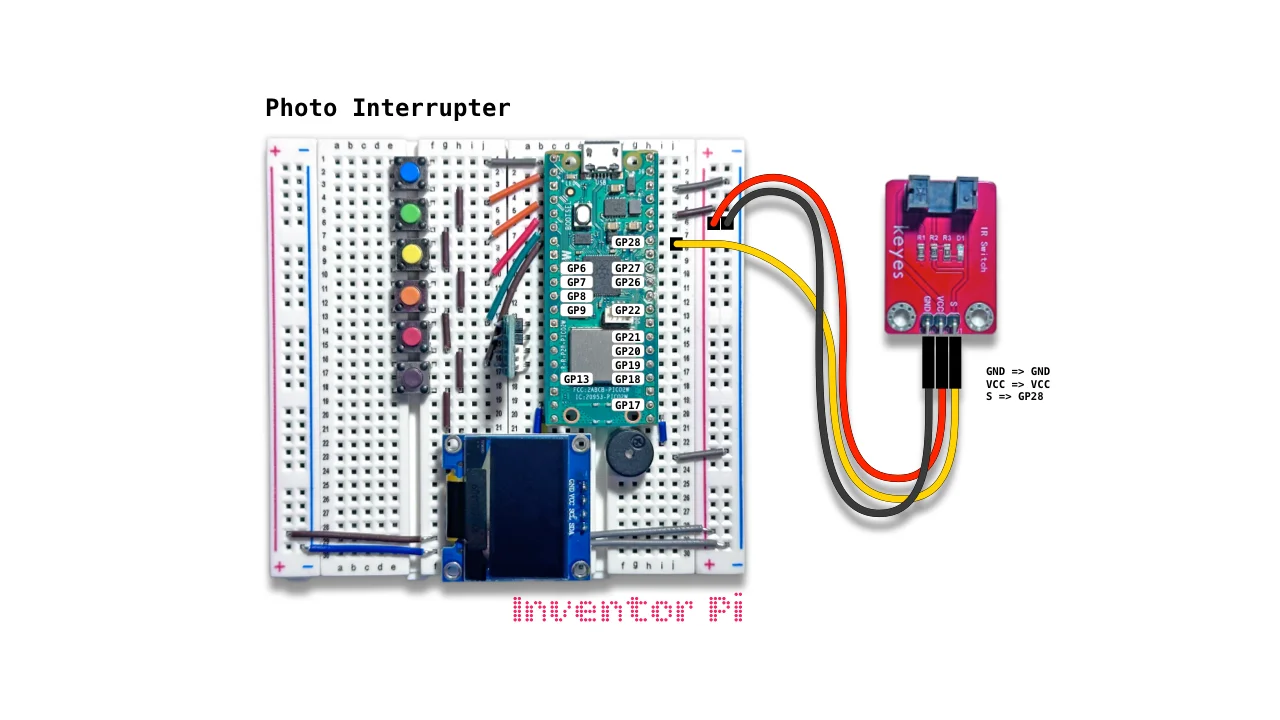
یک نمونه کد میکروپایتون اجرا روی میکروکنترلر Raspberry Pi Pico 2 W متصل به یک ماژول قطع کننده عکس، یک ماژول LED RGB و یک ماژول نمایشگر OLED (SSD1306) روی یک برد بورد برای افزایش تعداد دفعات نمایش داده شده در صفحه نمایش هر بار که پرتو نور قطع کننده عکس قطع میشود
یک ماژول قطعکننده نور، پرتو نور مادون قرمز را از یک فرستنده به یک گیرنده (دو بلوک سیاه روی ماژول) میفرستد و تشخیص میدهد که چه زمانی این پرتو مسدود میشود. برای تشخیص پایان مسیر در چاپگرهای سهبعدی، ماشینهای CNC و رباتها استفاده میشود. همچنین برای شمارش پالسهای چرخش یک دیسک شیاردار برای محاسبه سرعت موتور یا چرخ در رباتیک و ماشینهای هوشمند استفاده میشود. در یک چاپگر، وقتی کاغذی وجود دارد، آن را تشخیص میدهد.
یک فایل جدید در Thonny با نام photo_interrupter.py ایجاد کنید. کد زیر را کپی کرده و در فایلی که ایجاد کردهاید، قرار دهید.
1
2
3
4
5
6
7
8
9
10
11
12
13
14
15
16
17
18
19
20
21
22
23
24
25
26
27
28
29
30
31
32
33
34
35
36
37
38
39
40
41
42
43
44
45
46
47
48
49
50

print("\nPhoto Interrupter")

# DESCRIPTION

# A photo interrupter module sends infrared light beam from an emitter to a receiver
# (the two black blocks on the module), and detects when this beam is blocked.
# It is used to detect end-of-travel in 3D printers, CNC machines and robots. It is
# also used to count the pulses of a slotted disc rotating to calculate motor or wheel
# speed in robotics and smart cars. In a printer, it detects when a paper is present.

# CONNECTIONS REQUIRED

# Connect Photo Interrupter (KY-010) module (labeled 'IR Switch')
#   Pins: GND => GND, VCC => VCC, S => GP28

from machine import Pin
from oled import OLED
from rgbled import RGBLED
from buzzer import Buzzer

sensor = Pin(28, Pin.IN, Pin.PULL_UP)
oled = OLED(scl_pin=15, sda_pin=14)
buzzer = Buzzer(pwm_pin=16)
rgbled = RGBLED(red_pin=12, green_pin=11, blue_pin=10)

counter = 0

try:
    while True:
        rgbled.reset()

        # loop while nothing detected
        while sensor.value() == 0: pass

        # sensor value is no longer zero => object detected
        counter += 1
        oled.print(f"Counter: {counter}")
        rgbled.set_color(b=255)
        buzzer.play_tone(600)

        # loop while object is still present
        while sensor.value() == 1: pass

except KeyboardInterrupt:
    print("\nInterrupted by user!")

finally:
    oled.reset()
    rgbled.reset()
    buzzer.reset()