حسگر فاصله
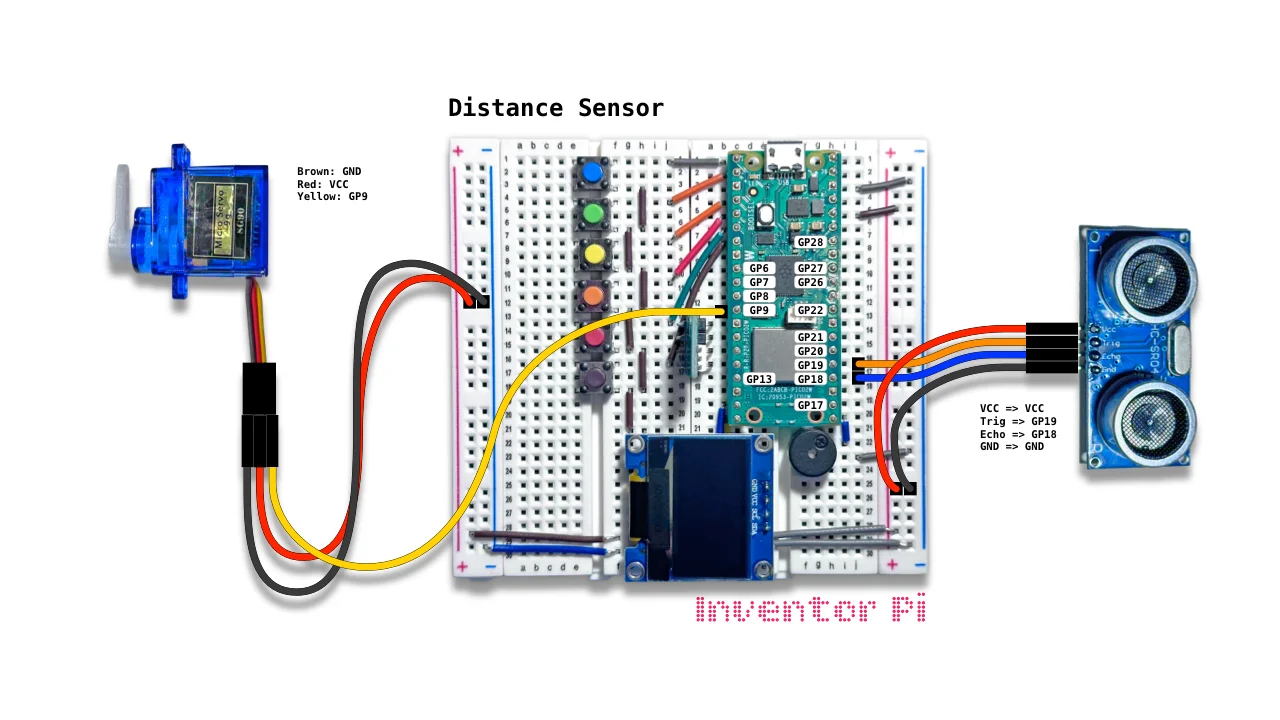
یک نمونه کد میکروپایتون اجرا روی میکروکنترلر Raspberry Pi Pico 2 W متصل به یک ماژول حسگر فاصله اولتراسونیک (HC-SR04)، یک میکرو سروو موتور، یک زنگ اخبار پیزوالکتریک غیرفعال، یک ماژول LED RGB و یک ماژول نمایشگر OLED (SSD1306) روی یک برد بورد برای ایجاد یک ابزار صوتی مبتنی بر اشاره که فاصله اندازهگیری شده را به فرکانسهای مختلف صدای زنگ، زوایای سروو و رنگهای LED تبدیل میکند و فاصله اندازهگیری شده را روی صفحه نمایش OLED نمایش میدهد
یک حسگر فاصله، فاصله تا هرگونه مانع نزدیک را اندازهگیری میکند. رباتها و ماشینها از چنین حسگرهایی برای توقف قبل از برخورد با هرگونه مانع استفاده میکنند. سنسور مورد استفاده در اینجا یک سنسور فاصله اولتراسونیک است. ما فاصله را به رنگهای RGB و فرکانسهای مختلف زنگ تبدیل میکنیم تا یک ساز موسیقی سرگرمکننده بسازیم که بتوانید با حرکات دست آن را بنوازید. ما همچنین زاویه یک سروو موتور را بر اساس فاصله شناسایی شده تغییر میدهیم.
سروو موتوری است که میتوانیم با تغییر سیگنال PWM که به آن ارسال میکنیم، زاویه چرخش آن را کنترل کنیم. برخلاف موتورهای الکتریکی استاندارد که به طور مداوم میچرخند، یک سروو موتور به یک زاویه یا موقعیت دقیق حرکت میکند و آن را محکم نگه میدارد.
یک فایل جدید در Thonny با نام distance_sensor.py ایجاد کنید. کد زیر را کپی کرده و در فایلی که ایجاد کردهاید، قرار دهید.
1
2
3
4
5
6
7
8
9
10
11
12
13
14
15
16
17
18
19
20
21
22
23
24
25
26
27
28
29
30
31
32
33
34
35
36
37
38
39
40
41
42
43
44
45
46
47
48
49
50
51
52
53
54
55
56
57
58
59
60
61
62
63
64
65
66
67
68
69
70
71
72
73
74
75
76
77
78

print("\nDistance Sensor")

# DESCRIPTION

# A distance sensor measures the distance to any nearby obstruction.
# Robots and cars use such sensors to stop before hitting any obstruction.
# The sensor used here is an ultrasonic distance sensor.
# We convert the distance to different RGB colors and buzzer frequencies
# to create a fun musical instrument that you can play with hand gestures.
# We also change the angle of a servo motor based on the distance detected.

# A servo is a motor where we can control the rotation angle by changing the PWM
# signal we send to it. Unlike standard electric motors that spin continuously,
# a servo motor moves to an exact angle or position and holds it firmly.

# CONNECTIONS REQUIRED

# Connect HC-SR04 module
#   Pins: VCC => VCC, Trig => GP19, Echo => GP18, GND => GND
# Connect Servo
#   Pins: Brown: GND, Red: VCC, Yellow: GP9

from time import sleep
from oled import OLED
from hcsr04 import HCSR04
from rgbled import RGBLED
from buzzer import Buzzer
from servo import Servo
from value_filter import ValueFilter
from helper import interpolate, clamp

distance_sensor = HCSR04(trigger_pin=19, echo_pin=18)
oled = OLED(scl_pin=15, sda_pin=14)
buzzer = Buzzer(pwm_pin=16)
rgbled = RGBLED(red_pin=12, green_pin=11, blue_pin=10)
servo = Servo(servo_pin=9)
distance_filter = ValueFilter()

min_distance = 4
max_distance = 40

try:
    while True:

        # Measure obstacle distance in cm
        distance_cm = distance_sensor.value()

        # Convert distance to discrete numbers with 2 cm interval
        distance = round(distance_cm / 2) * 2
        distance = clamp(distance, min_distance, max_distance)
        distance = distance_filter.update(distance)

        if distance_filter.did_change(): # only if distance has changed by 2 cm

            # Calculate red, green and servo angle using interpolation.
            # Red is 255 and green is 0 at min distance, green is 0.
            # Red is 0 and green is 255 at max distance.
            r = interpolate(distance, min_distance, max_distance, 255, 0)
            g = interpolate(distance, min_distance, max_distance, 0, 255)
            angle = interpolate(distance, min_distance, max_distance, 0, 180)

            rgbled.set_color(r=r, g=g)
            servo.set_angle(angle)

            # Play tone with frequency proportional to distance
            buzzer.play_tone(distance * 50)

        oled.print(f"{distance_cm:0.1f} cm", f"{angle:0.0f} degrees")
        sleep(0.05)

except KeyboardInterrupt:
    print("\nInterrupted by user!")

finally:
    oled.reset()
    rgbled.reset()
    buzzer.reset()
    servo.reset()