مُقاطع الصور
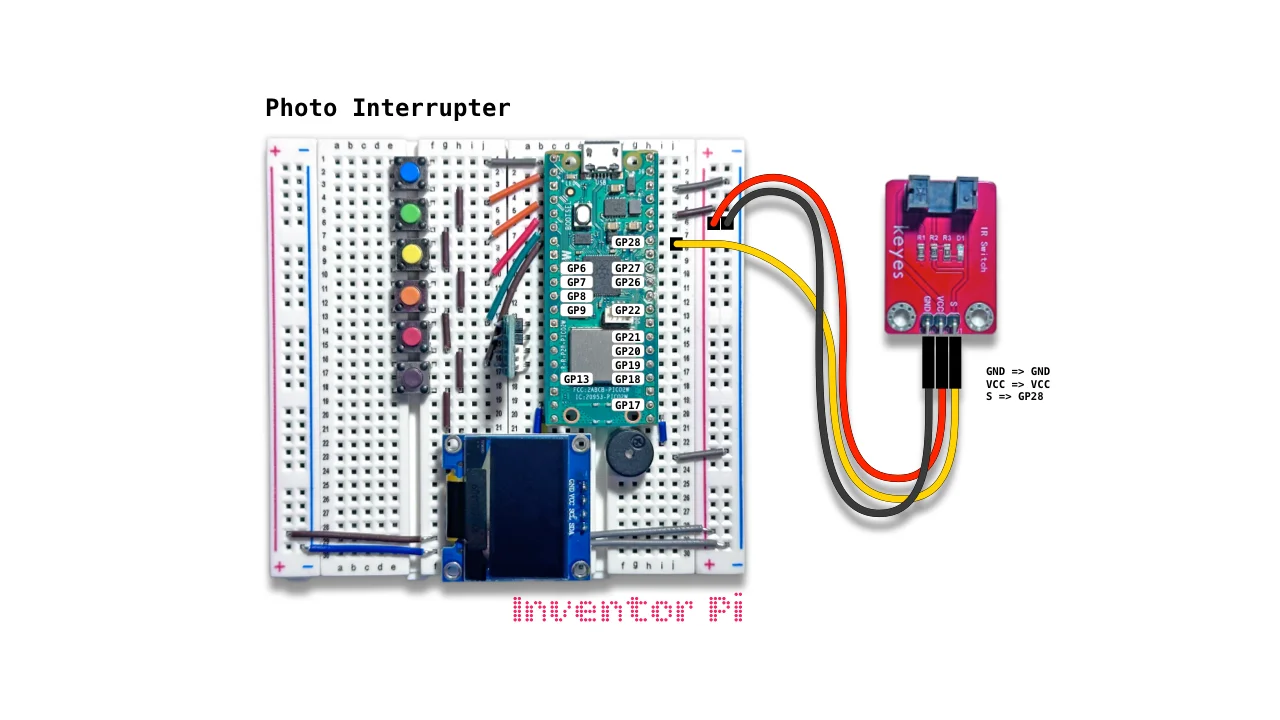
مثال على كود MicroPython يعمل على وحدة تحكم دقيقة Raspberry Pi Pico 2 W متصلة بوحدة مقاطعة ضوئية، ووحدة LED RGB، ووحدة عرض OLED (SSD1306) على لوحة تجارب لزيادة العدد على الشاشة في كل مرة يتم فيها مقاطعة شعاع ضوء جهاز فصل الصور
تقوم وحدة مقاطعة الضوء بإرسال شعاع ضوء الأشعة تحت الحمراء من باعث إلى مستقبل (الكتلتان السوداوان على الوحدة)، وتكتشف متى يتم حجب هذا الشعاع. يُستخدم هذا النظام للكشف عن نهاية مسار الحركة في الطابعات ثلاثية الأبعاد، وآلات التحكم الرقمي الحاسوبي، والروبوتات. كما يُستخدم لحساب نبضات قرص مشقوق يدور لحساب سرعة المحرك أو العجلة في الروبوتات والسيارات الذكية. في الطابعة، يكتشف وجود الورق.
أنشئ ملفًا جديدًا في Thonny، باسم photo_interrupter.py. انسخ والصق الكود أدناه في الملف الذي أنشأته.
1
2
3
4
5
6
7
8
9
10
11
12
13
14
15
16
17
18
19
20
21
22
23
24
25
26
27
28
29
30
31
32
33
34
35
36
37
38
39
40
41
42
43
44
45
46
47
48
49
50

print("\nPhoto Interrupter")

# DESCRIPTION

# A photo interrupter module sends infrared light beam from an emitter to a receiver
# (the two black blocks on the module), and detects when this beam is blocked.
# It is used to detect end-of-travel in 3D printers, CNC machines and robots. It is
# also used to count the pulses of a slotted disc rotating to calculate motor or wheel
# speed in robotics and smart cars. In a printer, it detects when a paper is present.

# CONNECTIONS REQUIRED

# Connect Photo Interrupter (KY-010) module (labeled 'IR Switch')
#   Pins: GND => GND, VCC => VCC, S => GP28

from machine import Pin
from oled import OLED
from rgbled import RGBLED
from buzzer import Buzzer

sensor = Pin(28, Pin.IN, Pin.PULL_UP)
oled = OLED(scl_pin=15, sda_pin=14)
buzzer = Buzzer(pwm_pin=16)
rgbled = RGBLED(red_pin=12, green_pin=11, blue_pin=10)

counter = 0

try:
    while True:
        rgbled.reset()

        # loop while nothing detected
        while sensor.value() == 0: pass

        # sensor value is no longer zero => object detected
        counter += 1
        oled.print(f"Counter: {counter}")
        rgbled.set_color(b=255)
        buzzer.play_tone(600)

        # loop while object is still present
        while sensor.value() == 1: pass

except KeyboardInterrupt:
    print("\nInterrupted by user!")

finally:
    oled.reset()
    rgbled.reset()
    buzzer.reset()