مستشعر الصدمات
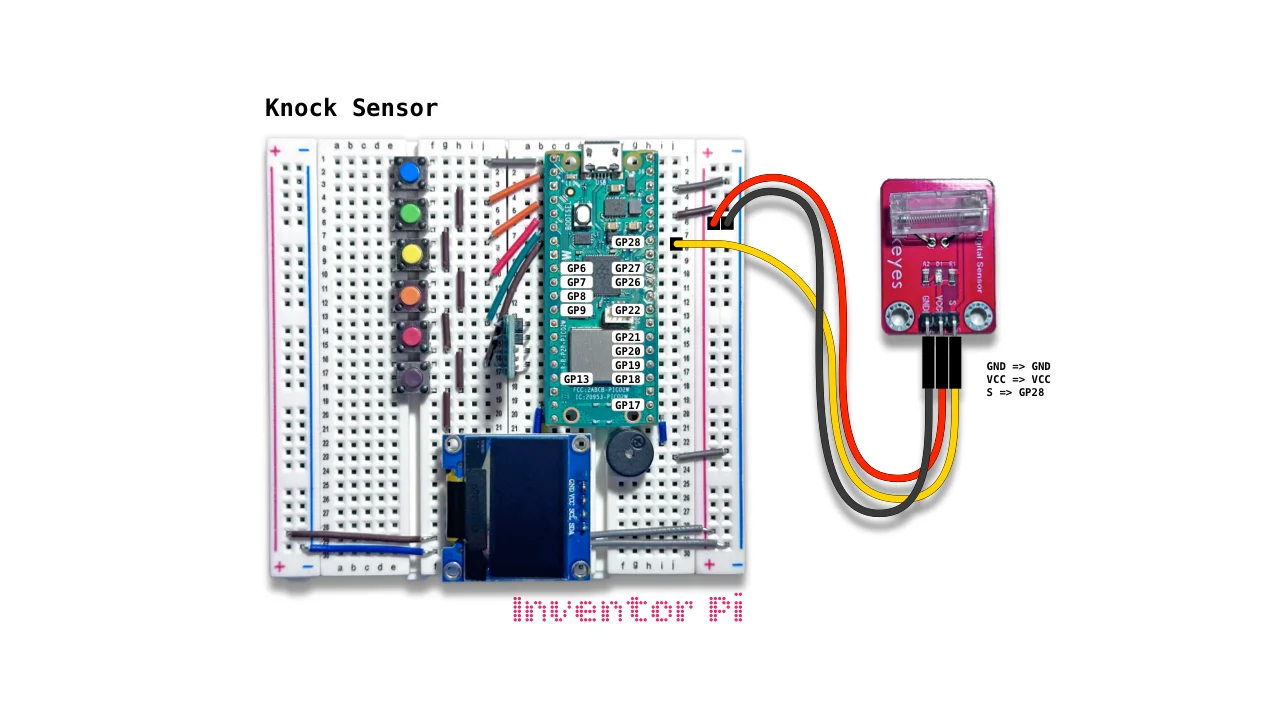
مثال على كود MicroPython يعمل على وحدة تحكم دقيقة Raspberry Pi Pico 2 W متصلة بوحدة استشعار الصدمات المزودة بنابض حلزوني، ووحدة إضاءة LED RGB، ووحدة عرض OLED (SSD1306) على لوحة تجارب لتغيير لون مؤشر LED وعرض الحالة على الشاشة عند اكتشاف اهتزاز مفاجئ
يستشعر مستشعر الصدمات الاهتزازات. تستخدم هذه الوحدة تحديدًا مفتاح اهتزاز قائم على زنبرك. عندما تكون الوحدة ثابتة، لا يلامس الزنبرك الدبوس المركزي، ولكن عند تعرضها للصدم أو الاهتزاز، يتأرجح الزنبرك ويضرب الدبوس المركزي، مما يؤدي إلى إغلاق الدائرة الكهربائية مؤقتًا. بالنسبة لروبوت تسلق السلالم، يمكن لمستشعر الصدمات اكتشاف متى يصطدم ذراع ممتد بإحدى درجات السلم، ثم يبدأ الحركة التالية. بينما يتطلب الأمر وضع مستشعر التصادم عند نقطة الاصطدام، يمكن لمستشعر الصدمات اكتشاف الاهتزازات عبر ذراع كامل. للاختبار، شغّل البرنامج النصي، ثم أمسك لوحة التجارب بأكملها مع مستشعر الصدمات بيدك، وهزّها بقوة حتى تتوقف فجأة.
أنشئ ملفًا جديدًا في Thonny، باسم knock_sensor.py. انسخ والصق الكود أدناه في الملف الذي أنشأته.
1
2
3
4
5
6
7
8
9
10
11
12
13
14
15
16
17
18
19
20
21
22
23
24
25
26
27
28
29
30
31
32
33
34
35
36
37
38
39
40
41
42
43

print("\nKnock Sensor")

# DESCRIPTION

# A knock sensor detects vibrations. This particular module uses a spring-based vibration switch.
# When the module is still, the spring does not touch the center pin, but when bumped or shaken,
# the spring sways and hits the center pin closing the circuit momentarily. For a ladder climbing robot,
# a knock sensor could detect when an extending arm hits a ladder rung, and then initiate next motion.
# While a crash sensor would need to be placed at the point of impact, a knock sensor could detect
# vibrations across an entire arm. To test, run the script, then hold the entire breadboard along with
# the knock sensor in hand, and give it a big shake bringing it to a sudden stop.

# CONNECTIONS REQUIRED

# Connect Knock Sensor (KY-031) module
# (labeled 'Digital Sensor' with an encased spring)
#   Pins: GND => GND, VCC => VCC, S => GP28

from time import sleep
from machine import Pin
from oled import OLED
from buzzer import Buzzer

knock_sensor = Pin(28, Pin.IN, Pin.PULL_UP)
oled = OLED(scl_pin=15, sda_pin=14)
buzzer = Buzzer(pwm_pin=16)

try:
    while True:
        oled.print("Shake...")

        # Sensor value == 1 => Knock detected, wait 2 seconds
        if knock_sensor.value() == 0:
            buzzer.play_tone(600)
            oled.print("Knock knock!")
            sleep(2)

except KeyboardInterrupt:
    print("\nInterrupted by user!")

finally:
    oled.reset()
    buzzer.reset()