مستشعر المسافة
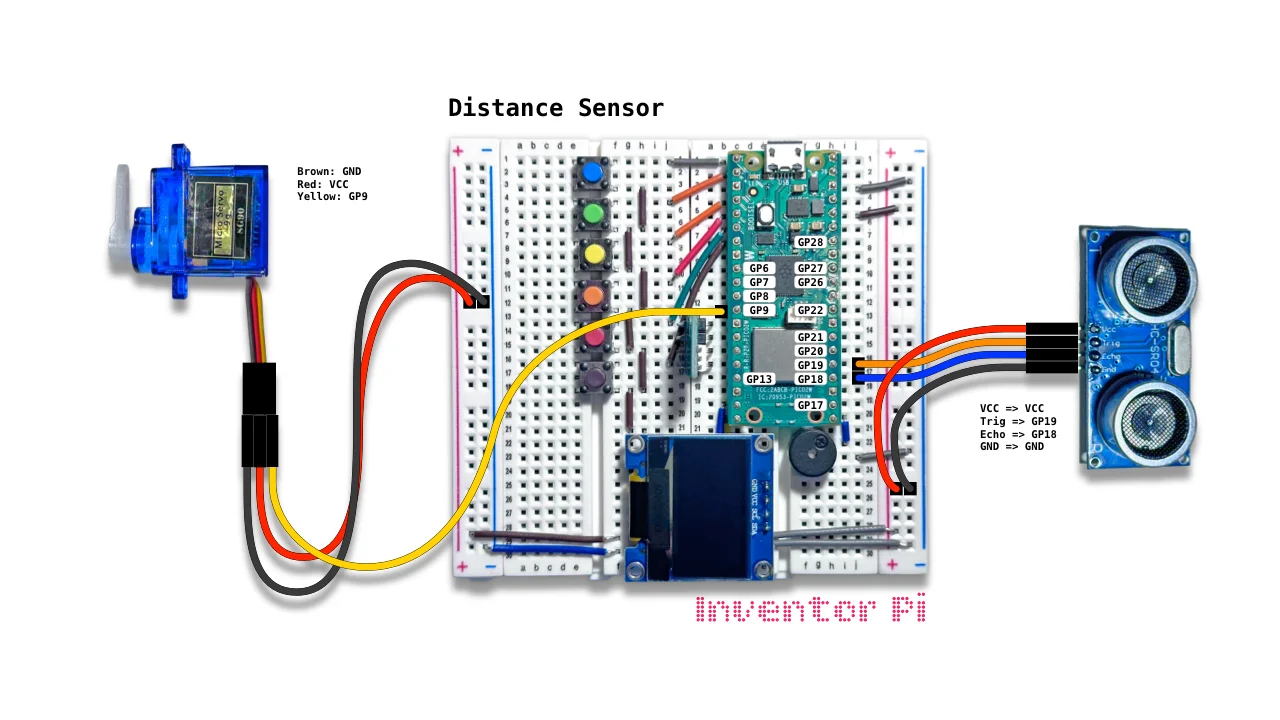
مثال على كود MicroPython يعمل على وحدة تحكم دقيقة Raspberry Pi Pico 2 W متصلة بوحدة استشعار المسافة بالموجات فوق الصوتية (HC-SR04)، ومحرك سيرفو صغير، وجهاز تنبيه كهرضغطية سلبي، ووحدة إضاءة LED RGB، ووحدة عرض OLED (SSD1306) على لوحة تجارب لإنشاء أداة صوتية تعتمد على الإيماءات، تقوم بتحويل المسافة المقاسة إلى ترددات صوتية مختلفة، وزوايا المؤازرة، وألوان LED، وتعرض المسافة المقاسة على شاشة OLED
يقيس مستشعر المسافة المسافة إلى أي عائق قريب. تستخدم الروبوتات والسيارات هذه المستشعرات للتوقف قبل الاصطدام بأي عائق. المستشعر المستخدم هنا هو مستشعر مسافة بالموجات فوق الصوتية. نقوم بتحويل المسافة إلى ألوان RGB مختلفة وترددات صوتية مختلفة لإنشاء آلة موسيقية ممتعة يمكنك العزف عليها بإيماءات اليد. نقوم أيضًا بتغيير زاوية محرك المؤازرة بناءً على المسافة المكتشفة.
المحرك المؤازر هو محرك يمكننا من خلاله التحكم في زاوية الدوران عن طريق تغيير إشارة تعديل عرض النبضة (PWM) التي نرسلها إليه. بخلاف المحركات الكهربائية القياسية التي تدور باستمرار، يتحرك محرك السيرفو إلى زاوية أو موضع محدد ويثبته بإحكام.
أنشئ ملفًا جديدًا في Thonny، باسم distance_sensor.py. انسخ والصق الكود أدناه في الملف الذي أنشأته.
1
2
3
4
5
6
7
8
9
10
11
12
13
14
15
16
17
18
19
20
21
22
23
24
25
26
27
28
29
30
31
32
33
34
35
36
37
38
39
40
41
42
43
44
45
46
47
48
49
50
51
52
53
54
55
56
57
58
59
60
61
62
63
64
65
66
67
68
69
70
71
72
73
74
75
76
77
78

print("\nDistance Sensor")

# DESCRIPTION

# A distance sensor measures the distance to any nearby obstruction.
# Robots and cars use such sensors to stop before hitting any obstruction.
# The sensor used here is an ultrasonic distance sensor.
# We convert the distance to different RGB colors and buzzer frequencies
# to create a fun musical instrument that you can play with hand gestures.
# We also change the angle of a servo motor based on the distance detected.

# A servo is a motor where we can control the rotation angle by changing the PWM
# signal we send to it. Unlike standard electric motors that spin continuously,
# a servo motor moves to an exact angle or position and holds it firmly.

# CONNECTIONS REQUIRED

# Connect HC-SR04 module
#   Pins: VCC => VCC, Trig => GP19, Echo => GP18, GND => GND
# Connect Servo
#   Pins: Brown: GND, Red: VCC, Yellow: GP9

from time import sleep
from oled import OLED
from hcsr04 import HCSR04
from rgbled import RGBLED
from buzzer import Buzzer
from servo import Servo
from value_filter import ValueFilter
from helper import interpolate, clamp

distance_sensor = HCSR04(trigger_pin=19, echo_pin=18)
oled = OLED(scl_pin=15, sda_pin=14)
buzzer = Buzzer(pwm_pin=16)
rgbled = RGBLED(red_pin=12, green_pin=11, blue_pin=10)
servo = Servo(servo_pin=9)
distance_filter = ValueFilter()

min_distance = 4
max_distance = 40

try:
    while True:

        # Measure obstacle distance in cm
        distance_cm = distance_sensor.value()

        # Convert distance to discrete numbers with 2 cm interval
        distance = round(distance_cm / 2) * 2
        distance = clamp(distance, min_distance, max_distance)
        distance = distance_filter.update(distance)

        if distance_filter.did_change(): # only if distance has changed by 2 cm

            # Calculate red, green and servo angle using interpolation.
            # Red is 255 and green is 0 at min distance, green is 0.
            # Red is 0 and green is 255 at max distance.
            r = interpolate(distance, min_distance, max_distance, 255, 0)
            g = interpolate(distance, min_distance, max_distance, 0, 255)
            angle = interpolate(distance, min_distance, max_distance, 0, 180)

            rgbled.set_color(r=r, g=g)
            servo.set_angle(angle)

            # Play tone with frequency proportional to distance
            buzzer.play_tone(distance * 50)

        oled.print(f"{distance_cm:0.1f} cm", f"{angle:0.0f} degrees")
        sleep(0.05)

except KeyboardInterrupt:
    print("\nInterrupted by user!")

finally:
    oled.reset()
    rgbled.reset()
    buzzer.reset()
    servo.reset()