مستشعر التصادم
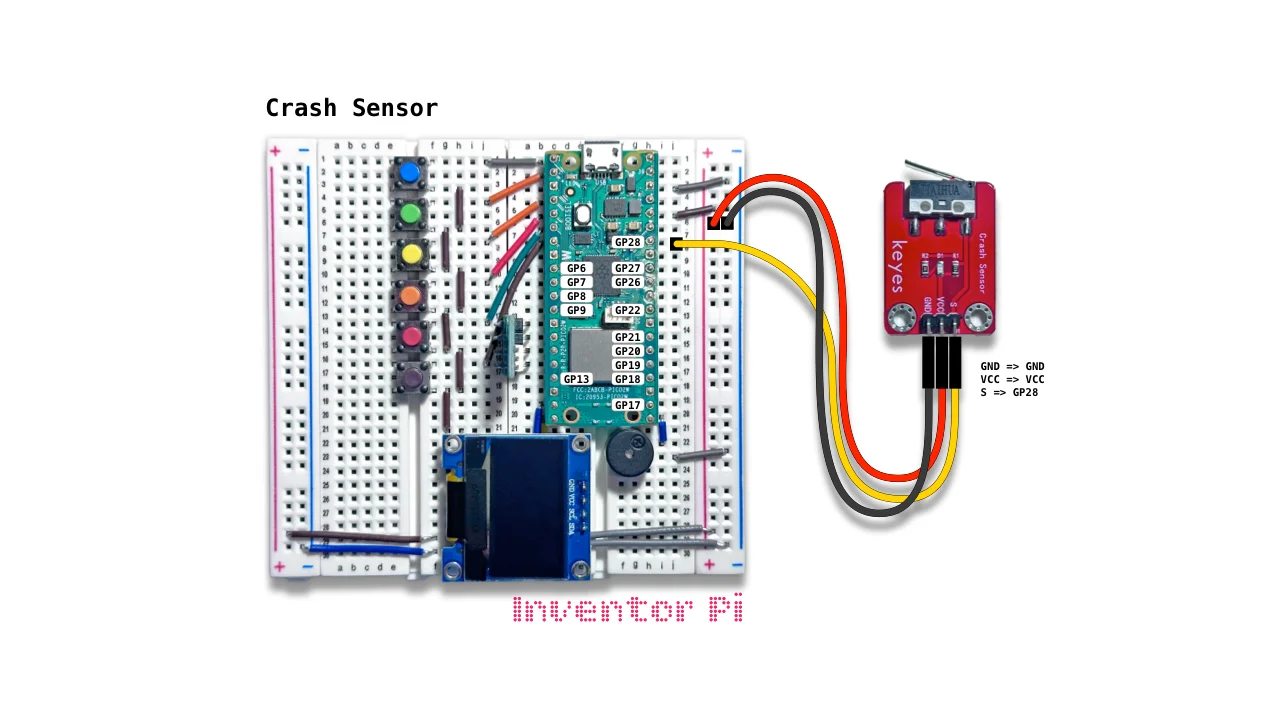
مثال على كود MicroPython يعمل على وحدة تحكم دقيقة Raspberry Pi Pico 2 W متصلة بوحدة استشعار التصادم المزودة بمفتاح حد، ووحدة إضاءة LED RGB، ووحدة عرض OLED (SSD1306) على لوحة تجارب لتغيير لون مؤشر LED وعرض الحالة على الشاشة عند اكتشاف عطل
يستخدم مستشعر التصادم مفتاح حد. يمكن استخدام هذا مع نقطة توقف صارمة لاكتشاف متى تصل آلية ما، مثل ذراع روبوتية، إلى حدود حركتها وتفعيل مفتاح الحد. كما يُستخدم في أبواب الأفران والثلاجات لتشغيل الإضاءة الداخلية عند فتح الباب.
أنشئ ملفًا جديدًا في Thonny، باسم crash_sensor.py. انسخ والصق الكود أدناه في الملف الذي أنشأته.
1
2
3
4
5
6
7
8
9
10
11
12
13
14
15
16
17
18
19
20
21
22
23
24
25
26
27
28
29
30
31
32
33
34
35
36
37
38
39
40
41
42
43
44
45
46
47

print("\nCrash Sensor")

# DESCRIPTION

# A crash sensor uses a limit switch. This can be used with a hard stop to detect
# when a mechanism, such as a robotic arm, reaches the limit of its motion and
# trigger a limit switch. It is also used in oven and refrigerator doors to turn
# on the internal light when the door is opened.

# CONNECTIONS REQUIRED

# Connect Crash Sensor (KY-021) module
#   Pins: GND => GND, VCC => VCC, S => GP28

from machine import Pin
from oled import OLED
from buzzer import Buzzer
from rgbled import RGBLED

sensor = Pin(28, Pin.IN, Pin.PULL_UP)
oled = OLED(scl_pin=15, sda_pin=14)
buzzer = Buzzer(pwm_pin=16)
rgbled = RGBLED(red_pin=12, green_pin=11, blue_pin=10)

try:
    while True:

        # Sensor value is 1 => No crash detected.
        # Loop while no crash detected
        oled.reset()
        rgbled.set_color(g=255)
        while sensor.value() == 1: pass

        # Sensor value is no longer 1 => Crash detected.
        # Loop while crash detected
        oled.print("Crash")
        rgbled.set_color(r=255)
        buzzer.play_tone(200)
        while sensor.value() == 0: pass

except KeyboardInterrupt:
    print("\nInterrupted by user!")

finally:
    oled.reset()
    rgbled.reset()
    buzzer.reset()