Distance Sensor
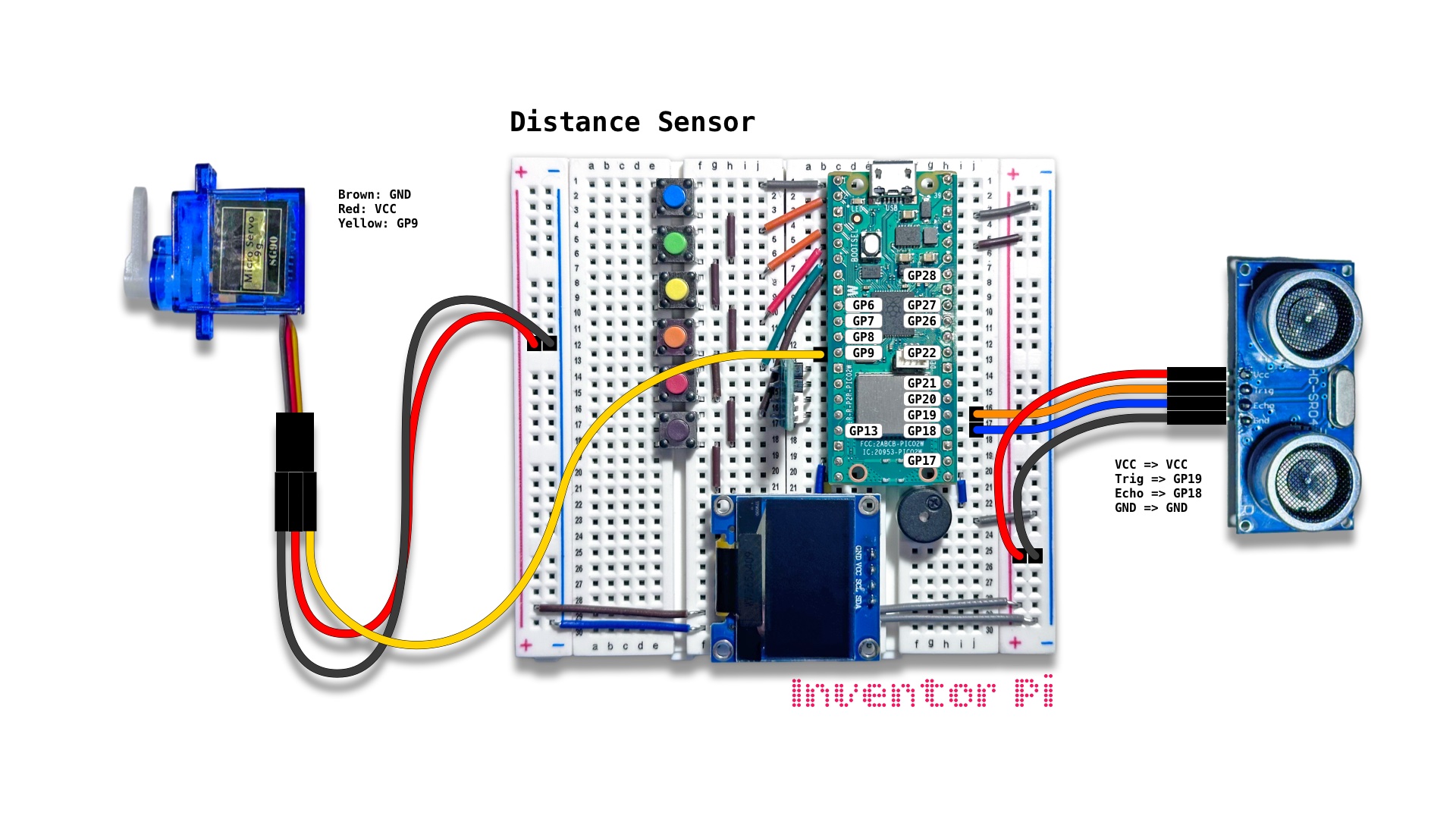
A MicroPython code example running on a Raspberry Pi Pico 2 W microcontroller connected to an ultrasonic distance sensor module (HC-SR04), a micro servo motor, a passive piezo buzzer, an RGB LED module, and an OLED display module (SSD1306) on a breadboard to create a gesture based sound instrument that converts the distance measured to different buzzer sound frequencies, servo angles and LED colors, and displays the distance measured on the OLED display
A distance sensor measures the distance to any nearby obstruction. Robots and cars use such sensors to stop before hitting any obstruction. The sensor used here is an ultrasonic distance sensor. We convert the distance to different RGB colors and buzzer frequencies to create a fun musical instrument that you can play with hand gestures. We also change the angle of a servo motor based on the distance detected.
A servo is a motor where we can control the rotation angle by changing the PWM signal we send to it. Unlike standard electric motors that spin continuously, a servo motor moves to an exact angle or position and holds it firmly.
Create a new file in Thonny, with file name distance_sensor.py. Copy and paste the code below into the file you created.
1
2
3
4
5
6
7
8
9
10
11
12
13
14
15
16
17
18
19
20
21
22
23
24
25
26
27
28
29
30
31
32
33
34
35
36
37
38
39
40
41
42
43
44
45
46
47
48
49
50
51
52
53
54
55
56
57
58
59
60
61
62
63
64
65
66
67
68
69
70
71
72
73
74
75
76
77
78
print("\nDistance Sensor")

# DESCRIPTION

# A distance sensor measures the distance to any nearby obstruction.
# Robots and cars use such sensors to stop before hitting any obstruction.
# The sensor used here is an ultrasonic distance sensor.
# We convert the distance to different RGB colors and buzzer frequencies
# to create a fun musical instrument that you can play with hand gestures.
# We also change the angle of a servo motor based on the distance detected.

# A servo is a motor where we can control the rotation angle by changing the PWM
# signal we send to it. Unlike standard electric motors that spin continuously,
# a servo motor moves to an exact angle or position and holds it firmly.

# CONNECTIONS REQUIRED

# Connect HC-SR04 module
#   Pins: VCC => VCC, Trig => GP19, Echo => GP18, GND => GND
# Connect Servo
#   Pins: Brown: GND, Red: VCC, Yellow: GP9

from time import sleep
from oled import OLED
from hcsr04 import HCSR04
from rgbled import RGBLED
from buzzer import Buzzer
from servo import Servo
from value_filter import ValueFilter
from helper import interpolate, clamp

distance_sensor = HCSR04(trigger_pin=19, echo_pin=18)
oled = OLED(scl_pin=15, sda_pin=14)
buzzer = Buzzer(pwm_pin=16)
rgbled = RGBLED(red_pin=12, green_pin=11, blue_pin=10)
servo = Servo(servo_pin=9)
distance_filter = ValueFilter()

min_distance = 4
max_distance = 40

try:
    while True:

        # Measure obstacle distance in cm
        distance_cm = distance_sensor.value()

        # Convert distance to discrete numbers with 2 cm interval
        distance = round(distance_cm / 2) * 2
        distance = clamp(distance, min_distance, max_distance)
        distance = distance_filter.update(distance)

        if distance_filter.did_change(): # only if distance has changed by 2 cm

            # Calculate red, green and servo angle using interpolation.
            # Red is 255 and green is 0 at min distance, green is 0.
            # Red is 0 and green is 255 at max distance.
            r = interpolate(distance, min_distance, max_distance, 255, 0)
            g = interpolate(distance, min_distance, max_distance, 0, 255)
            angle = interpolate(distance, min_distance, max_distance, 0, 180)

            rgbled.set_color(r=r, g=g)
            servo.set_angle(angle)

            # Play tone with frequency proportional to distance
            buzzer.play_tone(distance * 50)

        oled.print(f"{distance_cm:0.1f} cm", f"{angle:0.0f} degrees")
        sleep(0.05)

except KeyboardInterrupt:
    print("\nInterrupted by user!")

finally:
    oled.reset()
    rgbled.reset()
    buzzer.reset()
    servo.reset()