距离传感器
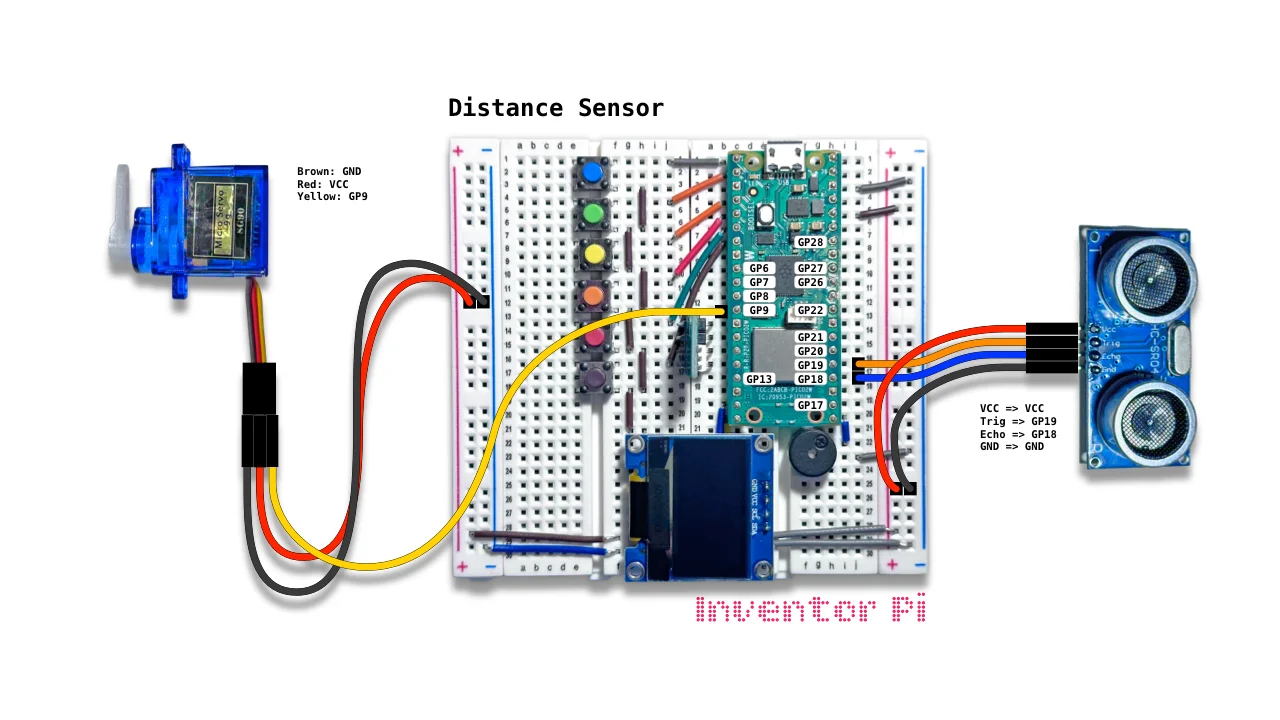
MicroPython 代码示例 运行在 Raspberry Pi Pico 2 W 微控制器上 在面包板上,连接了超声波距离传感器模块(HC-SR04)、微型伺服电机、无源压电蜂鸣器、RGB LED模块和OLED显示模块(SSD1306)。 创建一个基于手势的声音乐器,该乐器可以将测量的距离转换为不同的蜂鸣器声音频率、伺服角度和 LED 颜色,并在 OLED 显示屏上显示测量的距离。
距离传感器测量到附近障碍物的距离。. 机器人和汽车利用这类传感器在撞到障碍物之前停下来。. 这里使用的传感器是超声波测距传感器。. 我们将距离转换成不同的RGB颜色和蜂鸣器频率,创造出一种可以用手势演奏的趣味乐器。. 我们还会根据检测到的距离来改变伺服电机的角度。.
伺服电机是一种可以通过改变发送给它的PWM信号来控制其旋转角度的电机。. 与持续旋转的普通电动机不同,伺服电机可以精确地移动到特定角度或位置并保持稳定。.
在 Thonny 中创建一个名为 distance_sensor.py 的新文件。. 将以下代码复制并粘贴到您创建的文件中。.
1
2
3
4
5
6
7
8
9
10
11
12
13
14
15
16
17
18
19
20
21
22
23
24
25
26
27
28
29
30
31
32
33
34
35
36
37
38
39
40
41
42
43
44
45
46
47
48
49
50
51
52
53
54
55
56
57
58
59
60
61
62
63
64
65
66
67
68
69
70
71
72
73
74
75
76
77
78

print("\nDistance Sensor")

# DESCRIPTION

# A distance sensor measures the distance to any nearby obstruction.
# Robots and cars use such sensors to stop before hitting any obstruction.
# The sensor used here is an ultrasonic distance sensor.
# We convert the distance to different RGB colors and buzzer frequencies
# to create a fun musical instrument that you can play with hand gestures.
# We also change the angle of a servo motor based on the distance detected.

# A servo is a motor where we can control the rotation angle by changing the PWM
# signal we send to it. Unlike standard electric motors that spin continuously,
# a servo motor moves to an exact angle or position and holds it firmly.

# CONNECTIONS REQUIRED

# Connect HC-SR04 module
#   Pins: VCC => VCC, Trig => GP19, Echo => GP18, GND => GND
# Connect Servo
#   Pins: Brown: GND, Red: VCC, Yellow: GP9

from time import sleep
from oled import OLED
from hcsr04 import HCSR04
from rgbled import RGBLED
from buzzer import Buzzer
from servo import Servo
from value_filter import ValueFilter
from helper import interpolate, clamp

distance_sensor = HCSR04(trigger_pin=19, echo_pin=18)
oled = OLED(scl_pin=15, sda_pin=14)
buzzer = Buzzer(pwm_pin=16)
rgbled = RGBLED(red_pin=12, green_pin=11, blue_pin=10)
servo = Servo(servo_pin=9)
distance_filter = ValueFilter()

min_distance = 4
max_distance = 40

try:
    while True:

        # Measure obstacle distance in cm
        distance_cm = distance_sensor.value()

        # Convert distance to discrete numbers with 2 cm interval
        distance = round(distance_cm / 2) * 2
        distance = clamp(distance, min_distance, max_distance)
        distance = distance_filter.update(distance)

        if distance_filter.did_change(): # only if distance has changed by 2 cm

            # Calculate red, green and servo angle using interpolation.
            # Red is 255 and green is 0 at min distance, green is 0.
            # Red is 0 and green is 255 at max distance.
            r = interpolate(distance, min_distance, max_distance, 255, 0)
            g = interpolate(distance, min_distance, max_distance, 0, 255)
            angle = interpolate(distance, min_distance, max_distance, 0, 180)

            rgbled.set_color(r=r, g=g)
            servo.set_angle(angle)

            # Play tone with frequency proportional to distance
            buzzer.play_tone(distance * 50)

        oled.print(f"{distance_cm:0.1f} cm", f"{angle:0.0f} degrees")
        sleep(0.05)

except KeyboardInterrupt:
    print("\nInterrupted by user!")

finally:
    oled.reset()
    rgbled.reset()
    buzzer.reset()
    servo.reset()