दूरी सेंसर
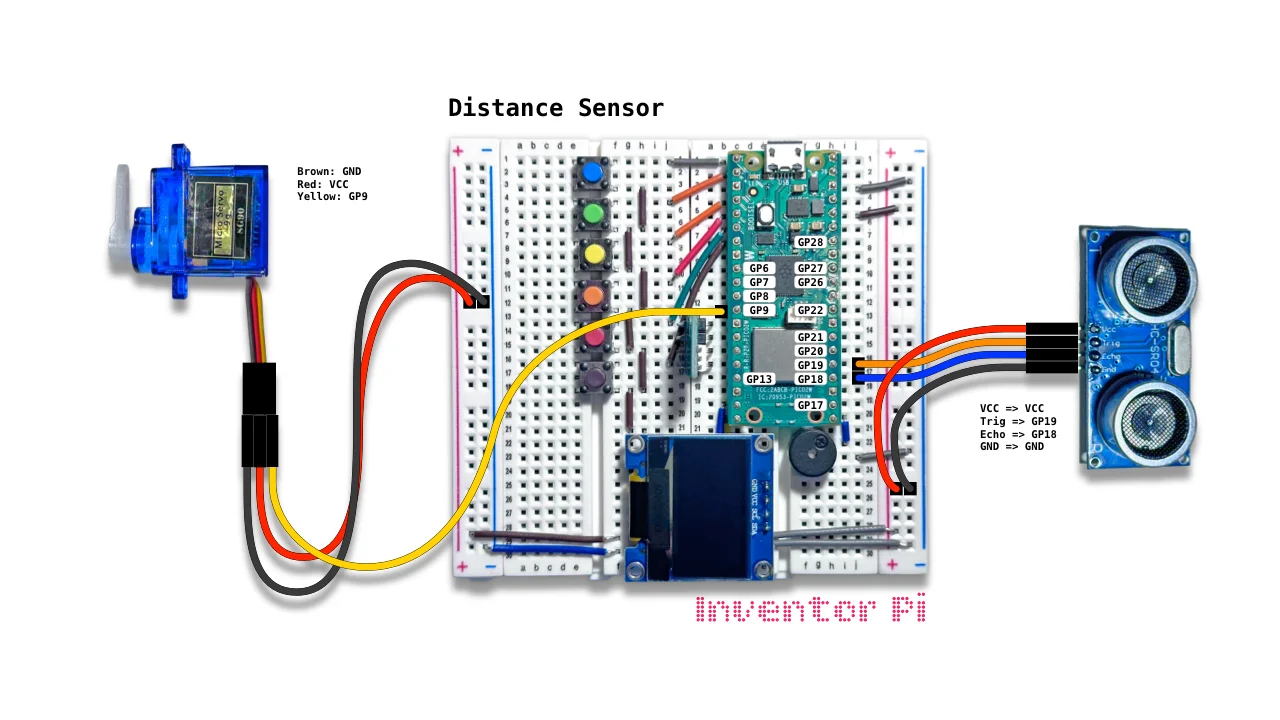
माइक्रो पाइथन कोड का एक उदाहरण Raspberry Pi Pico 2W माइक्रोकंट्रोलर पर चल रहा है ब्रेडबोर्ड पर अल्ट्रासोनिक दूरी सेंसर मॉड्यूल (HC-SR04), माइक्रो सर्वो मोटर, पैसिव पीजो बजर, आरजीबी एलईडी मॉड्यूल और OLED डिस्प्ले मॉड्यूल (SSD1306) से जुड़ा हुआ है। एक ऐसा जेस्चर-आधारित ध्वनि उपकरण बनाना जो मापी गई दूरी को विभिन्न बजर ध्वनि आवृत्तियों, सर्वो कोणों और एलईडी रंगों में परिवर्तित करे और मापी गई दूरी को ओएलईडी डिस्प्ले पर प्रदर्शित करे।
दूरी संवेदक आसपास की किसी भी बाधा से दूरी मापता है।. रोबोट और कारें किसी भी बाधा से टकराने से पहले रुकने के लिए ऐसे सेंसर का उपयोग करते हैं।. यहां इस्तेमाल किया गया सेंसर एक अल्ट्रासोनिक दूरी सेंसर है।. हम दूरी को अलग-अलग RGB रंगों और बजर आवृत्तियों में परिवर्तित करते हैं ताकि एक मजेदार वाद्य यंत्र बनाया जा सके जिसे आप हाथ के इशारों से बजा सकते हैं।. हम दूरी का पता लगाने के आधार पर सर्वो मोटर का कोण भी बदलते हैं।.
सर्वो एक मोटर है जिसमें हम भेजे जाने वाले PWM सिग्नल को बदलकर घूर्णन कोण को नियंत्रित कर सकते हैं।. मानक इलेक्ट्रिक मोटरों के विपरीत जो लगातार घूमती रहती हैं, एक सर्वो मोटर एक सटीक कोण या स्थिति तक जाती है और उसे मजबूती से रोके रखती है।.
Thonny में distance_sensor.py नाम से एक नई फ़ाइल बनाएँ।. नीचे दिए गए कोड को कॉपी करके अपनी बनाई गई फ़ाइल में पेस्ट करें।.
1
2
3
4
5
6
7
8
9
10
11
12
13
14
15
16
17
18
19
20
21
22
23
24
25
26
27
28
29
30
31
32
33
34
35
36
37
38
39
40
41
42
43
44
45
46
47
48
49
50
51
52
53
54
55
56
57
58
59
60
61
62
63
64
65
66
67
68
69
70
71
72
73
74
75
76
77
78

print("\nDistance Sensor")

# DESCRIPTION

# A distance sensor measures the distance to any nearby obstruction.
# Robots and cars use such sensors to stop before hitting any obstruction.
# The sensor used here is an ultrasonic distance sensor.
# We convert the distance to different RGB colors and buzzer frequencies
# to create a fun musical instrument that you can play with hand gestures.
# We also change the angle of a servo motor based on the distance detected.

# A servo is a motor where we can control the rotation angle by changing the PWM
# signal we send to it. Unlike standard electric motors that spin continuously,
# a servo motor moves to an exact angle or position and holds it firmly.

# CONNECTIONS REQUIRED

# Connect HC-SR04 module
#   Pins: VCC => VCC, Trig => GP19, Echo => GP18, GND => GND
# Connect Servo
#   Pins: Brown: GND, Red: VCC, Yellow: GP9

from time import sleep
from oled import OLED
from hcsr04 import HCSR04
from rgbled import RGBLED
from buzzer import Buzzer
from servo import Servo
from value_filter import ValueFilter
from helper import interpolate, clamp

distance_sensor = HCSR04(trigger_pin=19, echo_pin=18)
oled = OLED(scl_pin=15, sda_pin=14)
buzzer = Buzzer(pwm_pin=16)
rgbled = RGBLED(red_pin=12, green_pin=11, blue_pin=10)
servo = Servo(servo_pin=9)
distance_filter = ValueFilter()

min_distance = 4
max_distance = 40

try:
    while True:

        # Measure obstacle distance in cm
        distance_cm = distance_sensor.value()

        # Convert distance to discrete numbers with 2 cm interval
        distance = round(distance_cm / 2) * 2
        distance = clamp(distance, min_distance, max_distance)
        distance = distance_filter.update(distance)

        if distance_filter.did_change(): # only if distance has changed by 2 cm

            # Calculate red, green and servo angle using interpolation.
            # Red is 255 and green is 0 at min distance, green is 0.
            # Red is 0 and green is 255 at max distance.
            r = interpolate(distance, min_distance, max_distance, 255, 0)
            g = interpolate(distance, min_distance, max_distance, 0, 255)
            angle = interpolate(distance, min_distance, max_distance, 0, 180)

            rgbled.set_color(r=r, g=g)
            servo.set_angle(angle)

            # Play tone with frequency proportional to distance
            buzzer.play_tone(distance * 50)

        oled.print(f"{distance_cm:0.1f} cm", f"{angle:0.0f} degrees")
        sleep(0.05)

except KeyboardInterrupt:
    print("\nInterrupted by user!")

finally:
    oled.reset()
    rgbled.reset()
    buzzer.reset()
    servo.reset()