فاصلاتی سینسر
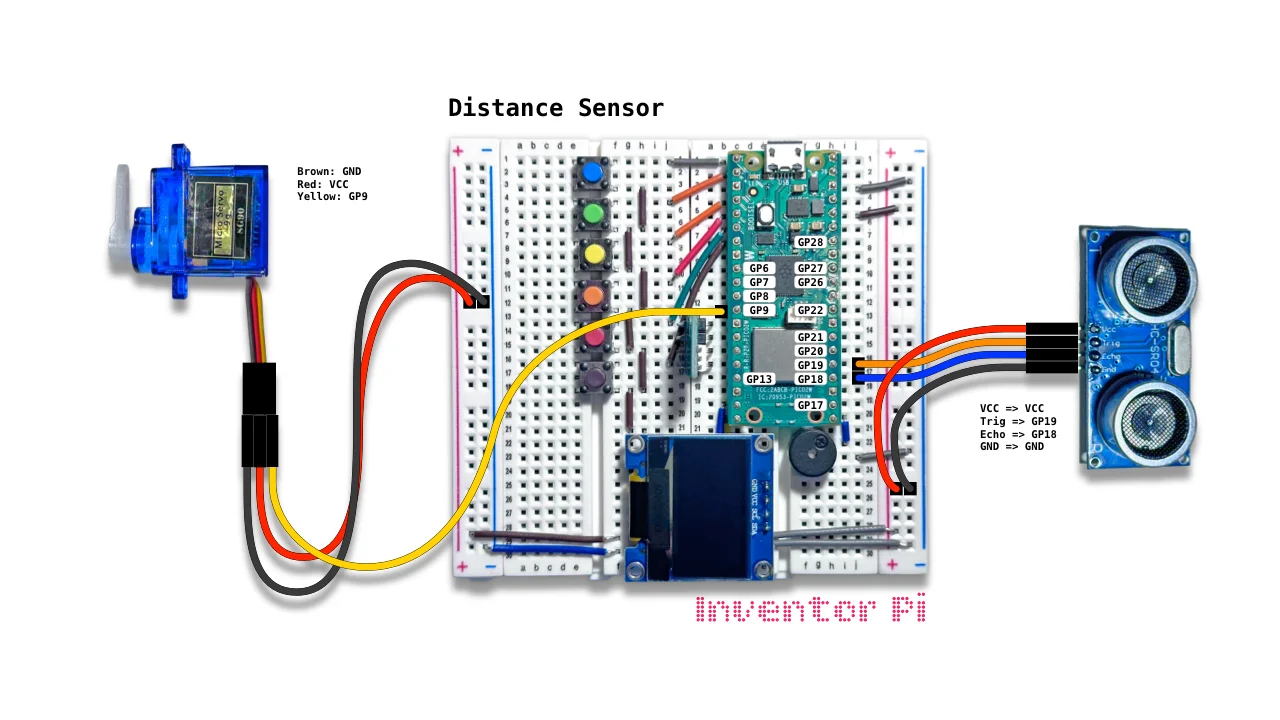
مائیکرو پیتھون کوڈ کی مثال Raspberry Pi Pico 2 W مائکروکنٹرولر پر چل رہا ہے۔ بریڈ بورڈ پر الٹراسونک فاصلاتی سینسر ماڈیول (HC-SR04)، ایک مائیکرو سروو موٹر، ایک غیر فعال پیزو بزر، ایک آرجیبی ایل ای ڈی ماڈیول، اور OLED ڈسپلے ماڈیول (SSD1306) سے جڑا ہوا ہے۔ اشارے پر مبنی آواز کا آلہ بنانے کے لیے جو ناپے گئے فاصلے کو مختلف بزر ساؤنڈ فریکوئنسیوں، سروو اینگلز اور ایل ای ڈی رنگوں میں تبدیل کرتا ہے، اور OLED ڈسپلے پر ناپے گئے فاصلے کو دکھاتا ہے۔
فاصلاتی سینسر کسی بھی قریبی رکاوٹ کے فاصلے کی پیمائش کرتا ہے۔. روبوٹ اور کاریں کسی بھی رکاوٹ کو ٹکرانے سے پہلے رکنے کے لیے ایسے سینسر استعمال کرتی ہیں۔. یہاں استعمال ہونے والا سینسر الٹراسونک فاصلاتی سینسر ہے۔. ہم فاصلے کو مختلف آر جی بی رنگوں اور بزر فریکوئنسیوں میں تبدیل کرتے ہیں تاکہ ایک تفریحی موسیقی کا آلہ بنایا جا سکے جسے آپ ہاتھ کے اشاروں سے بجا سکتے ہیں۔. ہم پتہ چلنے والے فاصلے کی بنیاد پر سروو موٹر کا زاویہ بھی تبدیل کرتے ہیں۔.
سروو ایک موٹر ہے جہاں ہم PWM سگنل کو تبدیل کرکے گردش کے زاویہ کو کنٹرول کرسکتے ہیں جو ہم اسے بھیجتے ہیں. معیاری الیکٹرک موٹرز کے برعکس جو مسلسل گھومتی ہیں، ایک سروو موٹر عین زاویہ یا پوزیشن پر چلتی ہے اور اسے مضبوطی سے پکڑتی ہے۔.
Thonny میں ایک نئی فائل بنائیں، جس میں فائل کا نام Dance_sensor.py ہے۔. نیچے دیے گئے کوڈ کو اپنی بنائی ہوئی فائل میں کاپی اور پیسٹ کریں۔.
1
2
3
4
5
6
7
8
9
10
11
12
13
14
15
16
17
18
19
20
21
22
23
24
25
26
27
28
29
30
31
32
33
34
35
36
37
38
39
40
41
42
43
44
45
46
47
48
49
50
51
52
53
54
55
56
57
58
59
60
61
62
63
64
65
66
67
68
69
70
71
72
73
74
75
76
77
78

print("\nDistance Sensor")

# DESCRIPTION

# A distance sensor measures the distance to any nearby obstruction.
# Robots and cars use such sensors to stop before hitting any obstruction.
# The sensor used here is an ultrasonic distance sensor.
# We convert the distance to different RGB colors and buzzer frequencies
# to create a fun musical instrument that you can play with hand gestures.
# We also change the angle of a servo motor based on the distance detected.

# A servo is a motor where we can control the rotation angle by changing the PWM
# signal we send to it. Unlike standard electric motors that spin continuously,
# a servo motor moves to an exact angle or position and holds it firmly.

# CONNECTIONS REQUIRED

# Connect HC-SR04 module
#   Pins: VCC => VCC, Trig => GP19, Echo => GP18, GND => GND
# Connect Servo
#   Pins: Brown: GND, Red: VCC, Yellow: GP9

from time import sleep
from oled import OLED
from hcsr04 import HCSR04
from rgbled import RGBLED
from buzzer import Buzzer
from servo import Servo
from value_filter import ValueFilter
from helper import interpolate, clamp

distance_sensor = HCSR04(trigger_pin=19, echo_pin=18)
oled = OLED(scl_pin=15, sda_pin=14)
buzzer = Buzzer(pwm_pin=16)
rgbled = RGBLED(red_pin=12, green_pin=11, blue_pin=10)
servo = Servo(servo_pin=9)
distance_filter = ValueFilter()

min_distance = 4
max_distance = 40

try:
    while True:

        # Measure obstacle distance in cm
        distance_cm = distance_sensor.value()

        # Convert distance to discrete numbers with 2 cm interval
        distance = round(distance_cm / 2) * 2
        distance = clamp(distance, min_distance, max_distance)
        distance = distance_filter.update(distance)

        if distance_filter.did_change(): # only if distance has changed by 2 cm

            # Calculate red, green and servo angle using interpolation.
            # Red is 255 and green is 0 at min distance, green is 0.
            # Red is 0 and green is 255 at max distance.
            r = interpolate(distance, min_distance, max_distance, 255, 0)
            g = interpolate(distance, min_distance, max_distance, 0, 255)
            angle = interpolate(distance, min_distance, max_distance, 0, 180)

            rgbled.set_color(r=r, g=g)
            servo.set_angle(angle)

            # Play tone with frequency proportional to distance
            buzzer.play_tone(distance * 50)

        oled.print(f"{distance_cm:0.1f} cm", f"{angle:0.0f} degrees")
        sleep(0.05)

except KeyboardInterrupt:
    print("\nInterrupted by user!")

finally:
    oled.reset()
    rgbled.reset()
    buzzer.reset()
    servo.reset()