Knock Sensor
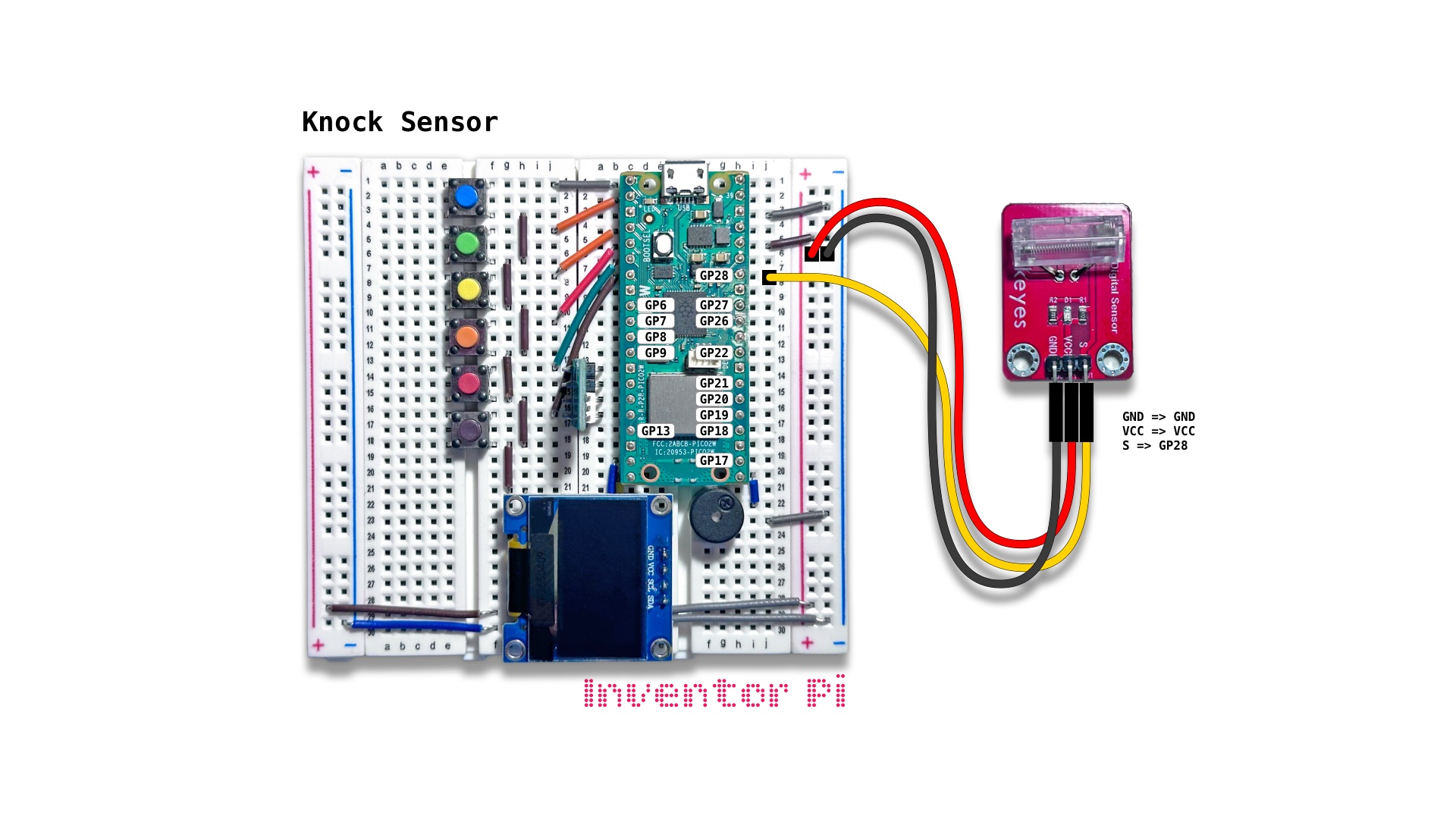
A MicroPython code example running on a Raspberry Pi Pico 2 W microcontroller connected to a knock sensor module with a coiled spring, an RGB LED module and an OLED display module (SSD1306) on a breadboard to change the LED color and show the status on the display when a sudden shake is detected
A knock sensor detects vibrations. This particular module uses a spring-based vibration switch. When the module is still, the spring does not touch the center pin, but when bumped or shaken, the spring sways and hits the center pin closing the circuit momentarily. For a ladder climbing robot, a knock sensor could detect when an extending arm hits a ladder rung, and then initiate next motion. While a crash sensor would need to be placed at the point of impact, a knock sensor could detect vibrations across an entire arm. To test, run the script, then hold the entire breadboard along with the knock sensor in hand, and give it a big skake bringing it to a sudden stop.
Create a new file in Thonny, with file name knock_sensor.py. Copy and paste the code below into the file you created.
1
2
3
4
5
6
7
8
9
10
11
12
13
14
15
16
17
18
19
20
21
22
23
24
25
26
27
28
29
30
31
32
33
34
35
36
37
38
39
40
41
42
43
print("\nKnock Sensor")

# DESCRIPTION

# A knock sensor detects vibrations. This particular module uses a spring-based vibration switch.
# When the module is still, the spring does not touch the center pin, but when bumped or shaken,
# the spring sways and hits the center pin closing the circuit momentarily. For a ladder climbing robot,
# a knock sensor could detect when an extending arm hits a ladder rung, and then initiate next motion.
# While a crash sensor would need to be placed at the point of impact, a knock sensor could detect
# vibrations across an entire arm. To test, run the script, then hold the entire breadboard along with
# the knock sensor in hand, and give it a big skake bringing it to a sudden stop.

# CONNECTIONS REQUIRED

# Connect Knock Sensor (KY-031) module
# (labeled 'Digital Sensor' with an encased spring)
#   Pins: GND => GND, VCC => VCC, S => GP28

from time import sleep
from machine import Pin
from oled import OLED
from buzzer import Buzzer

knock_sensor = Pin(28, Pin.IN, Pin.PULL_UP)
oled = OLED(scl_pin=15, sda_pin=14)
buzzer = Buzzer(pwm_pin=16)

try:
    while True:
        oled.print("Shake...")

        # Sensor value == 1 => Knock detected, wait 2 seconds
        if knock_sensor.value() == 0:
            buzzer.play_tone(600)
            oled.print("Knock knock!")
            sleep(2)

except KeyboardInterrupt:
    print("\nInterrupted by user!")

finally:
    oled.reset()
    buzzer.reset()